Php error with latest updates

Hey
I have this message coming on frontend with the latest updates
Warning: Attempt to read property "post_type" on null in /home/clients/7853c1f14cc1462df7b045f6c0b50e2c/sites/manaloc.fr/wp-content/plugins/brizy/admin/blocks/main.php on line 207
Warning: Attempt to read property "ID" on null in /home/clients/7853c1f14cc1462df7b045f6c0b50e2c/sites/manaloc.fr/wp-content/plugins/brizy/admin/blocks/main.php on line 208
Can you help ?
-

Hi Yves,
Thank you for the update.
Can you replicate the issue with all other plugins disabled besides Brizy and Brizy Pro?
If the issue persists, please provide us with temporary access to your WP Admin page so we can take a look. Please add us as an Admin user to your WordPress Dashboard and send the following details to communitysupport@brizy.io.
Community Post link: https://support.brizy.io/hc/en-us/community/posts/22116018147474
WordPress Admin URL:
Username:
Password:Additionally, we will also need temporary access to cPanel/FTP:
cPanel/FTP host address:
Username:
Password:Please make a full backup of your site as a precaution.
Best regards,
Ariel H.0 -
hey again
I moved back to Brizy Pro 2.5.4, the issue was still here
But going back to Brizy Free 2.5.8 corrected the issue
The problem is with Brizy Free
I have just added you as an admin to the web site https://manaloc.fr/webopale (custom login page)
Just so you know, I have the same problem on
https://lerivagededen-ardres.fr/
https://optikdesallies-audruicq.fr/
Fun fact, only the home page is affected, the 2 websites above are in coming soon mode, and the coming soon page is not affected
PS : on won't see the error on Manaloc anymore of course, all is fine when coming back to Brizy Free 2.5.8
I'll guess I'll wait for your answer before trying to update the pro version again, I guess its best practice to update both at the same time anyway
Please come back to me when you can
Have a great day
Thanks
0 -
Hi Yves,
Thank you for the update.
We've recently received similar reports, in case you want to update to most recent versions, please add the following directives in the wp-config.php file to hide the warning. This issue was already reported to our Dev team for further investigation. Sorry for the inconvenience.
ini_set('log_errors','On');
ini_set('display_errors','Off');
ini_set('error_reporting', E_ALL );
define('WP_DEBUG', false);
define('WP_DEBUG_LOG', true);
define('WP_DEBUG_DISPLAY', false);
Best regards,
Ariel H.0 -

I am also having a similar issue!
Currently, rolling back Brizy Free to the previous version to see if this helps
clients website, ablebridge.co.ukNo idea why this is happening.
0 -
This issue in question for me:
Warning: Attempt to read property "post_type" on null in public_html/ablebridge2.0/wp-content/plugins/brizy/admin/blocks/main.php on line 207
Warning: Attempt to read property "ID" on null in public_html/ablebridge2.0/wp-content/plugins/brizy/admin/blocks/main.php on line 2080 -
Hi,
Thank you for reaching out to us.
We have already reported this issue to our dev team, it should be fixed soon.
In the meantime, please add the following directives in wp-config.php to hide the warning:
ini_set('log_errors','On');
ini_set('display_errors','Off');
ini_set('error_reporting', E_ALL );
define('WP_DEBUG', false);
define('WP_DEBUG_LOG', true);
define('WP_DEBUG_DISPLAY', false);If you don't have access to update the wp-config.php file, you can also use a plugin to hide error reporting.
https://wordpress.org/plugins/debug/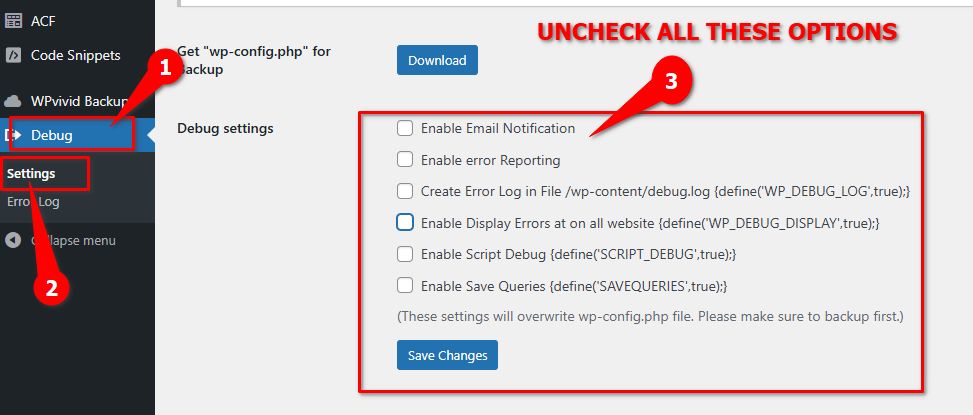
Sorry for the inconvenience.Best regards,
Ariel H.0 -
hey, any news on that ?
I tried installing the debug plugin, but the settings to show errors is already unselected
0 -
Hi Yves,
Thank you for keeping in touch.
The plugin doesn't seem to work on some websites. Please add the following directives instead in your wp-config.php file.
ini_set('log_errors','On');
ini_set('display_errors','Off');
ini_set('error_reporting', E_ALL );
define('WP_DEBUG', false);
define('WP_DEBUG_LOG', true);
define('WP_DEBUG_DISPLAY', false);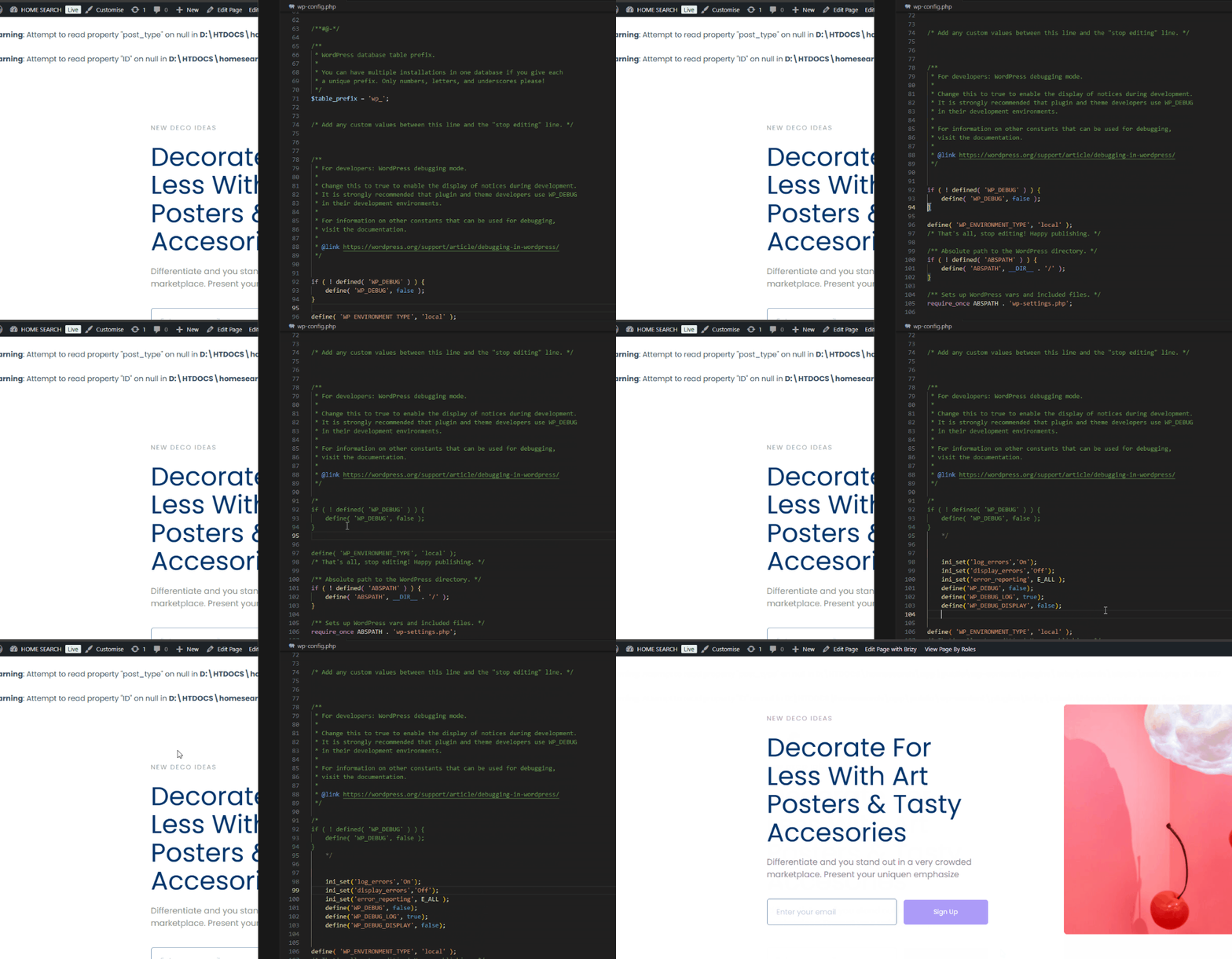
Please try this and let me know how it goes.
Best regards,
Ariel H.0 -
Hi Yves,
We've released an update to resolve this issue. Please update, and feel free to reach out if you have any further questions. If you added the above directives in your wp-config.php file, you could remove them or leave them in place—they simply suppress PHP warnings and won’t affect your site.

Best regards,
Ariel H.0 -
Hey Ariel
Thanks for letting me know, I'll update ASAP ans come back to you, should there be any problem.
Thanks
0
Please sign in to leave a comment.
Comments
10 comments