Brizy editor is not saving correctly.

Hello,
I am experiencing an issue while updating pages on my WordPress site. Every time I try to update a page in the editor, I receive the following error message:
"This page needs a refresh. You’ve probably updated this page (or another page) in a different tab or browser."
Steps to Reproduce:
Open the WordPress editor and make changes to a page.
Click "Update" to save changes.
The error message appears, preventing the update from completing.
Troubleshooting Attempts:
Cleared browser cache and cookies.
Updated WordPress, theme, and all plugins to their latest versions.
Tried editing in Incognito/Private mode and on different browsers.
Disabled all browser extensions.
Deactivated plugins one-by-one to identify any conflicts, but the issue persists.
Checked console for JavaScript errors but did not find any obvious issues.
Despite these troubleshooting steps, the error still occurs. I would appreciate any guidance or recommendations on how to resolve this.
Thank you for your support.
-

Hi Charles,
We're sorry to hear you're having this issue with Brizy.
Please provide us with temporary access to your WP Admin page so we can take a look. Please add us as an Admin user to your WordPress Dashboard and send the following details to communitysupport@brizy.io.
Community Post link: https://support.brizy.io/hc/en-us/community/posts/22115984062994
WordPress Admin URL:
Username:
Password:Additionally, we will also need temporary access to cPanel/FTP:
cPanel/FTP host address:
Username:
Password:Please make a full backup of your site as a precaution.
Best regards,
Ariel H.0 -
Hi Vedhaprakash,
Thank you for the update.
Unfortunately, the credentials don't work. Could you please revise and send us the correct login details?
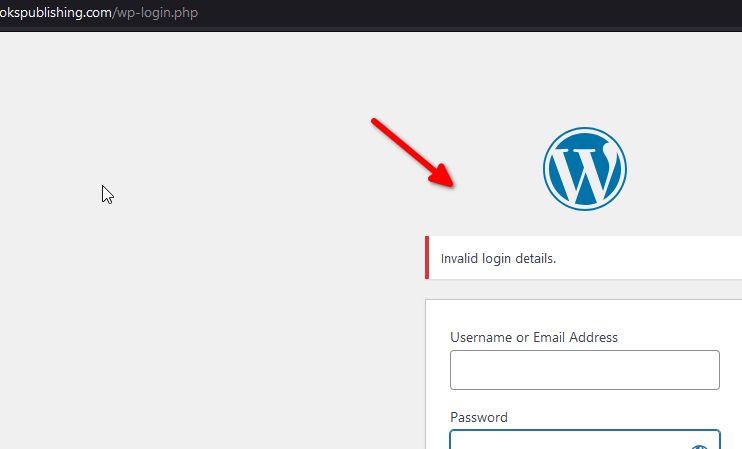
Best regards,
Ariel H.0
Please sign in to leave a comment.
Comments
2 comments