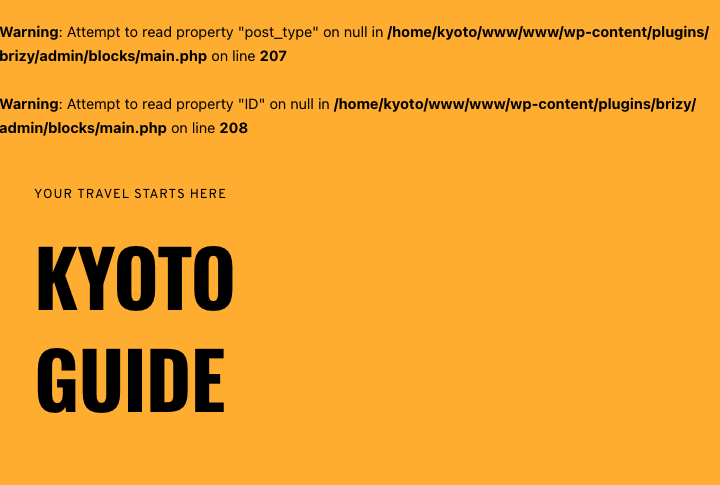
Warning: Attempt to read property "post_type" on null in plugins/brizy/admin/blocks/main.php on line 207
Answered
Hello
Today one of our client's site was showing this warning without editing or doing anything!
Warning: Attempt to read property "post_type" on null in /public_html/wp-content/plugins/brizy/admin/blocks/main.php on line 207
Warning: Attempt to read property "ID" on null in /public_html/wp-content/plugins/brizy/admin/blocks/main.php on line 208
I checked the debug mode of WordPress in config is disabled
-

Hello.
I did the the same, deactived all plugins except Brizy and Brizy Pro, make a change, update, activate all plugins. Same.
Tested in incognito, also in Firefox (which I just downlaodad to do the test)
Not resolved.https://kyoto.guide
 0
0 -

Hi Ahmed,
We're sorry to hear you're having this issue with Brizy
Please provide us with temporary access to your WP Admin page so we can take a look. Please add us as an Admin user to your WordPress Dashboard and send the following details to communitysupport@brizy.io.
Community Post link: https://support.brizy.io/hc/en-us/community/posts/22112971369234
WordPress Admin URL:
Username:
Password:Additionally, we will also need temporary access to cPanel/FTP:
cPanel/FTP host address:
Username:
Password:As a precaution, we recommend creating a full backup of your site.
Best regards,
Ariel H.0 -
Hi Sue,
If you're experiencing the same problem, please follow the instructions above to submit your website's credentials.
Kind regards,
Ariel H.0 -
Hi Roberto,
We received your website's credentials, but they don't seem to be working. Could you please revise and resend them? We'd also appreciate it if you could provide us with access to your FTP or cPanel.
Kind regards,
Ariel H.0 -

I have the same problem:
Warning: Attempt to read property "post_type" on null in /var/www/html/wp-content/plugins/brizy/admin/blocks/main.php on line 207 Warning: Attempt to read property "ID" on null in /var/www/html/wp-content/plugins/brizy/admin/blocks/main.php on line 2080 -
Hi Vitality,
Please try adding the following directives in your wp-config.php file to hide the warning on the front-end.
ini_set('log_errors','On');
ini_set('display_errors','Off');
ini_set('error_reporting', E_ALL );
define('WP_DEBUG', false);
define('WP_DEBUG_LOG', true);
define('WP_DEBUG_DISPLAY', false);
If you don't have access to update the wp-config.php file, you can also use a plugin to hide error reporting.
https://wordpress.org/plugins/debug/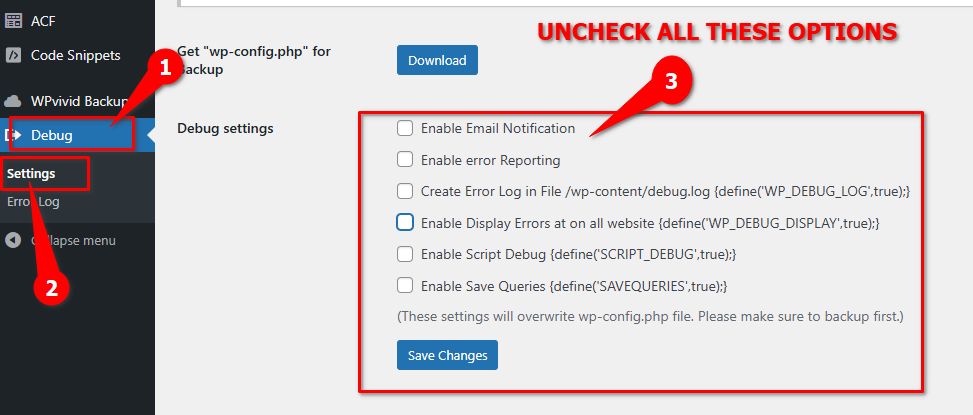
If this didn't work for you, please provide us with temporary access to your WP Admin page so we can take a look. Please add us as an Admin user to your WordPress Dashboard and send the following details to communitysupport@brizy.io.
Community Post link: https://support.brizy.io/hc/en-us/community/posts/22112971369234
WordPress Admin URL:
Username:
Password:Additionally, we will also need temporary access to cPanel/FTP:
cPanel/FTP host address:
Username:
Password:As a precaution, we recommend creating a full backup of your site.
Best regards,
Ariel H.0 -

All our client websites have the same issue and now it shows up on Google, too.
What's the issue with the Pro plugin? Can you give us an update?
0
Post is closed for comments.
Comments
37 comments