How do i make a link that leaves the website?

On www.stealthvideo.com there is the 'click here to view' demo section just below the header. I set it up to to go https:/cctvconnect.com/demo/cameras/grid .
However, when I click, it goes to https://stealthvideo.com/cctvconnect.com/demo/cameras/grid
How do I keep stealthvideo.com from being added to the url? Thank you for any feedback, I think I've tried every possible variation of setting up a link.
-
Had to change the url in question to https://stealthvideo.com/test/
0 -

Hi Celeste,
Thank you for reaching out to us.
Please ensure that the link for the button is set to 'https://cctvconnect.com/demo/cameras/grid'.
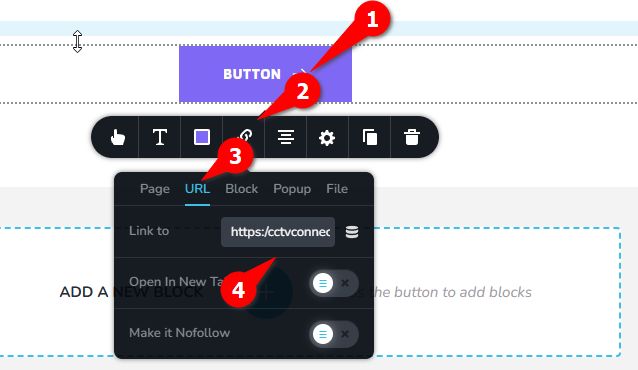
Also please try to flush the permalinks and see if this will help. You can find instructions here: https://wpastra.com/docs/how-to-refresh-wordpress-permalinks.
Otherwise, it’s possible that there are specific rules in the ".htaccess" file causing a redirect to "stealthvideo.com" whenever someone attempts to access "cctvconnect.com." In that case, you may need to consult your hosting provider or reset your ".htaccess" file to default as described in this link: https://wordpress.stackexchange.com/questions/45898/default-htaccess-file-for-wordpress.
If you have any further questions, please let us know.
Best regards,
Ariel H.0 -
Thank you. I will reach out to the host about this, though I tried a basic htaccess file and it didn't change anything. However, when I disabled brizy and brizy pro, the link worked and left the site.
0 -
Hi Celeste,
Upon checking, the button link is correct, but when you hover the mouse over the button, it shows the wrong URL.
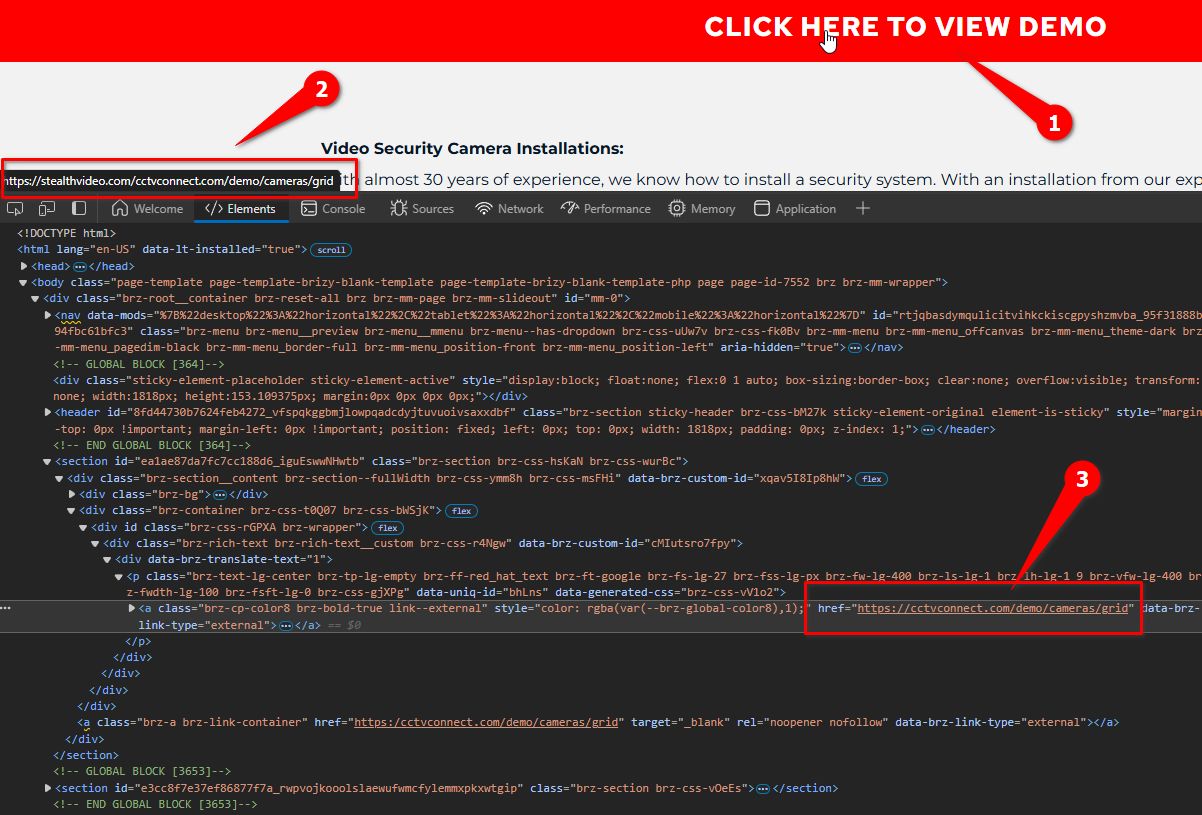
In addition to reviewing the .htaccess file for any redirect or rewrite rules that might be causing the URL to change, please also disable any plugins related to redirects, such as SEO or security plugins, and check if the issue persists. Additionally, verify that the WordPress Address (URL and Site Address (URL in Settings > General are correctly set to https://cctvconnect.com.
Best regards,
Ariel H.0
Please sign in to leave a comment.
Comments
4 comments