When trying to update my home page changes aren't saved

When I make a change, even a minor change in text and try to update the page it just seems to spin until it times out. I've attached a screenshot. 
-

Hello
Kindly try these steps to fix the error.
On Apache webservers, HTTP requests from Brizy 2.5.X series get blocked by ModSecurity software in the cPanel. ModSecurity is a tool that allows for full HTTP transaction logging, including complete requests and responses. Kindly add these configurations in the ModSecurity configuration file to avoid the block. Please take the help your hosting provider to set these limits.
- SecRequestBodyLimit 4194304 # Limit request bodies to 4 MB
- SecRequestBodyNoFilesLimit 2097152 # Limit non-file request bodies to 2 MB
Additionally set the post_max_size to at least 2MB following the process outlined at https://jmp.sh/mwKumdG6
Please get back to us if you are unable to save your work after implementing the above two steps.
0 -
Hello, the changes have been made and I still get the same error.
I have also tried deactivating every plugin except for Brizy and Brizy pro and I get the same error.
Please let me know what the next steps are.
Kind regards,
Nana
0 -

Hi Nana,
We're sorry to hear you're having this issue with Brizy
Please provide us with temporary access to your WP Admin page so we can take a look. Please add us as an Admin user to your WordPress Dashboard and send the following details to communitysupport@brizy.io.
Community Post link: https://support.brizy.io/hc/en-us/community/posts/22068092821138
WordPress Admin URL:
Username:
Password:As a precaution, we recommend creating a full backup of your site.
Best regards,
Ariel H.0 -
Hi Nana,
Thank you for your cooperation.
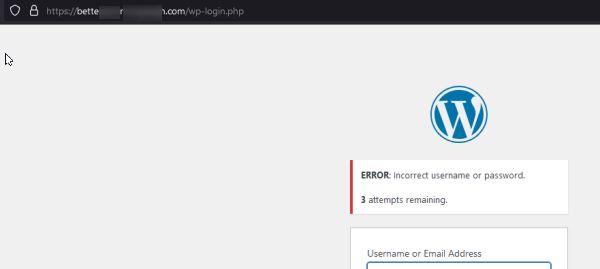
Unfortunately, the credentials don't work. Could you please revise and send us the correct login details?
Best regards,
Ariel H.0 -
Hello Ariel,
I thought replying to the email would update the ticket automatically. I've updated the credentials and tested logging in 2 minutes ago.
Please use the username and password I provided and you should be able to login.0 -
Hi Nana,
Thank you for your cooperation.
We tried uninstalling and reinstalling Brizy Pro; however, we were unable to upload it due to a low upload_max_filesize setting.
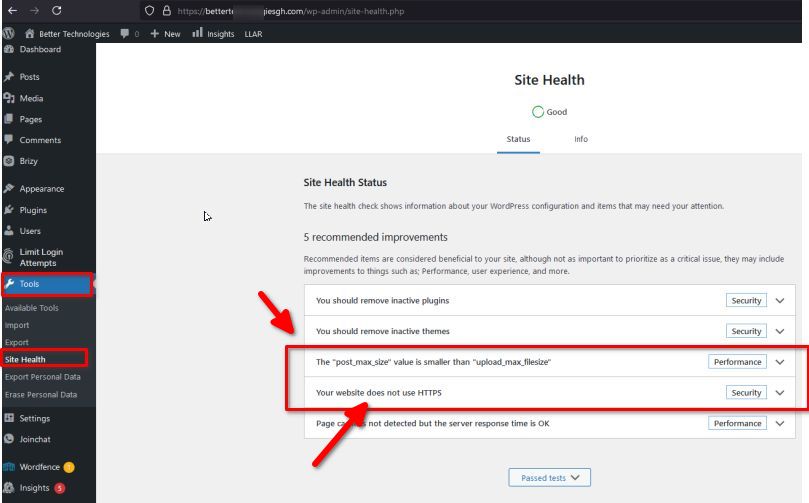
It also appears that the issue is related to insufficient memory. Could you please update the following server settings to see if this resolves the problem?
max_execution_time: 300
max_input_vars: 300
memory_limit: 512M (or higher)
post_max_size: 128M
upload_max_filesize: 32M
You can also make these changes yourself if you have access to cPanel. Go to 'Select PHP Version' and then to 'Options.' There, you will find these settings and can modify them. Otherwise, please reach out to your hosting provider for assistance.
Also, site health indicates that you don't use HTTPS, please update this from Settings ⇾ General.
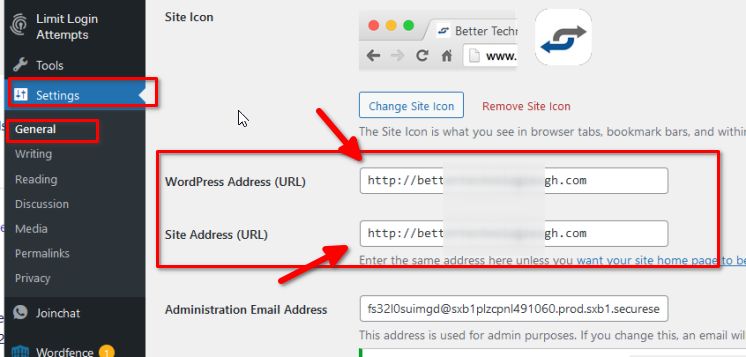
After the above steps, please reinstall Brizy Pro and let me know if you still encounter the same issue.
Best regards,
Ariel H.0 -
Hello Ariel,
The above steps have been completed and I still cannot save changes to the web page.
I have successfully tested the login with the account and password I provided 2 minutes ago. Please let me know what the next steps are and feel free to make necessary changes as the page is backed up.
Kind regards,
Nana
0 -
Hello Ariel,
The above steps have been completed and I still cannot save changes to the web page.
I have successfully tested the login with the account and password I provided 2 minutes ago. Please let me know what the next steps are and feel free to make necessary changes as the page is backed up.
Kind regards,
Nana
0 -
Hi Nana,
Thank you for your cooperation.
Could you also please provide us with FTP access to this website? If possible, please send the credentials to communitysupport@brizy.io and add this reference number to the subject line: 22068092821138.
Best regards,
Ariel H.0 -
Hello Ariel,
I've emailed the FTP account credentials to the suggested email address with the subject line 22068092821138.
I look forward to hearing back from you.
Kind regards,
Nana
0 -
Hi Nana,
I noticed that the page saves successfully with reduced content, but fails when there’s extensive content. For instance, I created a test page on your website with only a few blocks, and it saved without any issues. However, if you attempt to update a page with more content, it won’t save.
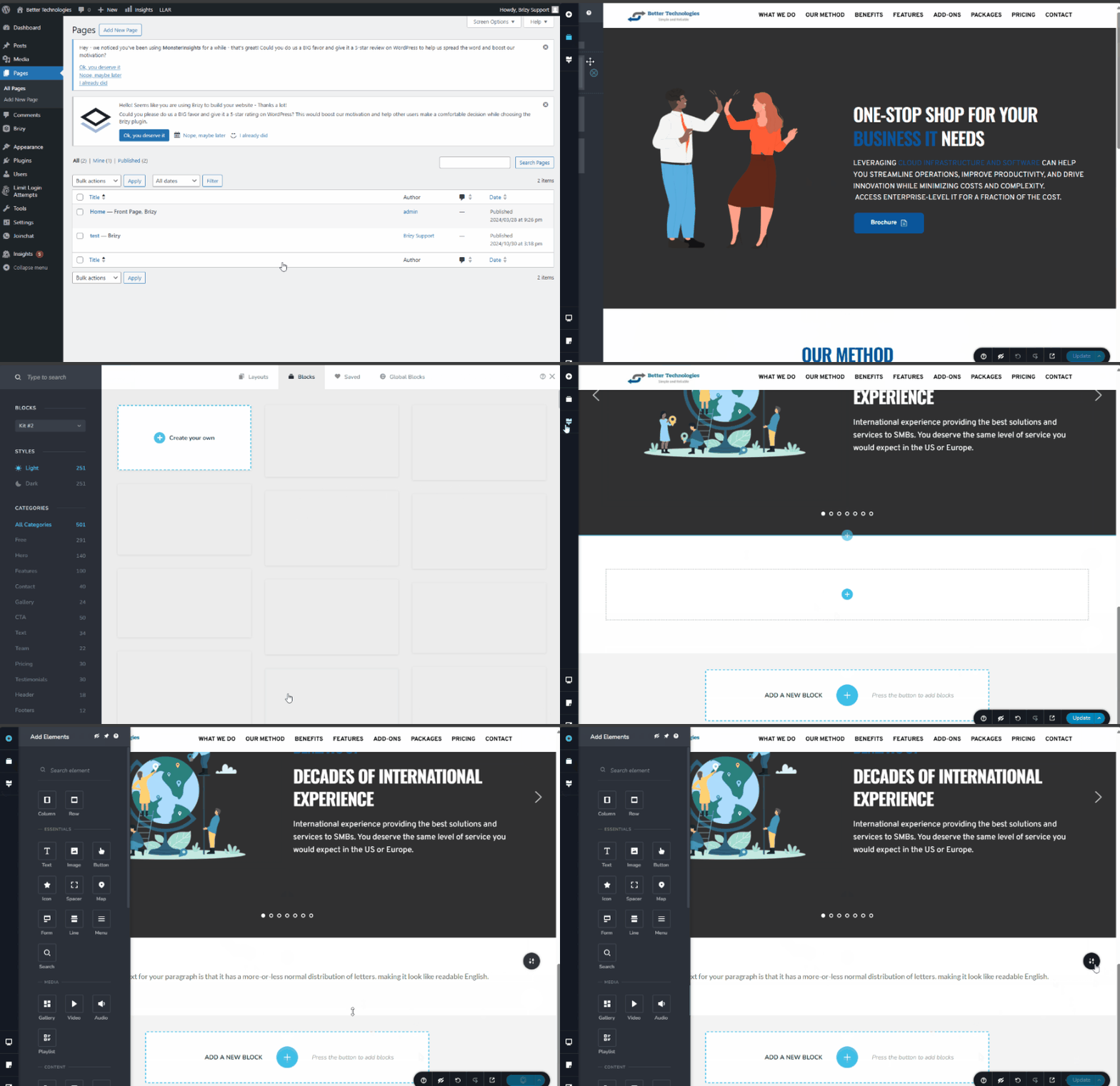
This problem stems from server limitations. Brizy relies on the server’s PHP and MySQL configurations for processing and saving content. Limitations like insufficient PHP memory or input settings can interfere with the save function.
To resolve this, please update the following settings in the php.ini file, or contact your hosting provider to assist with these adjustments:
max_execution_time: 300
max_input_vars: 6000
memory_limit: 512M (or higher)
post_max_size: 128M
upload_max_filesize: 128M
I understand that we've provided these details in one of our replies, but please try it again and ensure that max_input_vars is set to 6000 and upload_max_filesize is 128M. After making these changes, try saving the page again. Let me know how it goes.
Kind regards,
Ariel H.0 -
Hello Ariel,
I have had the changes you requested made by the hosting company. After changes were made I logged in and tried to save a small text edit to the page. It failed with the same error. Please next step.
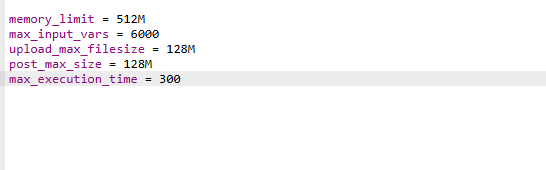
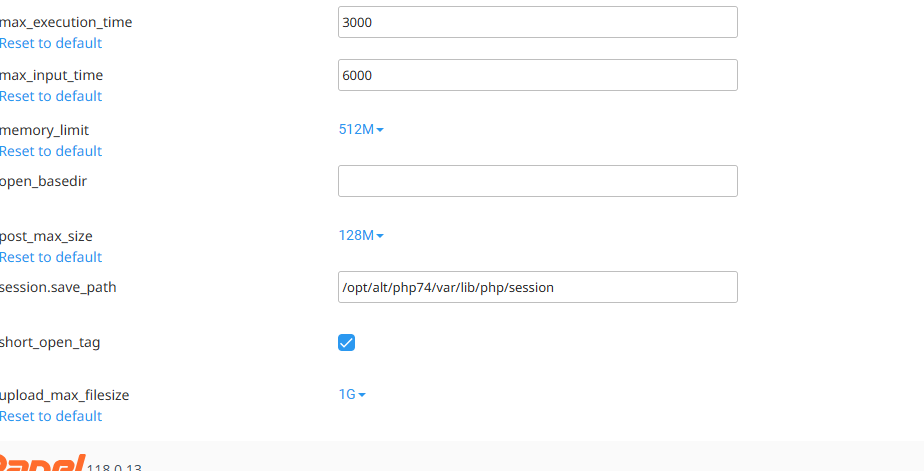 0
0 -
Hi Nana,
Thank you for the update. I noticed that your site is generating a 520 error in the console. Could you please enable Developer Mode in Cloudflare as suggested in this article: https://www.hostinger.ph/tutorials/error-520, and see if this helps resolve the issue?
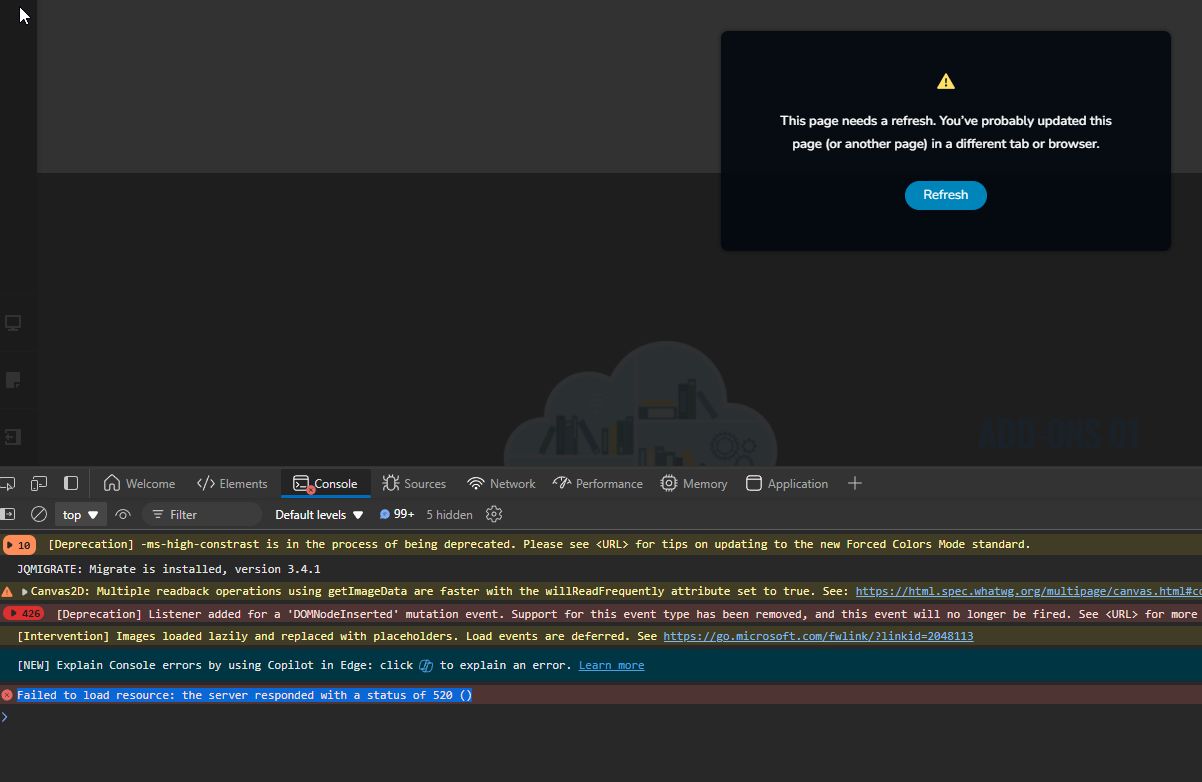
Best regards,
Ariel H.0 -
Hello Ariel,
I have enabled developer mode in cloudflare and I still cannot save.
I know someone else who is using Brizy Pro but doesn't use cloudflare and has the same problem saving bempongtalkingtherapy.com. Changes made do not save. It is unlikely cCoudflare is the cause of the issue.
There is also the fact that I previously saved the website and edited without any issues. It's been unchanged for about 5 months or more. The only changes I can think of would be Wordfence security plugin (currently deactivated) and updates to the Brizy plugin.
Here is some additional information that will hopefully shed more light on the issue. I created a new page and attempted to build a copy of the original page by adding saved blocks one at a time. I was able to save the test page as a draft after the addition of the first 6 blocks (out of 10). When I try to save the 7th block it stopped saving drafts. I also tried to create a new page using a saved layout. This failed with the same time out error.
Is there a way to revert to an older version of the brizy plugin? I've been reading the brizy support forums and it seems for a lot of people who experienced the same problem, they had joy reverting to an older version. Of the 5 or so I've read nobody had the problem resolved by changing the php settings on the host server.
Let me know what you think.
Kind regards,
Nana
0 -
Hi Nana,
Thank you for the update.
I have created a private ticket and escalated it to one of my colleagues for a thorough investigation. You can expect a response from them as soon as possible.
Best regards,
Ariel H.0 -
Hello Ariel,
It's been about 4 days since I last got an update on the private ticket you created. Can you have a look at it if K C George is not available? I've provided a recent update.
Kind regards,
Nana0 -
Hi Nana,
I’m sorry to hear you’re experiencing this issue with Brizy.
One of the suggestions from my colleague in the private ticket was to add specific directives in the .htaccess file.
<IfModule mod_security.c>
    SecRequestBodyLimit 4194304
    SecRequestBodyNoFilesLimit 2097152
</IfModule>
I tried adding them myself, but it didn’t make a difference. Page saving stops when there are more than 8 blocks, and the publish button begins looping.
If it’s urgent to make changes on your website, you could switch to these versions of Brizy and Brizy Pro.
Additionally, you might want to test the same layout or template in my testing environment for comparison. This environment also uses PHP v7.4.33, and the issue doesn’t occur there. You’re welcome to share credentials with your hosting provider so they can compare configurations directly, which may help them identify any needed server adjustments.
Please give this a try, and feel free to reach out with any further questions.
Best regards,
Ariel H.0 -
Hello Ariel,
I can confirm that moving to the older versions of Brizy and Brizy Pro resolved my problem. I can now edit and save my webpage.
Kind regards,
Nana
0 -

Hi there,
Is there any news on when Brizy will be fixing this issue?
I have now had issues, with GoDaddy and they can not update ModSecurity on shared hosting
Cloudway, Digital Ocean, SiteGround all have the same issue.I believe this is an issue with Brizy as it's impossible to get hosting providers to update the network to work with your product.
0 -
Hi Riaan,
The recently introduced Brizy compiler can sometimes result in larger HTTP requests when editing your page.This increased activity might occasionally be flagged by firewalls as unusual, which could lead to them blocking it.
Starting with Brizy version 2.5.x, we changed how the page compilation process works. Previously, when a page was updated in the Brizy editor, the data was sent to the Brizy compiler hosted on our servers. Once compiled, the data was saved to the website's database on the user's server.
From version 2.5.x onward, pages are compiled directly in the user's browser. After compilation, the data is immediately saved to the site's database on the user's server. However, if a page is large, the Apache server's ModSecurity module may block the update request due to high payload limits, preventing the page from being saved.
To address this issue, disabling ModSecurity on the server can provide a quick solution. If your hosting provider does not allow this, you can increase the limits instead. Below are example configurations for both Apache and Nginx users.
Apache:
<IfModule mod_security.c>
    SecRequestBodyLimit 4194304
    SecRequestBodyNoFilesLimit 2097152
</IfModule>
NGINX:
modsecurity on;
modsecurity_rules '
    SecRequestBodyLimit 4194304
    SecRequestBodyNoFilesLimit 2097152
';
Since server configuration falls under the hosting provider's responsibilities, we recommend forwarding this message to them for assistance. If you have further questions, feel free to reach out.Best regards,
Ariel H.0
Please sign in to leave a comment.
Comments
20 comments