Problem with translations

I have an issue with page translation. I see on the forum that it's a common problem. Despite adding a new page and text I see the message that "No translations yet Strings to be translated will be shown here after adding texts in your page".
1. Is there a way to fix it?
2. If I use translation in Brizy cloud can I also add separate SEO description etc. in another language?
3. Is there a way to automatically navigate users to language version e.g. based on their location or browser language?
-

Hello Piotr,
Let me go over your questions one by one.
- The page translations do not work as expected at the moment. The translation strings are added to the page within two to three hours of adding and publishing a new page. We have reported this issue and will look into it. After creating a new page, publish it, then check the translation strings three hours later as we work towards resolving this issue.
- Kindly add the SEO Title and Description under the "SEO" tab for the specific page and it will then appear as a translation string under the "Translate" tab. You can then edit the translation string to make it more accurate. Have a look at this screen recording https://jmp.sh/xNQVoB3t
- Its not possible at the moment to automatically redirect users to a specific language based on their location or browser language.
0 -

Maybe we could add some JS to enable the redirection?
Gemini suggested this, but I haven't tried it yet:
// Function to get the browser's preferred language
function getBrowserLanguage() {
  return navigator.language || navigator.userLanguage;
}

// Function to redirect to the appropriate language page
function redirectToLanguagePage(lang) {
  // Replace these with your actual page URLs
  switch(lang) {
    case 'en-US':
    case 'en':
      window.location.href = '/en/';
      break;
    case 'es-ES':
    case 'es':
      window.location.href = '/es/';
      break;
    // Add more cases for other languages as needed
    default:
      window.location.href = '/en/'; // Default to English
  }
}

// Get the browser language
const userLang = getBrowserLanguage();

// Redirect to the appropriate page
redirectToLanguagePage(userLang);
I also found this online:
<script>
const lang = navigator.language;
const langRedirected = localStorage.getItem("languageRedirected");
if (lang.includes('de') && (langRedirected === null || langRedirected === false)) {
  localStorage.setItem("languageRedirected", true);
  window.location = 'https://www.example.com/de'
}
</script>
It's a start...
0 -

Hi David,
Thank you for the update.
Unfortunately, these codes don't work in Brizy Cloud. However, if you have already manually translated your site, you can use the translation element in the menu so that users will have the option to switch between languages on your site.
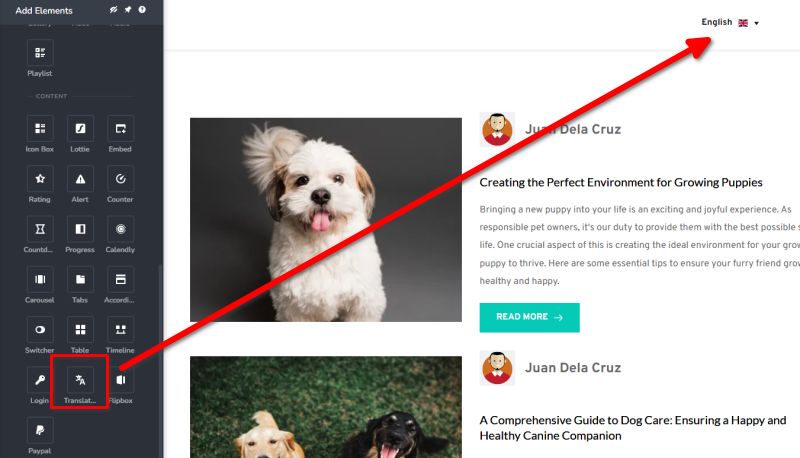
Best regards,
Ariel H.0 -
Thank you Ariel.
Browser language or country detection seems like a small feature but adds immense value to everyone. Otherwise the translation feature seems like half-baked. I hope the team gets to it sometime soon!
1 -
Hi David,
Thank you for the feedback. We will take this into account and submit it as a feature improvement.
Best regards,
Ariel H.0
Please sign in to leave a comment.
Comments
5 comments