Set ID for Entries + Slow Page Loading

So I've created the "projects" section of my website which I'm quite excited about. I've used "entries" to create a blog section where I'm adding each project as a separate page so I can then present them in a "posts" module from the builder (I'm using Brizy Cloud).
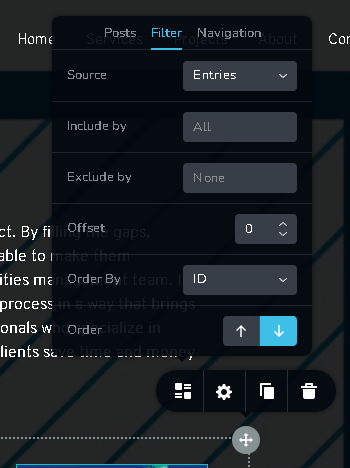
Now, under the "posts" table view of my blog entries where I can customize the view of the post thumbnail, title, etc of my posts, I've set the table to put the posts in order based on their "ID" number. See the screenshot below.
QUESTION 1: Is the a way to change the ID of the post entries so I can control the order the posts are being showed on the table? It's very important for me to be able to control the order of the posts.
Question 2: The project pages are loading very very slowly. Is there a reason why that is? I've checked the image sizes and they're very standard in terms of their size both KB and pixel-wise. Is there maybe a way to optimize the pages for faster loading times?
Here's a link to the page: https://www.luttec.com/en/projects
Thank you - Amir
-

Hi Amir,
Thank you for reaching out to us.
Unfortunately, there’s no option to change the post ID. You might want to consider a workaround provided by another user in this support thread:
https://support.brizy.io/hc/en-us/community/posts/15571204547858
Regarding the speed, it’s common for the site to be slower while you’re in the development phase. However, once your site is fully cached and distributed through the CDN, you should notice a significant improvement in speed.
If you have any further questions, please let us know.
Best regards,
Ariel H.0 -
Hi Ariel, are there any actions I need to take for the CDN to kick in? And sure, I'll review the workaround and be in touch with any questions. Thank you
0 -

Hi Amir,
The changes you make to a page are pushed to the CDN with each click of the "Update" button in the Brizy Editor. There is nothing else you need to do.
0
Please sign in to leave a comment.
Comments
3 comments