Page not Saving / Needing Refresh

Hi,
I am working on this small site at the moment - https://www.dj.freshhq.co.uk
I am the only person working on it but repeatedly when I try to save things, more often than not, it comes up with the message in the attached screenshot about the page needing a refresh etc. And doesn't save the changes.
This is happening for tiny changes e.g. changing an image, pasting in new text etc etc. It is making it entirely impossible and hugely time consuming to work on.
I have seen this in the past with Brizy but only when working on a site at the same time as other users.
Can I please politely ask that you don't ask us to go back to a previous version of Brizy? This has been your response for multiple issues we have encountered since the recent Brizy update which has seemed to result in a major catalogue of errors, if nothing else.
Any advice here that will fix this and be a lasting solution would be helpful.
Thanks,
Eilidh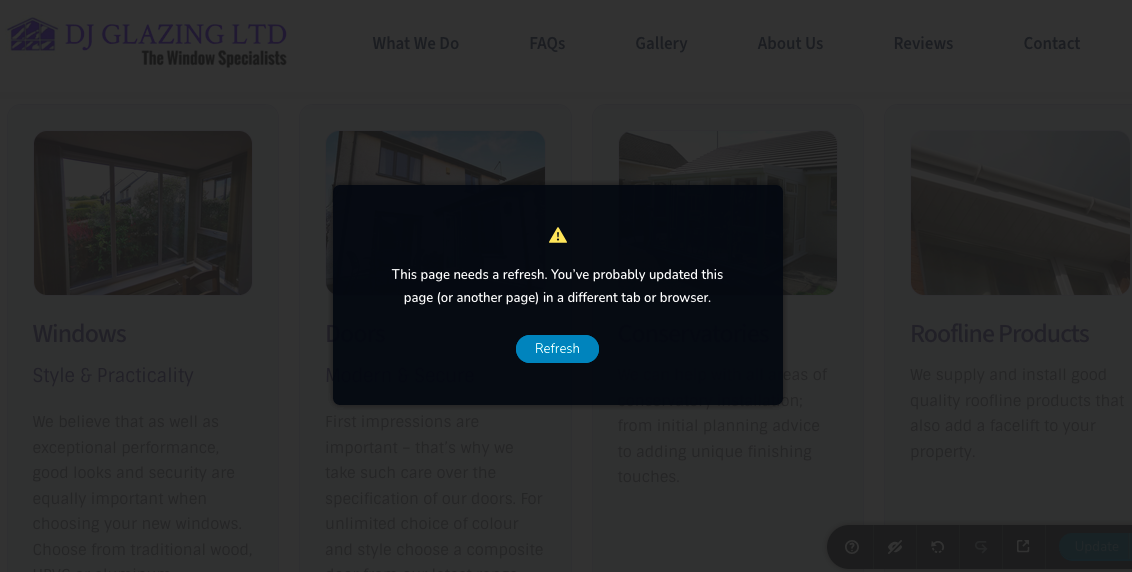
-

Hi Eilidh,
Thank you for reaching out to us.
Unfortunately, there isn't a quick solution to this issue, as it's unique to each website. However, I'd be happy to take a look at your website and see how we can fix it. Please add us as an Admin user to your WordPress Dashboard and send the following details to communitysupport@brizy.io:
Community Post link: https://support.brizy.io/hc/en-us/community/posts/21973181131922
WordPress Admin URL:
Username:
Password:Please make a full backup of your site as a precaution.
Best regards,
Ariel H.0 -
Hi Eilidh,
Thank you for your cooperation.
I tried to replicate the issue you reported, but I couldn't reproduce it. This is demonstrated on this screencast: https://youtu.be/f6LAzkq7lmk
Could you please try clearing your browser cache or using another browser to see if this resolves the issue?
Best regards,
Ariel H.0 -
Hi Ariel,
Done that and tried on other browsers with the same effect unfortunatly.
But then I tried again and it worked for a while but then started doing it again.
I guess we'll have to wait for another Brizy update.
Thanks,
Eilidh0 -
Hi Eilidh,
Please also try clearing your local storage and see if that makes any difference.
Here's a helpful guide on how to clear local storage: https://www.leadshook.com/help/how-to-clear-local-storage-in-google-chrome-browser/
Best regards,
Ariel H.0
Please sign in to leave a comment.
Comments
4 comments