contact form button does nothing

contact form button does nothing. It's integrated with Wordpress and a webhook.
in addition, it will not accept Brevo API key (I tried multiple ones)
demo for is here https://diligenceflow.pro/demo1/
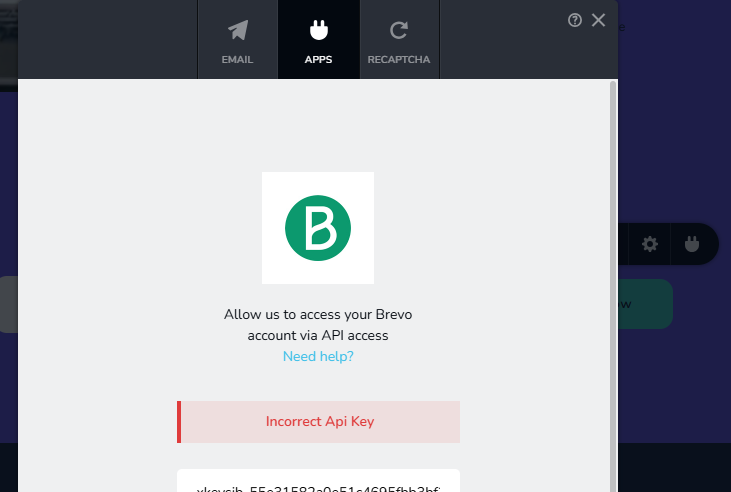
-
All plugins are disabled by the way
0 -

Hi Ibrahim,
Thank you for reaching out to us.
Please confirm that you have followed the steps demonstrated in this screencast to obtain the API Key from your Brevo account: https://youtu.be/9Bkku9RLcag
Best regards,
Ariel H.0 -
Hi Ariel,Yes confirmed. I followed the exact steps. The other issue here as well is the subscribe form button does nothing even when integrated with WordPress or Webhook. I provided a demo page for testing above.0
-
Hi Ibrahim,
Thank you for reaching out to us.
This is something we need to inspect from your WP Admin page. Please add us as an Admin user to your WordPress Dashboard and send the following details to: communitysupport@brizy.io
Community Post link: https://support.brizy.io/hc/en-us/community/posts/21941669130258
WordPress Admin URL:
Username:
Password:
Also include the URL of the problematic pages.Please make a full backup of your site as a precaution.
In the meantime, could you please try disabling all other plugins except for Brizy and Brizy Pro to see if the issue persists? If the issue does not occur with other plugins disabled, it is possible that there may be a conflict with one of the third-party plugins installed on your site. Additionally, you can try temporarily switching to another theme to determine if the issue is related to your current theme.
Best regards,
Ariel H.0 -
Email sent. All plugins are disabled except brizy's. A similar issue occurs on another site with a different theme (same hosting) Thanks
0 -
Hi Ibrahim,
Thank you for your cooperation.
I tried to replicate the issue by first creating two forms: one for Brevo and the second one for the Webhook. You can see this in this screencast: https://youtu.be/BeIpgbaXR0E
As you can see, the first form is sending the email address to my Brevo list. The second email capture form using Webhooks also works, and you can see the results here: https://webhook.site/#!/view/56dd679a-ecd4-4392-9391-714d24eddbf3/6173935f-4489-4fe0-91a5-116925489a80/1
Finally, I created a third form using both Brevo and Webhook, but everything appears to be working properly.
If it doesn't work using your Webhook, you might need to check and update your code.
Best regards,
Ariel H.0 -
Thanks, Ariel for your feedback. I see the form is working normally now. Can you please tell me what exactly was done to fix the issue? I have another site where the same issue occurs. To eliminate potential conflicts, I disabled all integration and only connected wordpress integration, and still the button does nothing. I need to replicate what you did here on the other site.
0 -
Hi Ibrahim,
Thank you for the update.
If you noticed the forms we created on your website, under the Email tab, WordPress, SMTP, or Gmail was not selected. The form was directly connected under the Apps tab where Brevo and Webhook were already set up. In this case, even if your Apps are configured properly, if the Email tab is not configured correctly, the form will fail. Before you select any of the Apps, and if you want to set up email, ensure that the email option you choose is working properly before configuring the Apps.
Please try this and let me know how it goes.
Best regards,
Ariel H.0
Please sign in to leave a comment.
Comments
8 comments