?brizy_media - slowing down site loading

hello !
On our production environment https://www.philippegauberti.com/, all images are loaded from a brizy administration URL: https://philippegauberti.com/?brizy_media=wp-888a9227f43450745b32b790bee84c70.jpg&brizy_crop=iW%3D613%26iH%3D920%26oX%3D182%26oY%3D329%26cW%3D383%26cH%3D500, slowing down site loading.
While the previous version of https://w2.philippegauberti.com/ is functional: https://w2.philippegauberti.com/wp-content/uploads/brizy/imgs/PhGAUBERTI9-scaled-613x920x182x329x383x500x1715764644.jpg

We can't find the solution to the problem, thank you for your help.
-

Hi Romain,
Thank you for reaching out to us.
Please try the following steps to see if they help address the issue:
1. Remove the "www" from your domain name. Change "https://www.philippegauberti.com" to "https://philippegauberti.com". You can make this change in your WP Dashboard → Settings → General, as shown in this example:
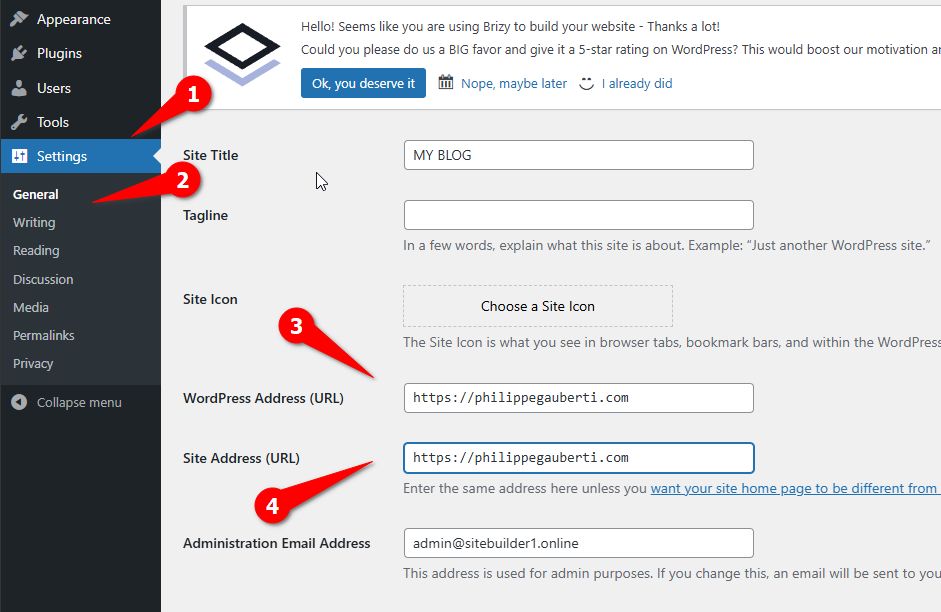
2. After making this adjustment, flush the Permalinks following the steps outlined in this link: https://wpastra.com/docs/how-to-refresh-wordpress-permalinks/3. If you have a caching plugin installed on your website, purge its cache.
Give these steps a try and let me know if they work for you.
Best regards,
Ariel H.0 -
Thank you very much, the site is working properly.
Thank you for your reactivity, we appreciate every time your customer support, thank you!
0
Please sign in to leave a comment.
Comments
2 comments