Mobile menu hamburger not working

Updated to new version of brizy, have multiple sites on edit mode hamburger open but when live and on mobile nothing happens.
Not sure if it just me or others also experincing this.
Thanks in advance.
-

Hi Edgar,
Thank you for reaching out to us.
Kindly access the "Display Conditions" for your global header, save the conditions and update the project and check if the issue resolves. Please take a look at this screen recording https://jmp.sh/f3HHuhmD
Please try this and let me know how it goes.
Best regards,
Ariel H.0 -
yes i have tried this to get the global block to show up again, but the mobile menus on all the sites are not working still :(
I sent an email reply yesterday please let me know if recevied or i should post it here. thanks!
0 -
working now , once I updated display conditions. thank you.!!!
0 -
sorry I was able to update display conditions on all site within multisite and mobile menus are working again. all for one site, https://stoneatlantacountertops.com/
on this particualr site, when i press update it just keeps loading (interestingly enough it lets me update other pages like contact etc, so mobile menu works on contact page but not homepage), is it possibly b/c of ccs animtaion on homepage? i also deactived all plugin to try see fi that help but nada.
any ideas - greatly appercaited. thanks
0 -

Hi Edgar,
When you deactivated all plugins, did you include the plugin you are using on your homepage hero section, Slider Revolution? If you did not deactivate this plugin, kindly carry out the following test
- Save the website homepage as a design layout by selecting the "Save Layout" option at the bottom right corner in the Brizy Editor
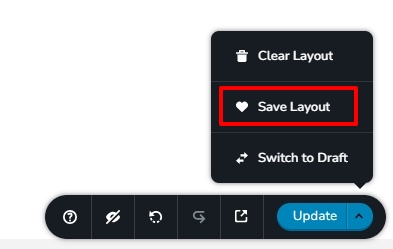
- Create a test page and import the homepage design to the page. (To import the homepage design, select the saved layout from the "Saved Layouts Library") Delete the hero section and check if the hamburger menu works on the test page.
This can help determine if Brizy hamburger menu has a conflict with the Slider Revolution slider
0 - Save the website homepage as a design layout by selecting the "Save Layout" option at the bottom right corner in the Brizy Editor
-
when i go to "save layout" it just load indefinelty like the update button and wont save the page. unable to update page. I have sent over info ia email for site access. thanks
0 -

I am having similar problems across multiple sites as well.
I do show that one of the JS files has an issue:
Uncaught SyntaxError: JSON.parse: unexpected end of data at line 1 column 1 of the JSON data
f https://<domain>/wp-content/plugins/brizy-pro/public/editor-build/prod/js/preview.pro.min.js?ver=169-wp:2z https://<domain>/wp-content/plugins/brizy-pro/public/editor-build/prod/js/preview.pro.min.js?ver=169-wp:2z https://<domain>/wp-content/plugins/brizy-pro/public/editor-build/prod/js/preview.pro.min.js?ver=169-wp:2<anonymous> https://<domain>/wp-content/plugins/brizy-pro/public/editor-build/prod/js/preview.pro.min.js?ver=169-wp:2<anonymous> https://<domain>/wp-content/plugins/brizy-pro/public/editor-build/prod/js/preview.pro.min.js?ver=169-wp:2emit https://<domain>/wp-content/plugins/brizy-pro/public/editor-build/prod/js/preview.pro.min.js?ver=169-wp:2emit https://<domain>/wp-content/plugins/brizy-pro/public/editor-build/prod/js/preview.pro.min.js?ver=169-wp:2emit https://<domain>/wp-content/plugins/brizy-pro/public/editor-build/prod/js/preview.pro.min.js?ver=169-wp:2Only the Tablet/Mobile menus seem to be affected. I tried removing all plugins, and reinstall current brizy plugins. Issue continues across all site.0 -
Hi Edgar,
I don't see credentials for stoneatlantacountertops.com in our Inbox. Can you please check?
0 -
Hello Cadillac News,
Kindly resave "Display Conditions" for each and every global block following the procedure at https://jmp.sh/f3HHuhmD and check if the above error disappears from the browser console and the hamburger menu starts working.
0 -
started working for me again.
possibly was b/c of the rev slider?
hope you cen get this sorted out for next update. thanks for the help.
0
Please sign in to leave a comment.
Comments
10 comments