Issue with images after URL update on Wordpress multisite

Hi,
We've changed the URL on a multisite from https://www.friedascott.org.uk/ to https://www.friedascott.org.uk/
We've notied two problems:
- The font in the primary navigation is showing as a sans serif. This isn't the case when we edit a page. Also the drop down shows the correct font.
- Images don't show or show a broken icon when editing a page in Brizy
Think the latter is to do with the change of URL and we're not sure how to fix that.
Thanks,
Darren
-

Hi Darren,
Thank you for reaching out to us.
1. Could you please try flushing the Permalinks and see if this helps?
https://wpastra.com/docs/how-to-refresh-wordpress-permalinks/2. If you have any caching plugins installed, also purge them.
3. You can also try using the replace URL tool and see if this will help.
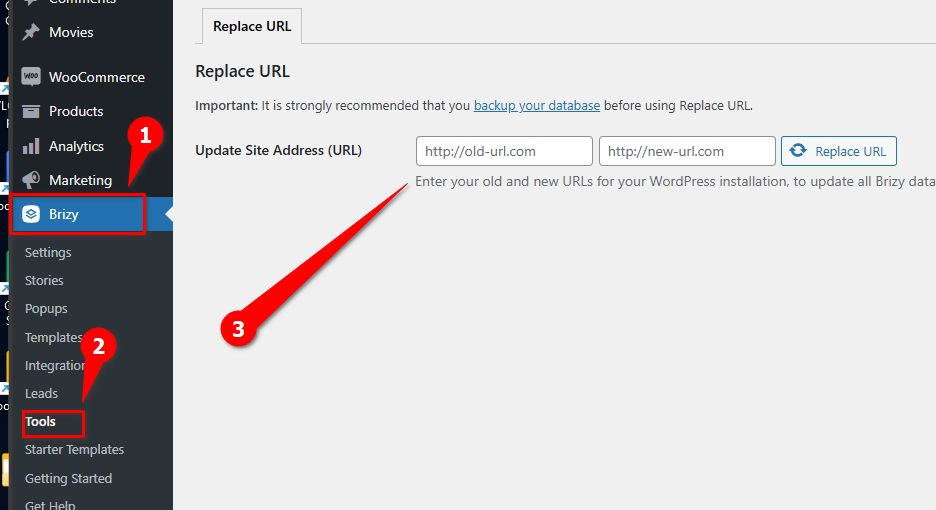
Please try these steps and let me know if this helps.
Best regards,
Ariel H.0 -
Hi Ariel,
Unfortunatly that hasn't made any differnce. I fillowed the aboe via Permalinks, cleared the cache but it didn't make any difference.
When I went back to edit a page all images are broken / missing.
We looked at the Replace URL yesterday and when we tried that it broke the site, so we are hesitant to try that again.
Happy to provide login details if you want to take a look?
For info this is the path for the logo: https://francis-scott.org.uk/friedascottnew?brizy_media=wp-2a844f671011c5297b703ac17ff2bf62.png&brizy_crop=original
As you can see it's using https://francis-scott.org.uk rather than https://www.friedascott.org.uk/. When I login to Media Library https://www.friedascott.org.uk/wp-admin/upload.php all the files are there.
And also as mentioned yesterday the font in the main navigation is broken and we're not sure why.
Thanks,
Darren0 -
Hi Darren,
Please send your site's credentials to communitysupport@brizy.io so we can inspect your site. Please include reference number 21829117726354 in the Subject line.
Best regards,
Ariel H.0 -
Ok, I will send that shortly.
Also we've just put this site live https://www.thebritanniainn.com/. It's dev link was https://www.bi.freshhq.co.uk/.
We're having to manually edit every page in Brizy for images to show up even though we've run the Replace URL tool above.
0 -
Hi Darren,
Thank you for your cooperation.
Could you please check if reverting to previous versions of Brizy and Brizy Pro resolves this issue? You can download the older versions HERE.
Otherwise, please provide us with Super Admin access to your website so we can further investigate the issue.
Best regards,
Ariel H.0 -
HI Ariel,
It's not something we normally do. To be honest we're confused because all the issues we've had we'e been told are with older sites built in Brizy but we built this site in the past 10 days.
As mentioned we're really concerned with what;s happening with Brizy. There doesn't seem to he aby clear solution. In fact with every update it's just causing us more issues and using up more of our time.
Thanks,
Darren0 -
Hi Darren,
We sincerely apologize for the inconvenience you're facing. We understand how frustrating this situation can be. There are many factors to consider in this scenario, so we can only provide possible steps to address this issue.
1. CDNs often cache website content (including images) in their servers. After changing your URL, the CDN might still be serving cached versions pointing to the old URL. Clearing the CDN cache might resolve this issue.
2. Examine your .htaccess file to make sure it's correctly handling the URL change. Incorrect configurations in this file could be causing the issue.
3. Try reverting to the previous versions of Brizy and Brizy Pro to see if that resolves the issue. This could help determine if a recent update is causing the problem.
Please try these steps and let me know how it goes.
Best regards,
Ariel H.0 -
Hi Ariel,
Just to check are you guys still looking at https://www.friedascott.org.uk/? As all images have now disappeared.
Thanks,
Darren0 -
Hi Darren,
We didn't have access to the plugins area, so we only tried purging the LiteSpeed cache to see if it would make a difference.
0 -
Ok, I'll send you differnt login details so you have full access to the site.
0 -
Hi Darren,
Thank you for the update.
In your multisite setup, please try removing the "www" from your domain name. Instead of using "www.friedascott.org.uk," change it to "friedascott.org.uk."
After making this change, purge the cache and check if it resolves the issue.
Please give this a try and let me know if it works for you.
Best regards,
Ariel H.0 -
Hi Ariel,
So in the table wp_domain_mapping I changed "www.friedascott.org.uk," to "friedascott.org.uk." And although I can now see images on the site I can't login to it to make changes, it just goes on a lopp at https://www.friedascott.org.uk/wp-admin/.
Thanks,
Darren0 -
Also put the www. back ontot it and I can login and also see images on the front end. Not sure about editng though as you were in the site!
0 -
In the error_log I can see this:
[08-Oct-2024 15:52:22 Europe/London] PHP Warning: Constant SUBDOMAIN_INSTALL already defined in /home/fcsct/public_html/wp-config.php on line 106
0 -
Hi Darren,
When you change the domain name from "www" to a non-"www" version in a WordPress multisite and still see the admin page redirecting to the "www" domain, you likely need to update several places in both your wp-config.php file and the WordPress database.
For more information, please refer to the following links:
1. https://wordpress.stackexchange.com/questions/232038/switching-primary-site-in-wordpress-multisite
2. https://pressable.com/knowledgebase/adding-or-changing-the-domain-on-a-wordpress-multisite/I hope this helps.
Best regards,
Ariel H.0 -
Hi Ariel,
I changed it back to www. and all images went. Removed www. again and images display again buit as before we now can't edit the site.
I looked at the two articles and although iuseful, they refer to switching the primary domain name from a sub-domain and that's not what we are looking to do.
What we did was switch https://www.friedascott.org.uk/ from another sub-domain to point to another sub-domain. See attached image:
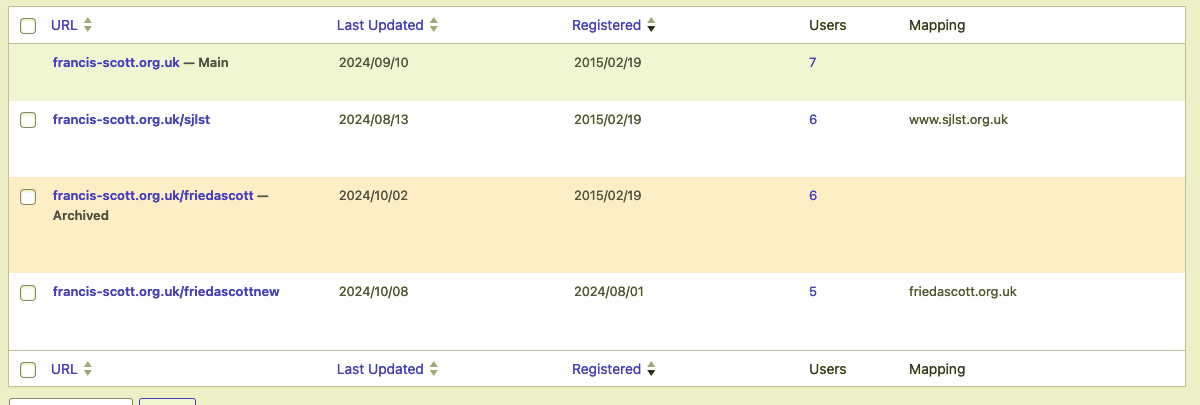
Originally https://www.friedascott.org.uk/ pointed to francis-scott.org.uk/friedascott but once the new site was ready to go live we switched to francis-scott.org.uk/friedascottnew. To this we changed the mapping id in wp_domain_mapping from 7 to 8 (8 beig rancis-scott.org.uk/friedascottnew).
And then in wp_8_options we made sure that siteurl and home were set to https://www.friedascott.org.uk.
And that's where we are at.
A bit stuck as to where we go from here.
Thanks<
Darren0 -
Hi Daren,
Thank you for the update.
We have successfully resolved a similar issue using the following approach: https://youtu.be/dAVqUFZTjf0
This website is using native domain mapping, which made implementing the changes relatively simple. Unfortunately, your setup is more complex. However, a temporary workaround would be to switch the domain from 'www' to non-'www' and then revert it back. This should help address the issue until we release the next update, which will provide a more permanent fix.
Alternatively, you could consider reverting to earlier versions. If you choose this option, you can download them HERE. After installation, please remember to edit and update your pages as an additional step to ensure that images are visible in both the backend and frontend.
Please give this a try and let me know if it resolves the issue for you.
Best regards,
Ariel H.0 -
Hi Ariel,
Yes, we did think about removing the www in the options table and then using cpanel to make sure it worked if someone typed in the site with www.
Reverting back to an earlier version of Brizy isn't an option for us as we've spent hours of additional time on this project that we're not getting paid for. If you guys at Brziy want to do this for us that would be appreciated.
Again, and sorry if I'm repeating myself, we're becoming very disatisfied with the constant stream of issues we're gettting with every Brizy update.
Thanks,
Darren0 -
For info. I can now, after removing www. from wp_domain_mapping get into the Admin but when I try and edit a page in Brizy it just spins.
0 -
Ok, I have run network updates and then went back to the site and I seem to able to edit the site ok now and images are also showing.
0 -
Hi there,
Another change of URL another issue with images in Brizy disappearing. So we went from https://www.rc.freshhq.co.uk/ to https://www.rcdalgliesh.com/ and images in Brizy all disapeared. I've had to manually edit every page to get them to reappear.
Before that, I did the following:
- Used Brizy > Tools to change change the URL
- Cleared cache within the site
- Clear CLoudFlare cache
- Checked .htaccess - nothing to change there.
- Edited permalinks
Is this something you are working on fixing? To be honest Brizy is starting to become a liability. From seeing what you (Brizy) are posting, it would seem that your efforts are going into AI and now Shopify. Can you confirm that WordPress plugin is still important to you?
If you can't then we'll start looking at other options. We became a partner with Brizy this year and I feel that we've been let down.
Feel free to pass that back to an account manager. If they want to contact me directly please feel free to pass this on.
Thanks,
Darren0 -
Hi Darren,
Thank you for your message and for sharing the details.
We are actively working to address the issue with images disappearing after a URL change, and we understand the frustration this has caused. It will take us a little more time, but a fix should be available soon.
Thank you for your patience and continued support.
Best regards,
Ariel H.0 -
Thanks Ariel.
I appreciated that it's not directly your fault so apologies for my frustration.
We look forward to the issue being fixed.
Thanks,
Darren
0

Please sign in to leave a comment.
Comments
23 comments