Unable to include Brizy template on the page

Hi
Im trying to include a brizy template on a single page but the page is not in the dropdown. We do have 1000s of pages so perhaps it's not included?
Hope you can help to get this page included. Thanks
See this video https://www.loom.com/share/71eafcb0ae8040f28f799c083dd15224?sid=81812b28-231b-4353-8054-b59e94c7b3db
-

Hi David,
Thank you for reaching out to us.
Please try assigning the page to a different user or create a new user specifically for this purpose. Make sure the new user has the Admin or Editor role. Then, go to the page, update the Author, and set it to the newly created user.
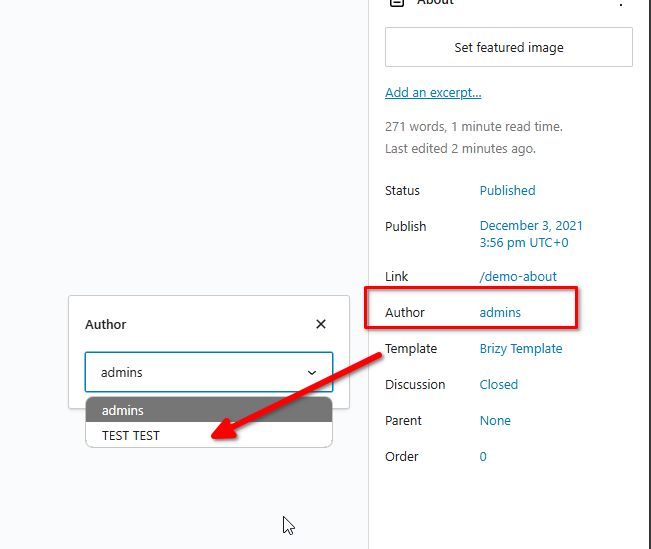
Once that’s done, return to the template and select the new user from the dropdown.
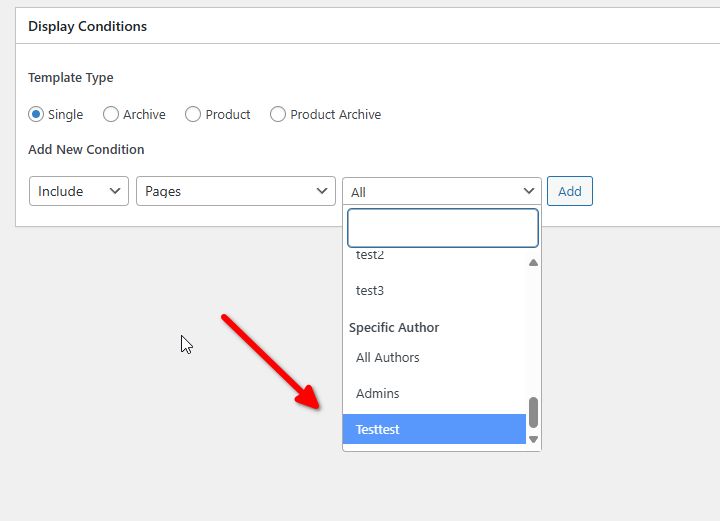
Give this a try and let me know if it works for you.
Best regards,
Ariel H.0 -
Hi
This didn't work. The user is assigned to a page and the template is assigned to that page.
The number of posts assigned to the user in "users" is still 0. Maybe cos its a page, not a post? Hope you can advise. Thanks
0 -
It looks like it was assigned but the template is not appearing and the page throws 502 error, similarly when I try to add the layout to the page.
0 -
Hi David,
Thank you for the update.
Can you replicate the issue with all other plugins disabled besides Brizy and Brizy Pro?
If the issue persists, please provide us with temporary access to your WP Admin page so we can take a look. Please add us as an Admin user to your WordPress Dashboard and send the following details to communitysupport@brizy.io.
Community Post link: https://support.brizy.io/hc/en-us/community/posts/21778125675410
WordPress Admin URL:
Username:
Password:Also, please include the URL of the problematic page where you need the template to be assigned and the name of the template you are using for this specific page.
Please make a full backup of your site as a precaution.
Best regards,
Ariel H.0 -
Hi David,
Thank you for your cooperation.
We tried inspecting your site; however, we've repeatedly received this error.
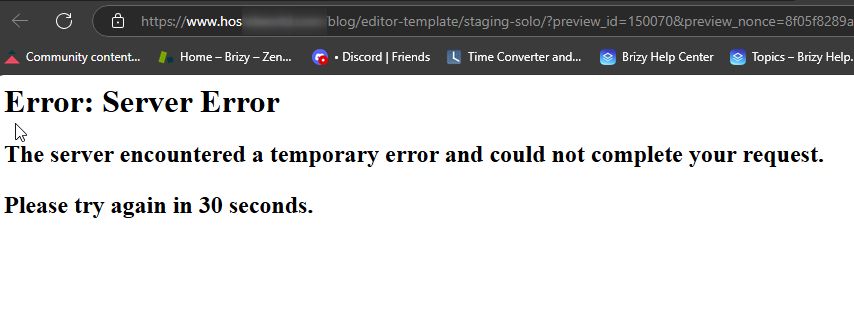
Could you please check this with your hosting provider and see if they can resolve this issue on their end?
Best regards,
Ariel H.0 -
Hi David,
I am following up on the issue you recently reported. Did you reach out to your hosting provider to check on the above issue?
Best regards,
Ariel H.0 -
This is the error im getting when Im trying to upload the template. This was working before
0 -
The page is back when I removed the display rule on the template
0 -
Hi David,
Thanks for letting me know. I'm working with a colleague to figure out what's going on. I'll let you know as soon as I have an update.
Best regards,
Ariel H.0 -
Hi David,
Thank you for your patience.
We created a new page for testing, but it's not appearing in the display conditions, which leads us to believe that Brizy might have limitations in fetching pages. To investigate this further, would it be possible for you to create a staging version of your website? I understand it's a large site, but we want to avoid causing any issues while troubleshooting.
I look forward to your response.
Best regards,
Ariel H.0 -
I deleted that template as I as of now can't access some pages in the backend.
Can you advise what changes you made yesterday as I cannot edit
https://www.hostelworld.com/blog/solo-travel/spain/https://www.hostelworld.com/blog/solo-travel/italy/
https://www.hostelworld.com/blog/solo-travel/thailand/
In the backend now
Struggle to make the brizy templates to load too
Thanks
0 -
Hi David,
Thank you for the update.
We only worked on the template and nothing else. We didn't make much progress because we repeatedly received the error. Today, we only added the page to replicate the issue. If you can create a staging version of your site, we would be happy to check these issues for you.
However, if it's urgent that you need to make some updates on your site, and this issue only occurred on this last update, we can send you the version of Brizy and Brizy Pro that was previously working on your website. Please let us know which versions you were previously using.
Best regards,
Ariel H.0 -
Hi
I received the below from the hosted support
Hello,
Thank you for the update.
I have checked this for you and the problem comes from the Brizy builder that you are using, as per the php_errorlog file:[08-Oct-2024 12:13:54 UTC] PHP Fatal error: Uncaught InvalidArgumentException: Unrecognized readable file type "NULL" in /home/customer/www/hostelworldblog.com/public_html/blog/wp-content/plugins/brizy/vendor/phplrt/source/src/FactoryTrait.php:76
Please try updating the plugin and/or reinstalling it. If you still face issues, you can contact their support as I see this is paid plugin:
https://support.brizy.io/hc/en-us0 -
Hi David,
Thank you for the update.
This issue could be due to a conflict. We can check this as well if you can set up a staging version of your website so we can troubleshoot the issue without affecting your live website.
Best regards,
Ariel H.0 -
I can't set up the staging version of the website just for this. A live website is all we have atm. The backup is completed. Whats the best way to go about it?
0 -
seems to be ok now. One of the pages https://www.hostelworld.com/blog/solo-travel/spain/ was set to "edit with brizy" and this broke all other pages.
The issues ( cannot upload template onto a page" ) still stands0 -
Hi David,
Thank you for the update.
My colleague and I will be working on this tomorrow, as he has already stepped out for the day. Our working hours are from 11:00 to 18:00 EET. I hope you’re available during this time in case any issues arise during troubleshooting, so you can restore your site if needed.
Best regards,
Ariel H.0 -
ok. Let me
know when you are ready to jump in. Thanks
0 -
Hi David,
Thank you for your patience. We were unable to resolve the issue on our end, so we've escalated it to a developer for further review. I’ll keep you updated as soon as we have more information. I apologize for any inconvenience this may have caused.
Best regards,
Ariel H.0 -
ok
0
Please sign in to leave a comment.
Comments
20 comments