Problem with site

-

Hi Celine,
The Wordfence firewall can block requests to your site that match specific patterns. Sometimes WordPress plugins and themes will exhibit behavior that resembles known attack patterns, which may then result in the firewall blocking something that is not actually malicious. This is called a false positive.
To prevent false positives from causing problems with the functionality of your site, the Wordfence firewall has a feature called “Learning Mode”. When Learning Mode is active, Wordfence will add any requests that resemble attack patterns to the allowlist. When a request is added to the allowlist it is considered safe and will not be blocked. Kindly activate the Wordfence plugin and enable the "Learning Mode" following the process below.
In your WordPress Dashboard under WordFence - All Options, scroll down to the heading "Firewall Options" and under the heading "Web Application Firewall status, enable "Learning Mode" and set it to automatically switch back to "Enabled Protecting" mode in 2 days or more; this will allow WordFence to learn that Brizy editing is safe.
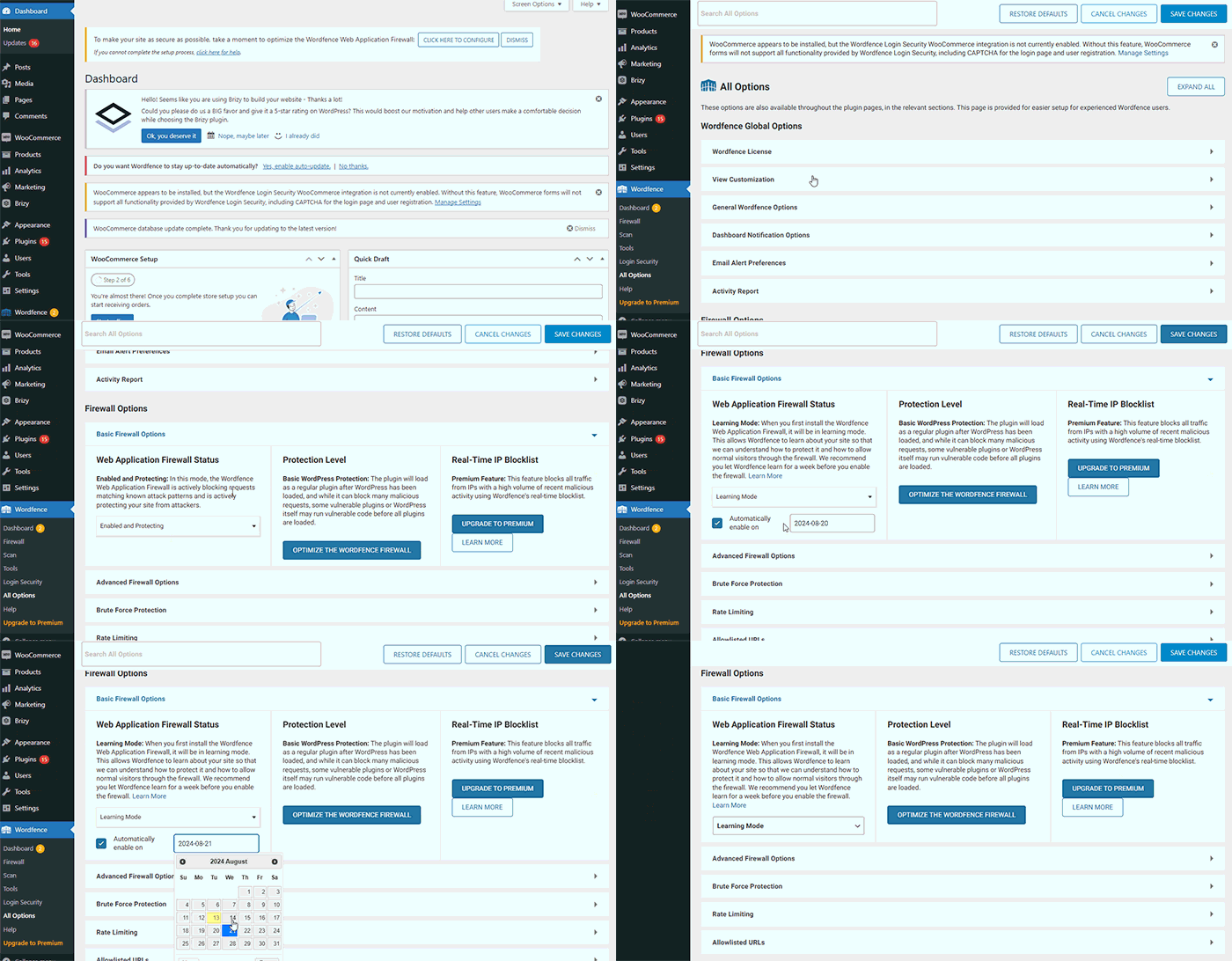
After enabling the "Learning Mode", please check if you are able to edit Brizy pages and save your work.
0
Please sign in to leave a comment.
Comments
1 comment