Header on the site is messed up - URGENT

I am having a lot of issues with the header on multiple sites, but right now specifically on https://stellahomeservices.com/
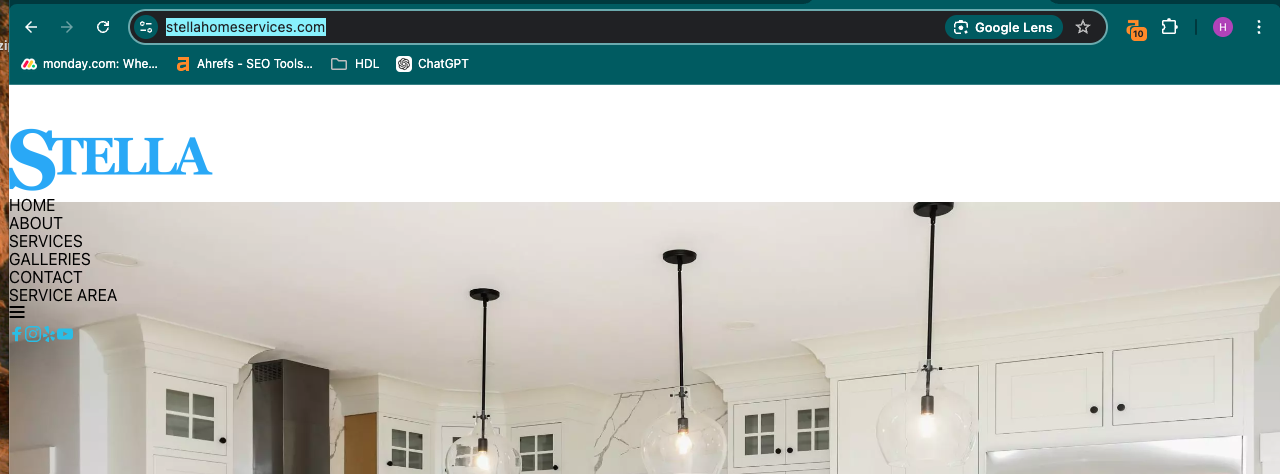
this is what is looks like before I did anything. they I had to go in and remove the header which is a global block and add it again. and it worked. or at least I think it did. but I cannot go and do this on every site and every page because it didnt fix it on every page. other pages still have messed up header. and all of my brizy plugins are up to date
-

Hi Tatsiana,
Thank you for reaching out to us.
There's no need to delete the global headers or blocks with this issue. Simply go to the settings and make a small adjustment, like adding 1 pixel of padding to the global block, then click update to save your changes. This should fix the issue.
Unfortunately, we don’t have a faster solution at this time, and we apologize for any inconvenience this may cause. The latest version requires following this process, as outlined in this article: https://www.brizy.io/new-compiler-200-loading-performance-boost.
It may be a bit inconvenient, but once your entire site is updated, you won’t have to do this again.
Please give it a try, and feel free to reach out if you have any other questions.
Best regards,
Ariel H.0 -
it didnt work. I went in and try changing different things in the header. but it is back on the home page after I thought I was fixed. and I just went in and added padding and saved that and still didn't work globally. it only fixed it on the 2 pages I changed it on. but I did this yesterday as well. this site I have 30 pages that I need to fix plus some posts. doing this every day is not really an option for me.
and I have many other sites that this issue keeps happening to.
0 -
Hi Tatsiana,
I'm sorry to hear you're running into this issue with Brizy. To help us troubleshoot the problem, could you please provide us temporary access to your WP Admin page?
Please add us as an Admin user to your WordPress Dashboard and send the following details to communitysupport@brizy.io:Community Post link: https://support.brizy.io/hc/en-us/community/posts/21697283857426
Username:
Password:Please make a full backup of your site as a precaution.
Best regards,
Ariel H.0 -
Hi Tatsiana,
Thank you for your cooperation.
The issue appears to be caused by caching in WP Rocket. In the settings, we temporarily disabled CSS and JavaScript minification and also purged the cache in WP Optimize. After that, we re-enabled Minify CSS files and Minify JavaScript files, while disabling Optimize CSS delivery. This procedure fixed the broken layouts on several pages, as demonstrated in this screencast: https://youtu.be/d0cRndR_vTI.
Using WP Optimize and WP Rocket together can cause conflicts, as both handle similar tasks like caching and optimization, which may slow down your site or cause issues. It’s best to use just one.
If you have any further questions, please feel free to reply.
Best regards,
Ariel H.0
Please sign in to leave a comment.
Comments
4 comments