Subscription downgrade

Hi,
I no longer run 2 PRO websites from Brizy Cloud, only one has left on this platform.
Is there a way for me to downgrade subscription but still have PRO on this www.techni-scan.com site?
Thanks
0
-

Hello Boris,
Yes; you can downgrade your subscription. Kindly follow the procedure below.
- Sign in to your Brizy account at https://www.brizy.io/account/login
- Navigate to the "Billing" option under "Account" menu
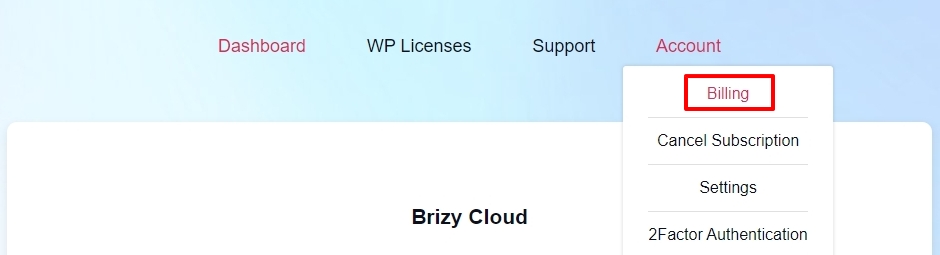
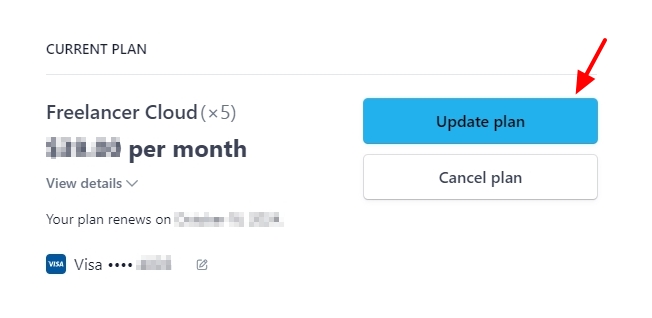
- In the Stripe page that follows, select the "Update Plan" button
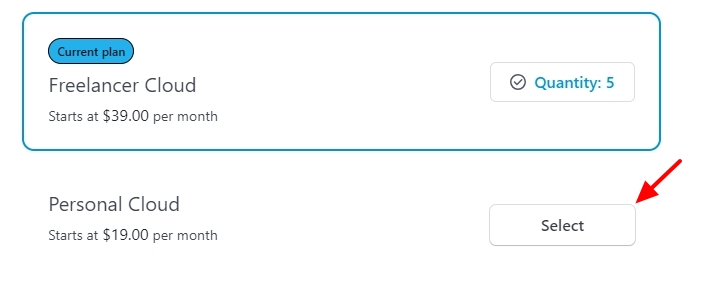
- Select a plan suitable for you. In your case, you could select Personal Cloud plan by clicking on the "Select" button and then set the desired quantity. If you need only a single Pro license, set quantity as 1 and click the "Continue" button at the bottom of the page.
- On the next page, confirm your updates by clicking on the "Confirm" button.
0
Please sign in to leave a comment.
Comments
1 comment