I cannot Update the page

Hi,
I cannot update this page:
https://www.ambulante.com.ar/wp-admin/post.php?action=in-front-editor&post=8107
https://www.ambulante.com.ar/santiago-lena-web/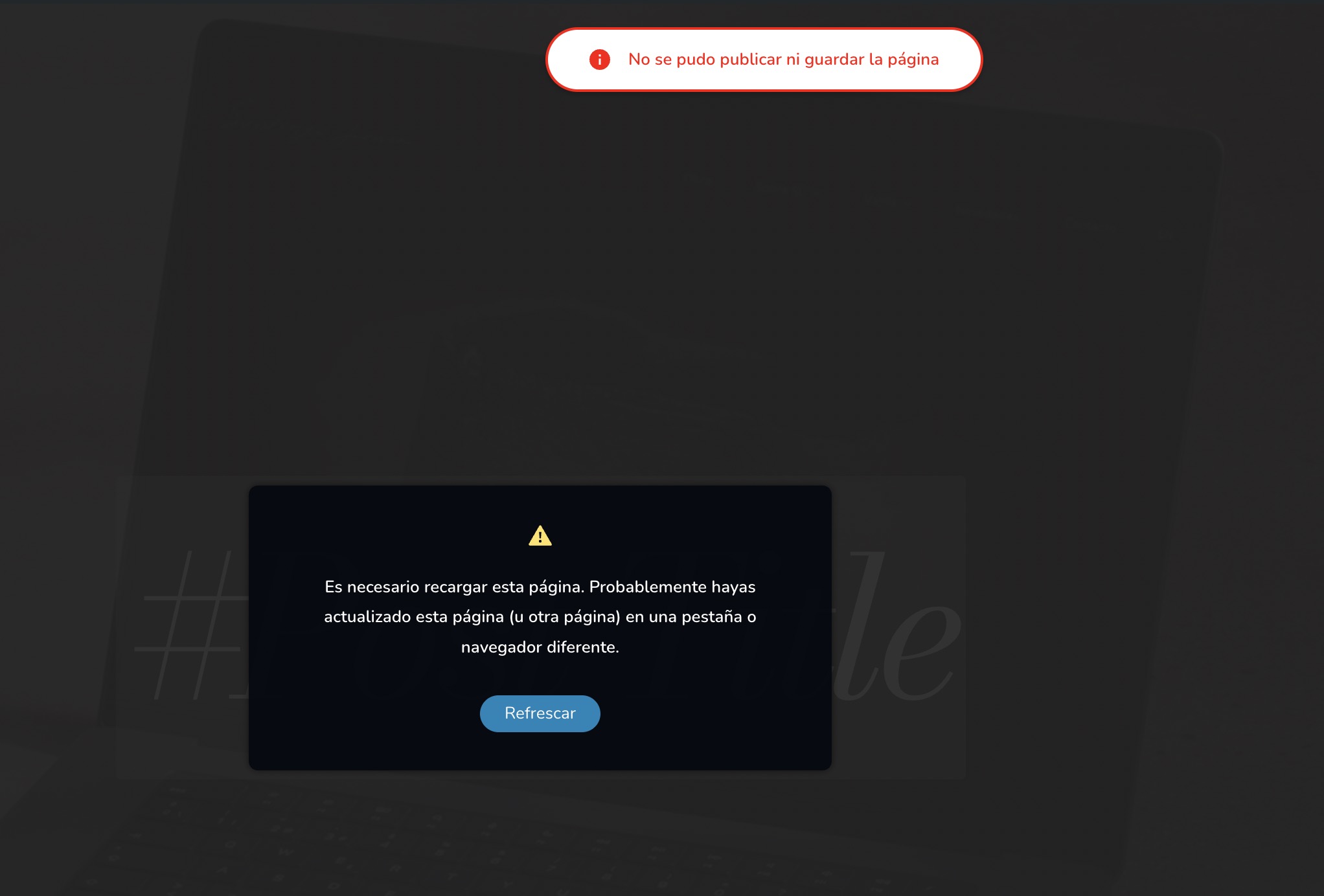
Everything is updated. Can you help me please?
-

Hi Gera,
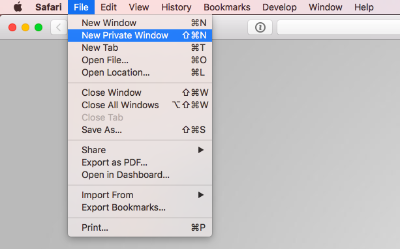
I could not replicate the above error at my end. Have a look at my test at https://jmp.sh/3QEu81jd Kindly sign into your WordPress Dashboard from a new private window of your browser and check if that helps.
 0
0 -
Hi KC! Thank you for the captures.
The problem happens when I change the block of the header. When I move up and click update gives me that error. 0
0 -
Hi Gera,
Kindly follow the procedure in the screen recording at https://jmp.sh/kziwZZZi to add the global header to a page. If this does not address the issue you are facing, kindly get back to us with more details of the issue.
0 -
Hi KC,
Thank you for your pattience. When I try what you say in an example page, it works fine. But when I go to posts comes the error: https://jmp.sh/3YaAjumF
Please let me know if you understand0 -
Hello Gera,
I have fixed the issue on your post page.https://www.ambulante.com.ar/santiago-lena-web/ Please check
0 -
Hi KC, thank you very much for your help. I show you the header I want to put here: https://jmp.sh/LyrlAOrr
Please check. Thank you!
0 -
Hi Gera,
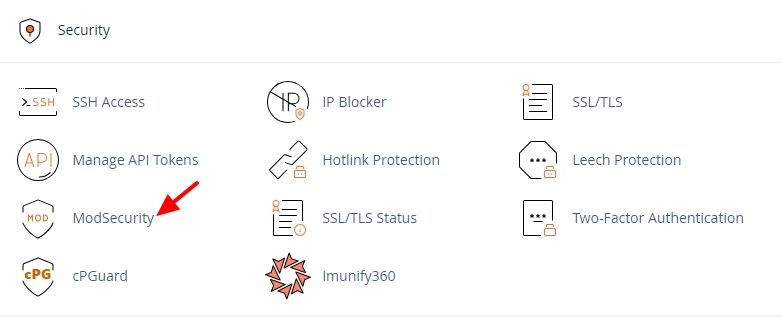
ModSecurity appears interfering with the functioning of your global blocks. Kindly sign into your cPanel and check if you have enabled ModSecurity. Please turn it off temporarily and get back to us. We will continue to work on fixing the issue with the global blocks
 0
0 -
Hi KC,
Now it's ready! Please let me know if you need anything else. Thank you!
0 -
Hi Gera,
Can you please check if the blog posts are displaying well with the correct header? If everything works fine, feel free to enable ModSecurity
0 -
Perfect KC! Now it works like a charm. Thank you for your help!
0 -
HI KC. Sorry to bother you. I'm having the same issue in this website.
there is something I have to change in my hosting service? I thing I will have this problem with every website I make. Can you help me please? Thank you!0 -
Hi Gera,
The recent Brizy versions are being blocked by ModSecurity on Apache webservers. We are looking into how we can resolve this issue. In the interim, kindly rollback to these Brizy versions to edit and save your changes to websites deployed on Apache web servers (like https://test.ambulante.com.ar)
- Brizy 2.4.45 https://jmp.sh/6w60BmCr
- Brizy Pro 2.4.38 https://jmp.sh/eEwWoJGK
Follow the below procedure to roll back.
- Deactivate and delete Brizy Pro
- Deactivate and delete Brizy
- Download Brizy 2.4.45 and in your WordPress Dashboard under Plugins - Add New - Upload Plugin, upload Brizy
- Download Brizy Pro 2.4.38 and under Plugins - Add New - Upload Plugin, upload Brizy Pro
0 -
Now I understand. Brizy is blocked by apache webservers when I create a new Global block.
I realized because I did as you said of installing the old versions and saving. Then I updated the version, everything was working ok until I created a new global block and refreshed the page. So every time I create a new global block I'm going to have to install the old version and do what you said.
I will have in mind this till you resolve this issue.
Thank you for your help and pattience.0 -
Hi Gera,
After you have rolled back to the earlier versions, please do not update Brizy to its most recent versions until we roll out a fix for this problem
0 -
Hi K C!
I have this site that I couldn't fix with your method, can you help me please? Thank you!
link removed0 -
Hi George, could you take a look to this issue? I don't know how to solve it, please help me.
0 -
Hello Gera,
HTTP requests from Brizy 2.5.X series get blocked by ModSecurity software in cPanel. Kindly add these configurations in the ModSecurity configuration file to avoid the block. Please take the help your hosting provider to set these limits.
- SecRequestBodyLimit 4194304 # Limit request bodies to 4 MB
- SecRequestBodyNoFilesLimit 2097152 # Limit non-file request bodies to 2 MB
Additionally set the post_max_size to at least 2MB following the process outlined at https://jmp.sh/mwKumdG6 and check if you are able to update Brizy pages.
0 -
Hi George, I spoke with the hosting provider they made the modification but I still cannot see the blocks, please help me with these, I don't know what else I can do
0 -
Hi Gera,
When you say "I still cannot see the blocks" what do you mean? Can you elaborate?
I tried updating two of your pages and I could. Kindly see my test at https://jmp.sh/7FVHbcL3
0 -
Hi, here is the problem:
https://jumpshare.com/v/eGq4QIUxJCmJnxOnp0Lg0 -
Hello Gera,
We have fixed the issue with the missing map block and the on-click popups in the hero section of your homepage. Please check if everything works as expected.
0 -
Everything works like expected. Thank you very much
0
Please sign in to leave a comment.
Comments
22 comments