Question about a Menu

I want to create something like in the Picture attached, where you can filter the options. Is this possible?
-

Hi Andre,
Can you provide more context for your question so that we can better comprehend it?
- Are you creating a website that sells products?
- Do you wish to filter products based on various criteria?
- Can you provide the URL of a reference website where we can observe this functionality?
0 -
Hi Geoge,
of course, I will answer to your points down below:
- Iam a Real Estate Website
- the Products need to be filtered on the criteria, yes :)
- reference Website would be: Real Estate Brokers in Dubai | White & Co Real Estate | White and Co Real Estate (whiteandcogroup.com)
0 -
Hi Andre,
Brizy Cloud may not be suitable for listing hundreds or thousands of properties like in your reference website. You will need a hosting service which can scale up as the business grows, as the database will gets bigger with more and more properties. Brizy Cloud also does not have the search feature to search properties according to locations, number of bed rooms, bathrooms, price range etc.
Kindly consider developing the above website using WordPress and a directory plugin. You could have a look at https://www.hostinger.in/tutorials/wordpress-directory-plugins for a list of plugins you can consider
0 -
Thanks a lot for the Help!
I have two more questions left if it is okay.
- First one would be alligning two pictures in one frame. I also attach an Image to that :)

- second would be the contact form. Is it possible to customize it like that ?
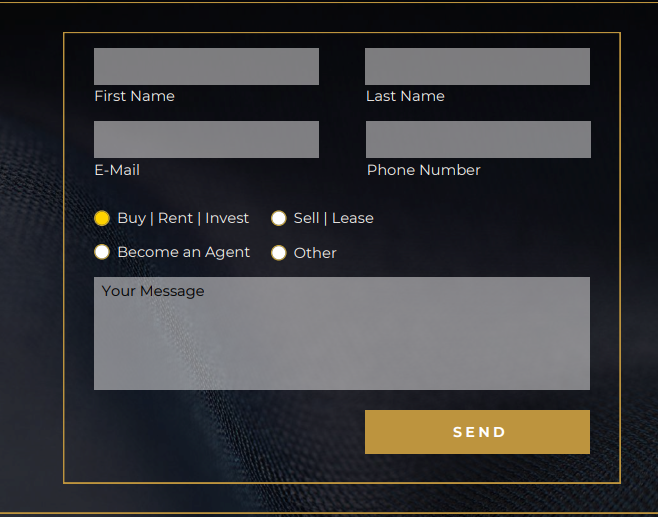
Thanks a lot in advance :)
0 - First one would be alligning two pictures in one frame. I also attach an Image to that :)
-

Hi Andre,
Thank you for the update.
I’ve created an example for you at this link: https://youtu.be/GgIi875SeGo
For the first example, you’ll need to create a column with a background image. Use the spacer element to add a gap at the top of the second image. Then, use the image element and select the second image. To position it towards the right, apply a negative right margin.
For the form, you can set the field width to 50%, so the fields align side by side.
If you have any further questions, please let us know.
Best regards,
Ariel H.0 -
Hi Ariel,
thanks a lot that helped! :)
0
Please sign in to leave a comment.
Comments
6 comments