E-Mails landing in Spam

Hi, my emails from gelem-werkt.de land in the spam folder. What can I do, what is the reason?
-

Hi Nasir,
The "Subject" field was left blank in the email notification settings. Mail clients are prone to flag emails without a subject as SPAM.
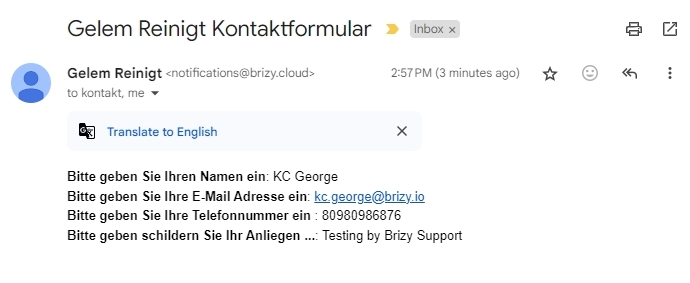
I added a "Subject" field and tested the form. I got an email notification in my inbox. Please check to see whether you have received it in your inbox.
 0
0 -
No, I think I did not describe the problem properly. When I send an email through the native email programm, then this email will land in spam. kontakt@gelem-werkt.de -> Spam
0 -
Hi Nasir,
I did understand your question. One of the possible reasons why the email landed in the SPAM folder was that the subject line was missing. To fix that issue, I have added a subject line.
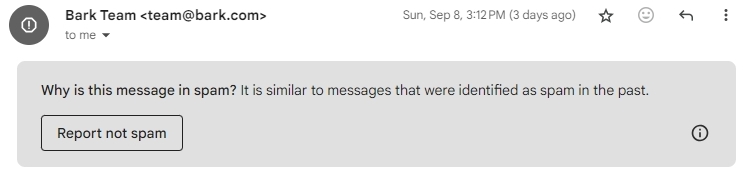
If the above email also landed in the SPAM folder, kindly try to whitelist the email address notifications@brizy.cloud in your mail server. Please also check if the mail client allows you to set the sender as not spam
 0
0 -
Ahhh perfect, it works now! Thank you, can I do this also on my own?
0 -
Hi Nasir,
I'm sorry, I could not understand your question. When you say "can I do this also on my own" do you mean whitelisting, setting the sender as not spam, adding a subject line, or something else?
0 -
This part here:
The "Subject" field was left blank in the email notification settings. Mail clients are prone to flag emails without a subject as SPAM.
I added a "Subject" field and tested the form.
How can I do this on my own?
0 -
Hello Nasir,
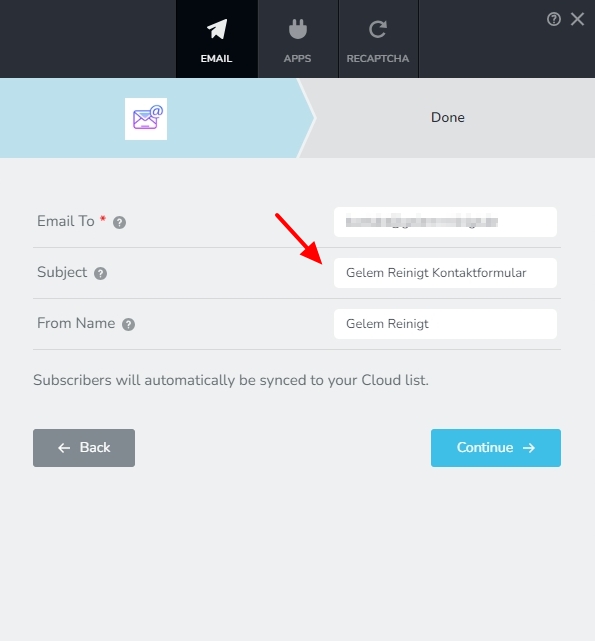
The Subject field in the Email Notification settings was not filled up. I filled it up.
 0
0 -
Ahhh! Perfect, thank you so much!!
0
Please sign in to leave a comment.
Comments
8 comments