Page will not scroll after loading

Hi, can you give us a hand please, I have tried to follow the link on similar post but I can not for the life of me work out why the page on this site will not scroll once fully loaded.
https://ad*******dding.co.uk/
Thanks
Dan
-

Hi Dan,
It sounds like the issue you're experiencing may be related to embedded custom code on your page. If the script tags in your custom code are not properly closed, it can prevent the page from loading correctly.
Please check the custom code for any unclosed script tags or other errors. If you find any, correct them and see if that resolves the issue. Additionally, ensure that there are no other syntax errors in your code that could be affecting the page load.
If the problem persists after checking the code, please let me know, and we can look into other potential causes.
Best regards,
Ariel H.0 -
Hi mate, I have checked what I can and can not find anything, I am not that good at this. I have checked my other clients sites and found a few where the header, footer or sliders are not showing on the main site but they do in the editor, Its strange as these site have not had any work done on them but this is the same as sites that don't show any problems? weird.
https://c*****bbt.co.uk/
https://fort******n.co.uk/
https://a******ding.co.uk/
Thanks
Dan
0 -
Hi Dan,
Please try making minor modifications to your global blocks, such as adding some 1-pixel padding, and then save your changes by clicking the "Update" button. After doing so, please preview the page to see if this resolves the issue. You can revert your changes after doing this.
Otherwise, please provide us with temporary access to your WP Admin credentials for the three websites so we can check them. Kindly add us as an Admin user to your WordPress Dashboard and send the following details to communitysupport@brizy.io:
* Community Post link: https://support.brizy.io/hc/en-us/community/posts/21281497557394
* WordPress Admin URL:
* Username:
* Password:Please make a full backup of your site as a precaution.
Best regards,
Ariel H.0 -
Hiya, so I have worked two of the sites out, I had to delete the display conditions on the header and foot and then re-do them and that has worked, WordPress hey, I don't know how you keep your cool working on it Lol. I have sent the details of the one I can not work out, Thanks for your help.
Dan
0 -
Hi Dan,
Thank you for the update. We attempted to uninstall and reinstall Brizy and Brizy Pro, however, we are unable to upload due to some server limitations.
In cPanel, could you please update the following:
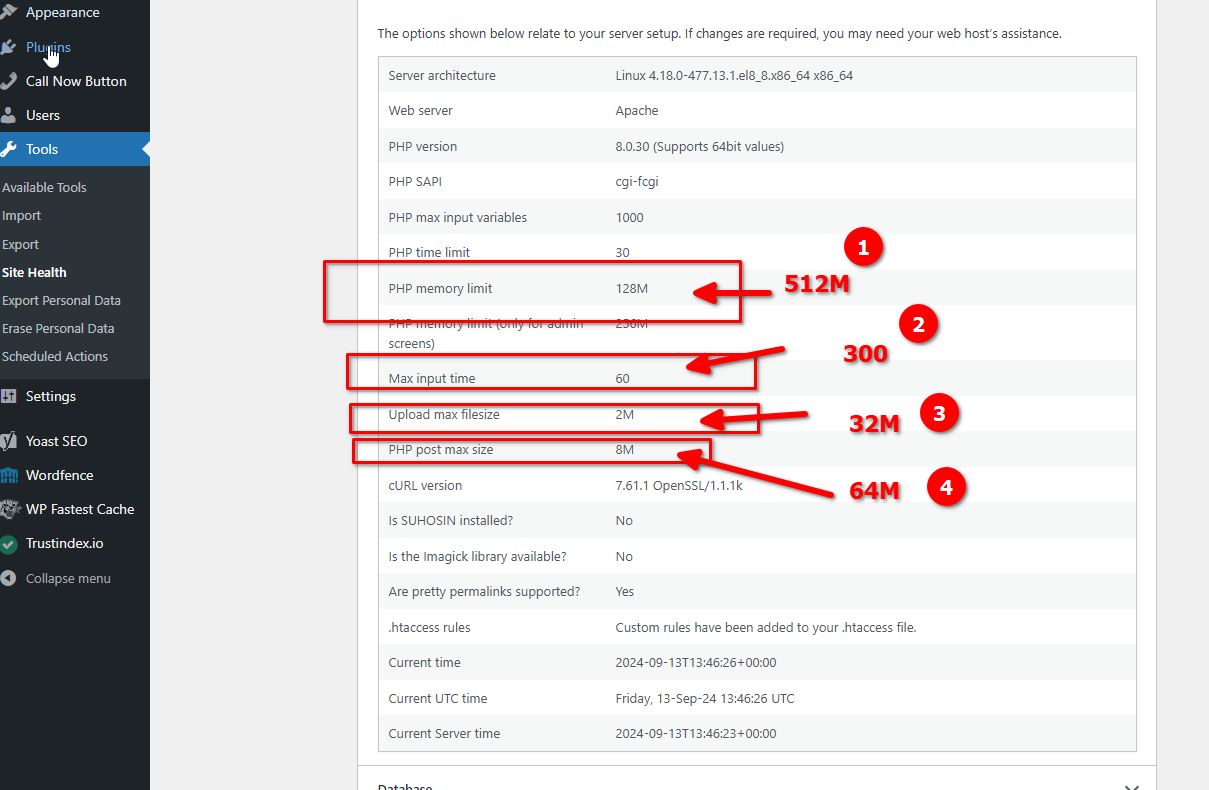
You can find these options under "Select PHP Version > Options."
Otherwise, please also provide us with temporary access to your cPanel so we can make the above changes from our end.
Best regards,
Ariel H.0 -
Hi Dan,
I'm following up on my previous request. Could you please provide us with temporary access to your cPanel? Please send the credentials to communitysupport@brizy.io.
Best regards,
Ariel H.0 -
Hi Dan,
Sorry for the delay. It looks like the cPanel credentials have already expired.
Could you please update to Brizy 2.5.4 and Brizy Pro 2.5.2 and see if this resolves the issue?
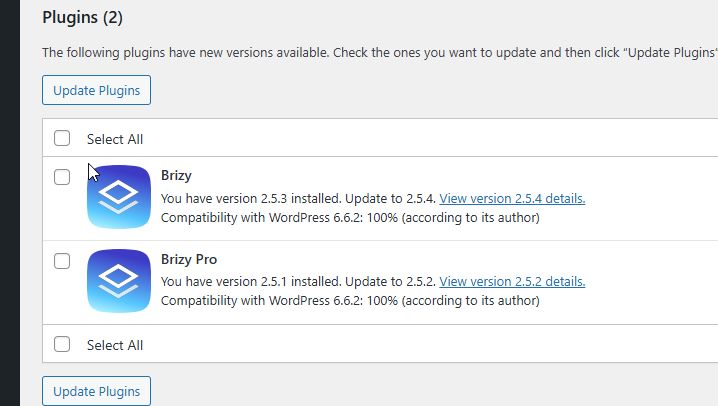
If not, please resend the cPanel credentials.
I look forward to your response.
Best regards,
Ariel H.0 -
Sorry for the delay, all set up again. Thanks Dan
0 -

I am having the same issue on a very simple site with no custom script or additional plugins. Would love to know the fix asap. Thanks!
0 -
Hi Clyde,
Thank you reaching out to us.
Could you also please try using another theme and see if you get the same result?
If the issue continues, this is something we need to inspect from your WP Admin page. Please add us as an Admin user to your WordPress Dashboard and send the following details to: communitysupport@brizy.io
Community Post link: https://support.brizy.io/hc/en-us/community/posts/21281497557394
WordPress Admin URL:
Username:
Password:
Also, kindly include some screenshots to demonstrate the issue.Please make a full backup of your site as a precaution.
Best regards,
Ariel H.0 -
That worked!
0 -
I have tried the same but did not work for me, I have just had it on another site too and I think it has something to do with the Brizy update.
I don't know how to roll it back!
So I am going into hospital tomorrow for a big operation and will be in for a few weeks. If you don't mind looking in to it for me while I am in. I will be able to get my emails but will not be able to do much work on the sites for a few days.
Thanks so much for your time, I will email you the details on the community support email.
Thanks
Dan
0 -
Hi Dan,
Wishing you all the best for your operation tomorrow! I hope it goes smoothly, and your recovery is swift.
To ensure we can assist you while you're away, please double-check that we have full access to your cPanel. We've recently received the invite and created a password, unfortunately we still couldn't log in.
Best regards,
Ariel H.0 -
Hi Dan,
I hope everything went well with your operation, and I wish you a smooth and speedy recovery!
We received the WHM credentials you provided, but unfortunately, we’re still unable to log in. It seems likely that WHM access may be restricted to the UK, which could be why we’re unable to connect.
Could you kindly check if there are any location-based restrictions on WHM/cPanel access or provide a workaround?
In the meantime, I’ve set up a testing environment, copied your site, and everything appears to be working properly - https://imgur.com/TPRBfCj
I suspect the issue might be due to some limitations in your server settings, or we may need to uninstall and reinstall Brizy Pro.
Best regards,
Ariel H.0 -
Hi mate, I am back in the game now, a little sore but back at my desk, I went onto the server and deleted pro and then reinstalled it but that did not work, I have just had this from the hosting company about you logging onto the server.
As check can see that there is no country block on the server firewall
Please provide us the your friend local machine IPv4 address with browsing below link to allow WHM access on the server.
We will also check if your friend IP is block for some reason on server.
Awaiting your response
0 -
Hi Dan,
Thank you for the update. I'm glad that you're back in the game! Here is my IP address: 136.158.11.132.
0 -
Hi mate, I have sent them your IP and its not blocked, they said could you try a vpn with the link to my WHM that I gave you, They have said they are in India and it works there OK. Strange one this Lol Cheers Dan
0 -
Hi Dan,
Thank you for the update.
Could you please review the credentials and send them again? I copied them exactly as they appear in your email, but they are not working.
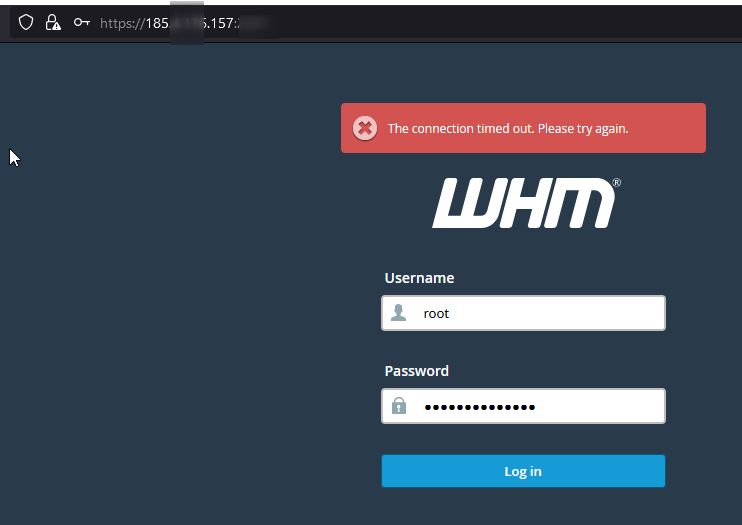
I look forward to your response.
Best regards,
Ariel H.0 -
Hiya mate, technoligy lol its a pain. I have deleted the brizy pro from the server and then downloaded it from your site and installed it again but no joy, I hope you have better luck but you know what you are doing.
Thanks
Dan
0 -
Hi Dan,
Thank you for your cooperation. Everything seems to be working fine now - https://youtu.be/Xl5OfKQFtmg
Upon checking, the issue stems from WordFence Extended Protection. We needed to uninstall all the files it added to the root directory of your website. WordFence had also added some directives to the .htaccess file that were causing this issue. We recreated the .htaccess files to their default settings (see: https://wordpress.stackexchange.com/questions/45898/default-htaccess-file-for-wordpress).
Please check the website to confirm that everything is working correctly.
Best regards,
Ariel H.0 -
Thanks mate, you are a life saver...... Thanks so much for your help and all the time you have spent on this. It speaks volumes for how good the brand and team are.
Thanks
Dan
0
Please sign in to leave a comment.
Comments
21 comments