Website button links not working when creating new template project

Hello,
We created a new template for our students. When using the templates, the buttons inside the template get disconnected. We suspect this could be a glitch. You can check the links below to check. We want the links to the page intact when we create a new project based on this template.
Main template link:
https://www.corporaterentalpro.com/
A template copy example:
https://apricot21363716.proxbnb.com/
Let me know how we can make the button links stay after users copy the template
-

Hi Taylor,
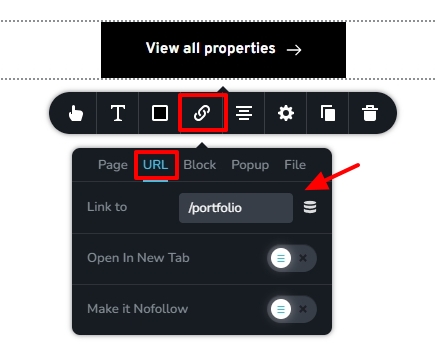
To make the hyperlinks portable when importing to a different account, kindly use the URL tab of the Link tool and paste the page slug as shown in the attached image. I have implemented this change in the homepage of https://www.corporaterentalpro.com/. Please clone the project and check if all buttons hyperlink correctly to the respective pages.
 0
0
Please sign in to leave a comment.
Comments
1 comment