Menu issues

I am having issues with the menu. When I add a new page to the menu, it's showing in the editor but not on the published website. I made sure it was published, too.
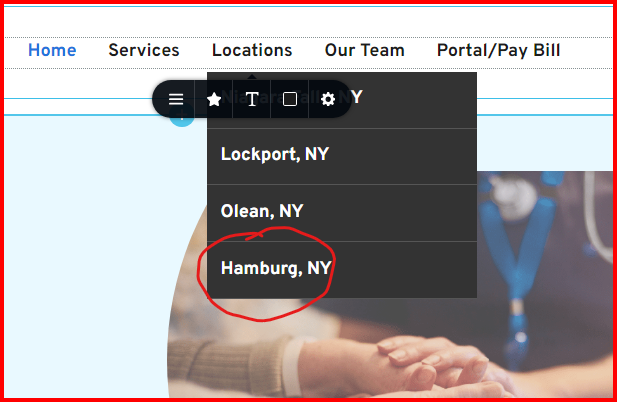
Hamburg, NY is not showing on the published website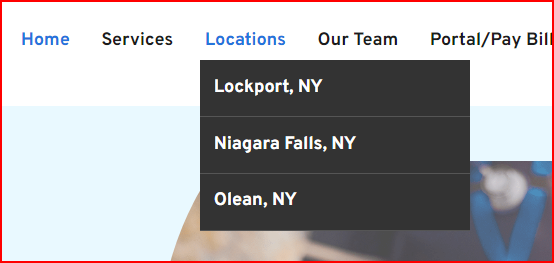
-

Hello Gina,
Kindly make a minor change to the header block (like increasing the padding by 1 pixel), reverse the change, save your work by clicking on the "Update" button on the bottom right corner and check if the issue resolves.
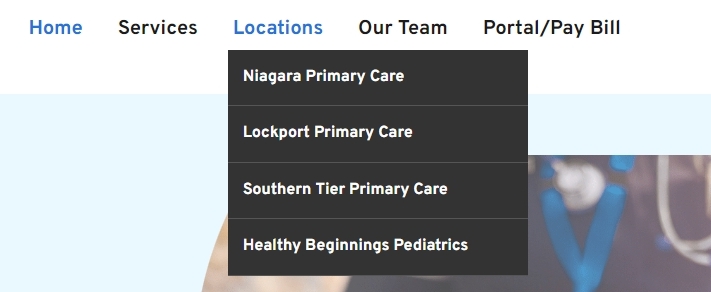
I see a completely different sub menu under Locations menu when visiting your website.
 0
0 -

I am having this problem as well.
0 -

Hi Glenn,
Thank you for contacting us.
Could you please try deleting the menu element, hitting the update button, reloading the page, adding the menu element back, and then selecting your website menu again? After that, hit update again and preview your site to see if this resolves the issue.
Please let me know how it goes.
Best regards,
Ariel H.0 -

I have the same issue and modifying a setting in the menu, updating it and reversing the modification made the menu reappeared. Clearly a bug...
0
Please sign in to leave a comment.
Comments
4 comments