Menu Item added does not show up

Hi,
I have added a page to our main menu but it does not show up on the front end. If I am editing the page with Brizy, I can see the menu item in the header, but again, it does not show up on the front end.
WordPress version 6.6.1
Brisy version 2.5.3
Brizy Pro version 2.5.1
The page is "Why SDS RiskAssist" and it is under the menu "Company"
The website is sdsriskassist.ca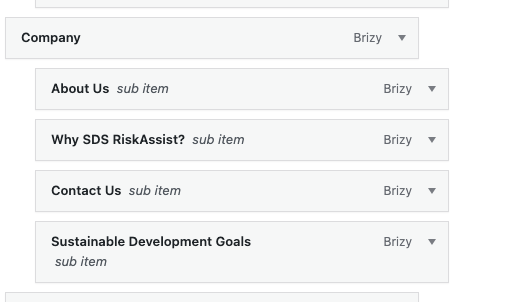

-

Hi Glenn,
Thank you for contacting us.
Could you please replicate the issue with all plugins disabled except for Brizy and Brizy Pro?
It also appears that you are currently using WP Rocket to optimize your website. Could you please try clearing the cache and see if this helps fix the issue? - https://wpengine.com/resources/clear-cache/
Please try this and let me know the outcome.
Best regards,
Ariel H.0 -
Hi,
I have a staging site replica of the main site and have done this. Same effect.
At one point in the debugging process, I disabled WP-Rocket altogether. And I have tried clearing WP-Rocket cache and our CDN cache.
If however, we do the opposite and disable Brizy and Brizy Pro, the menu item shows up.
There is another thing going on though. If I have over the menu section, it will flash the sub-menu but it will not stay there.
I can give you access to the staging site if you like.0 -
Hi Glenn,
Thank you for the update.
Could you please provide us with temporary access to your staging site where the issue can be replicated? Please send the credentials to communitysupport@brizy.io and include this reference number in the subject line of your email: 21137297424914.
Best regards,
Ariel H.0 -
Hi,
I just sent that to you now.
Thank you very much!
Glenn0 -
Hi Glenn,
Thank you for your cooperation.
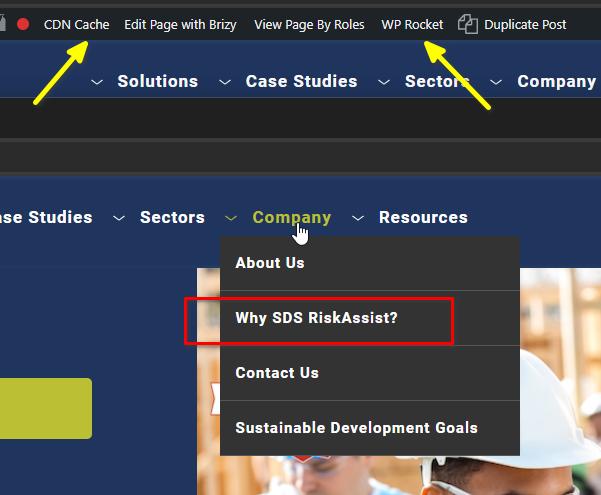
We were able to resolve the issue by making minor adjustments, such as adding some padding, clicking the update button, and then reverting the changes. After that, we purged both the CDN and WP Rocket caches.
If you have any further questions, please let us know.Best regards,
Ariel H.0 -
Thank you, Ariel. Based on your information, I did the same thing for the live site and that resolved the problem.
Appreciate the support!0
Please sign in to leave a comment.
Comments
6 comments