Brizy WP plugin / urls broken

Hello,
We've been having problems with the WP plugin since we cloned the project on a local development instance, and set up a preproduction.
It's currently impossible for us to have clean links on the prod environment, despite the use of WP CLI search-replace, despite the use of Brizy's url replacement system via the admin UI.
Can you please help?
url of the site in question https://home-expo.lu
Thanks in advance.
All the best,
-

Hi Marcom,
Thank you for contacting us.
Please try the following to help address the issue:
1. Ensure that the Home and Site URL match, if you have SSL, please ensure that the URL use HTTPS.
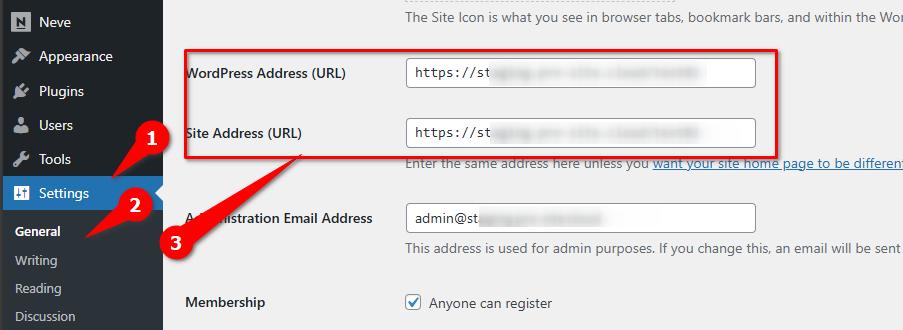
2. After this reset the Permalinks, to help solve link errors on your website.
This is better explained on this article:
https://muffingroup.com/blog/remove-category-from-wordpress-url/3. If the issue persist, also try using the URL replacement tool by entering staging site's URL and the new domain or new URL and hit the Replace URL button. Before using this tool, please make a full backup of your site.
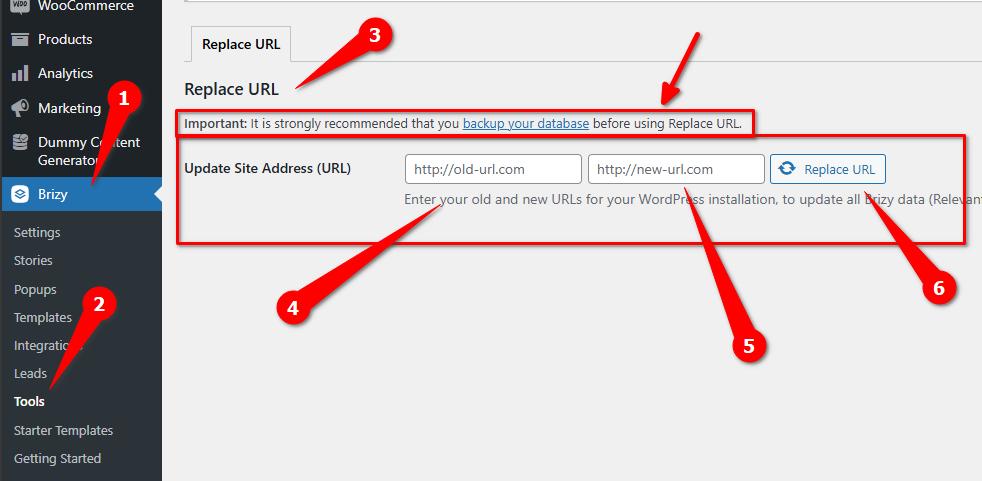
You may need to flush the Permalinks again after using the Replace URL tool.Please try this and let me know how it goes.
Best regards,
Ariel H.0 -
Hi Ariel,
Just for information, this issue has been resolved thanks to a dedicated ticket to the support team.
The issue was link to old compiled HTML that was generated on staging site.To solve this, after migrating your site , you had not recompiled the global blocks due to which it was using the old compiled HTML that was generated on staging site. To recompile the global blocks again , you simply need to re save the display conditions and then update the page.
Hope it helps someone else.
Best,0
Please sign in to leave a comment.
Comments
2 comments