Pop-ups not working in Brizy Cloud project

Hi, I want to show a pop-up when visitors get to my site. I've tried editing an existing pop-up with no luck, so I tried making a new one, no luck either.
I get this message:

I've cleared the cache memory on Chrome, Firefox and Safari, and I still can't get pop-ups to work.
My project:
https://admin.brizy.io/projects/4879425/
Thanks in advance!!!
-

Hi Erika,
I could not access your project with the project URL you have shared above. Kindly share these details of your project and we will take a look.
- Workspace
- Project Name
- Preview URL
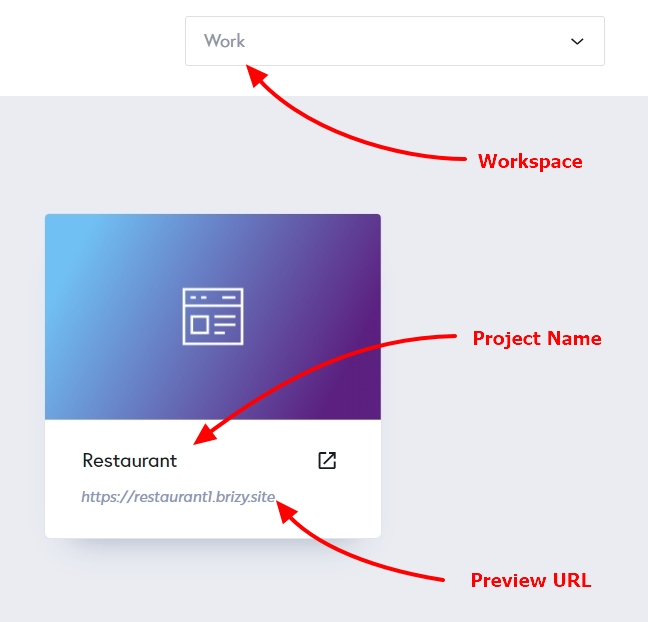 0
0 -
Hi K C,
Here's the info you asked me for:
- My Personal Projects
- INTERACTIVE SPANISH LEARNING
- https://pomegranate4879425.brizy.site
Thank you for your help!
0 -
Hello Erika,
Projects that were created before February 2021 uses the Brizy Cloud legacy project format. The above project was developed using the Brizy Cloud legacy project format. Popups do not work well in legacy projects. However, if you recreate the project in the current project format, the popup will work well. I have created a new project by the name "Interactive Spanish Copy" and have recreated two pages.
Kindly follow these steps to complete the process
- Recreate the menu in the new project
- Design a new popup in the above project
- Ensure everything looks exactly same in both websites
- Publish the project
- Connect your custom domain to the newly created website
0 -
Will do! Thanks K C!
0
Please sign in to leave a comment.
Comments
4 comments