All links linking to staging site after full deploy

Need some assistance, please. I created a new site in a staging environment and deployed it successfully. All pages and buttons with page links on the production website of this first site have worked fine.
Then, I created a second site. After deploying the second site from staging environment, and performing a full deployment to the production site, it immediately broke all links on the production site. All links on the production site now point to the staging site links (staging site pages) and not the live production site.
Our hosting company was able to identify the issue is with the Brizy page builder plug-in. What can we do?
Current Build: WordPress 6.6.1, Brizy 2.5.3, Brizy Pro 2.5.1
-

Hi Charmaine,
Thank you for contacting us.
Please try the following steps to resolve the issue:
1. Ensure that your Home and Site URLs match. If you have SSL enabled, make sure the URL uses HTTPS.
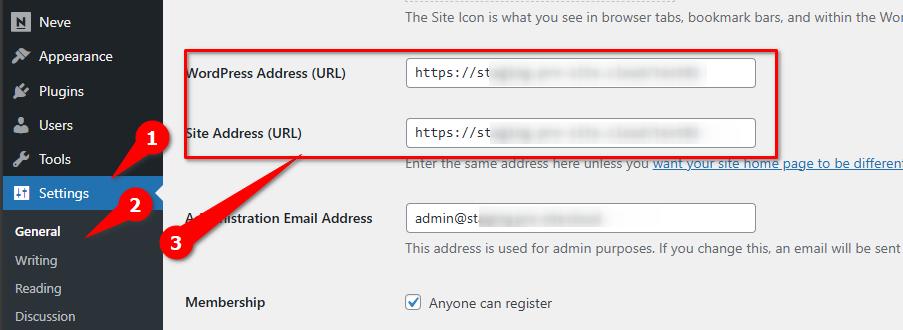
2. After confirming the URLs, reset the Permalinks to help address any link errors on your website. This process is explained in detail in this article: https://wpastra.com/docs/how-to-refresh-wordpress-permalinks
3. If the issue persists, try using the URL replacement tool by entering your staging site's URL and the new domain or the new URL and clicking the Replace URL button. Before using this tool, please create a complete backup of your site.
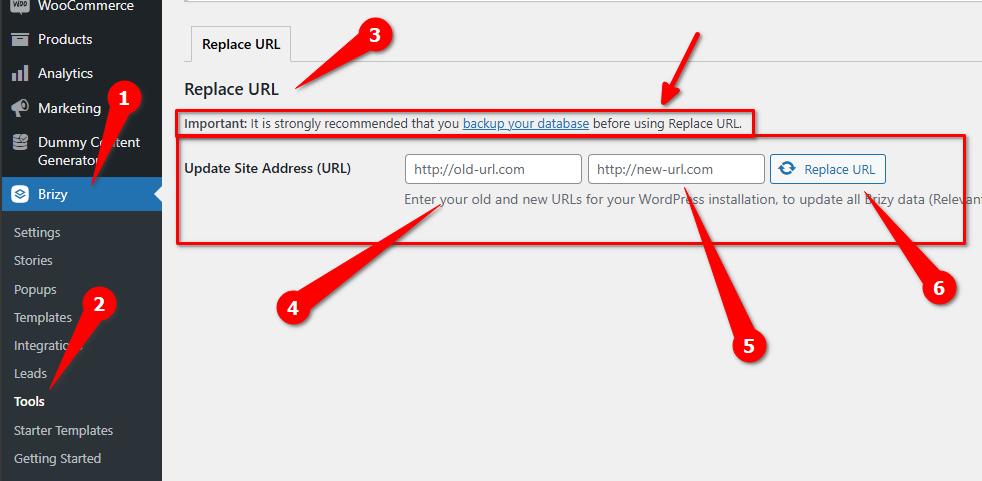
You may need to flush the permalinks again after using the Replace URL tool.
Please try these steps and let me know the outcome.
Best regards,
Ariel H.-1 -
It didn't work.
Forms are still redirect to staging website.
SiteGround is saying this:
----SiteGround Message 1----
I managed to resolve the issue by accessing the page by Brizy builder and setting up the link in the following settings to Auto:
https://imgur.com/a/eqy8Agc
Please clear your browser's cache and cookies or use another browser/incognito if you still don't see the change on your end.
If you have any other questions, you are more than welcome to contact us by making a new inquiry through the Help Center.
---- SiteGround Message 2---
Hello,
Thank you for the update.
It seems that the builder that you are using is not properly compatible with our staging tool, as it probably stores fixed URLs in its settings, while our staging works in a different day. I would advice you to refrain from publishing the staging website again, as this will mess things up.
That being said, I would recommend you to manually revise all forms and menus created with this builder, in order to make sure that they are using your primary domain name or the "automatic" selection as my colleague did, you should check which option works best.
If you have further questions, you are more than welcome to contact us by opening a ticket.
--- End of SiteGround Messages----
However that doesn't make any sense because I have another website built with Brizy on SiteGround and we don't have the issue. Is the builder not compatible with SiteGround Staging tool?0 -
Hi Charmaine,
Thank you for the update.
Unfortunately, I haven't tried using SiteGround Staging Tool, so I can't confirm its compatibility. However, if the website is functional in the staging environment, there may be an issue during migration. I recommend using plugins such as All-in-One WP Migration and WPvivid Backup & Migration, which I have tested and found to work effectively for migrating websites.
If you have any further questions, please let us know.
Best regards,
Ariel H.0 -
I'm not migrating the website.
I have a website build it staging and I am trying to deploy it.
Are you saying instead of doing a full deploy from staging to do a migration from staging to live site?0 -
Hi Charmaine,
You might want to consider using Auto Migration with WP Vivid: https://docs.wpvivid.com/wpvivid-backup-pro-auto-migration.html
Alternatively, you can use WP All in One Migration: https://youtu.be/tIurrwfsCOg?si=1N-rPAV8gfF9LOz0
Both plugins allow you to keep your staging site and functionality intact.
Best regards,
Ariel H.1 -
Hi there, Thank you so much. I am still not clear on the instructions.
Are you saying do not do a full deploy from staging site?
And instead, use one of these plugins to do a migration from staging to live site as a workaround?0 -
Hi Charmaine,
Yes, I suggest using the plugins mentioned above to migrate your site from your staging environment to your live site.
Best regards,
Ariel H.0
Please sign in to leave a comment.
Comments
7 comments