Edit with brizy taking too much load not open page

I am trying to edit my page with brizy but it is only loading from 1 hour not open a editing page.
WordPress Version: 6.6.1
Brizy version: 2.5.3
Brizy Pro Version: 2.5.1
-

Hi Tony,
Thank you for contacting us.
1. Please check if you can replicate the issue with all other third-party plugins disabled (except for Brizy and Brizy Pro). If this resolves the issue, one or more plugins on your website could be causing it. To find the conflicting plugin, gradually re-enable the other plugins one by one, testing the page after each activation until the issue reappears. This process will help you identify the problematic plugin.
2. This issue could also arise from a conflict with your current theme. Try switching to another theme and see if it resolves the problem.
3. We also have observed this issue on websites using WordFence. Try setting it to Learning Mode and see if it helps.
To set WordFence to Learning Mode:
a. Go to the Firewall section within the WordFence plugin settings.
b. Enable Learning Mode and configure it to automatically switch back to "Enabled Protecting" after two days. This allows WordFence to learn the actions from the Brizy editor.
c. Save your WordFence changes.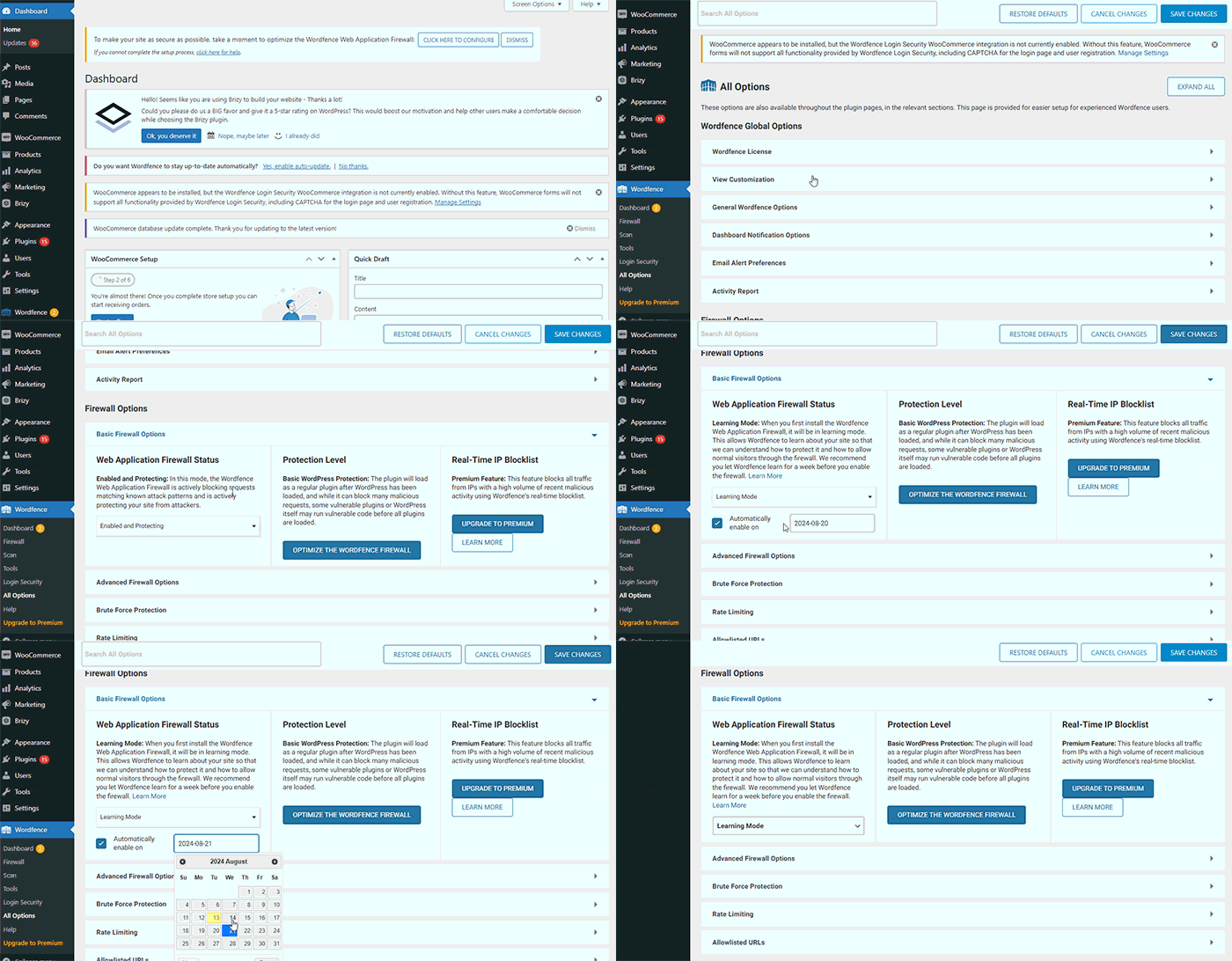
4. If you don't have WordFence, check if you have access to disable Firewall/ModSecurity in your hosting panel, as this might resolve the issue.
5. If this issue occurs only on specific pages, it could be due to excessive page revisions.

I recommend trying the steps outlined in this link to see if it resolves the issue: https://www.elegantthemes.com/blog/wordpress/how-to-manage-wordpress-revisions-to-optimize-site-performance.The article offers a manual method of limiting page revisions using PHPMyAdmin, or you can opt for the more user-friendly WP Optimize plugin.
6. This issue could also occur due to insufficient memory and other server settings, please try to update the following:
a. Memory Limit should be at least 256M or higher for optimal performance.
b. Maximum Execution Time should be at least 300.
c. Max Input Variables should be 300.
d. Post Max Size should be 128M.
e. Upload Max File Size should be 32M.Kindly refer to this link for assistance with these settings: https://www.a2hosting.com/kb/installable-applications/optimization-and-configuration.
Otherwise, please contact your hosting provider for assistance.Please try these steps and let us know if they help address the issue.
Best regards,
Ariel H.0
Please sign in to leave a comment.
Comments
1 comment