Very slow page rendering.

The pages compile very slowly. For some of them, the loading time is 19 to 25 seconds.
Something seems to be wrong with your new rendering engine. I would appreciate any help with this issue.
--
BR
KAzik
-

Hi Kazik,
Are you referring the website performance of https://pttk.dinst.pl/v1/? I checked your homepage performance. A few observations
- Total Page Size is 15.3MB. This is comparatively a very big size for a webpage
- TTFB (Time To First Byte) is 4.0 seconds. This is relatively high
- You are using 5 images on your homepage which are more than 1 MB in size. Kindly use a service like https://tinypng.com/ to reduce its size to few hundred KBs
- https://pttk.dinst.pl/v1/wp-content/uploads/2023/01/Walenty-Krzysiek-25.jpg - 1.71 MB
- https://pttk.dinst.pl/v1/wp-content/uploads/2023/01/1AlicjaDabrowska_Karkonosze_2013.jpg - 1.48 MB
- https://pttk.dinst.pl/v1/wp-content/uploads/2023/01/Jadwiga-Lozinska-Droga-do-kompleksu-Wlodarz-2018.jpg - 2.1 MB
- https://pttk.dinst.pl/v1/wp-content/uploads/2023/01/Wieslawa-Standzon-Skansen-w-Sanoku-2017-r.jpg 1.63 MB
- https://pttk.dinst.pl/v1/wp-content/uploads/2023/01/Wieslawa-Standzon-Chojnik-2018-r.jpg 1.76 MB
0 -
The loading issue does not concern pages with images. Please check this link: https://pttk.dinst.pl/v1/informacje-kryzysowe/. The page load time is 18.5 seconds. Please check other links as well. I am aware of the issues with image sizes, but unfortunately, the person updating the site cannot seem to learn that images should be optimized for the web.
--
K0 -
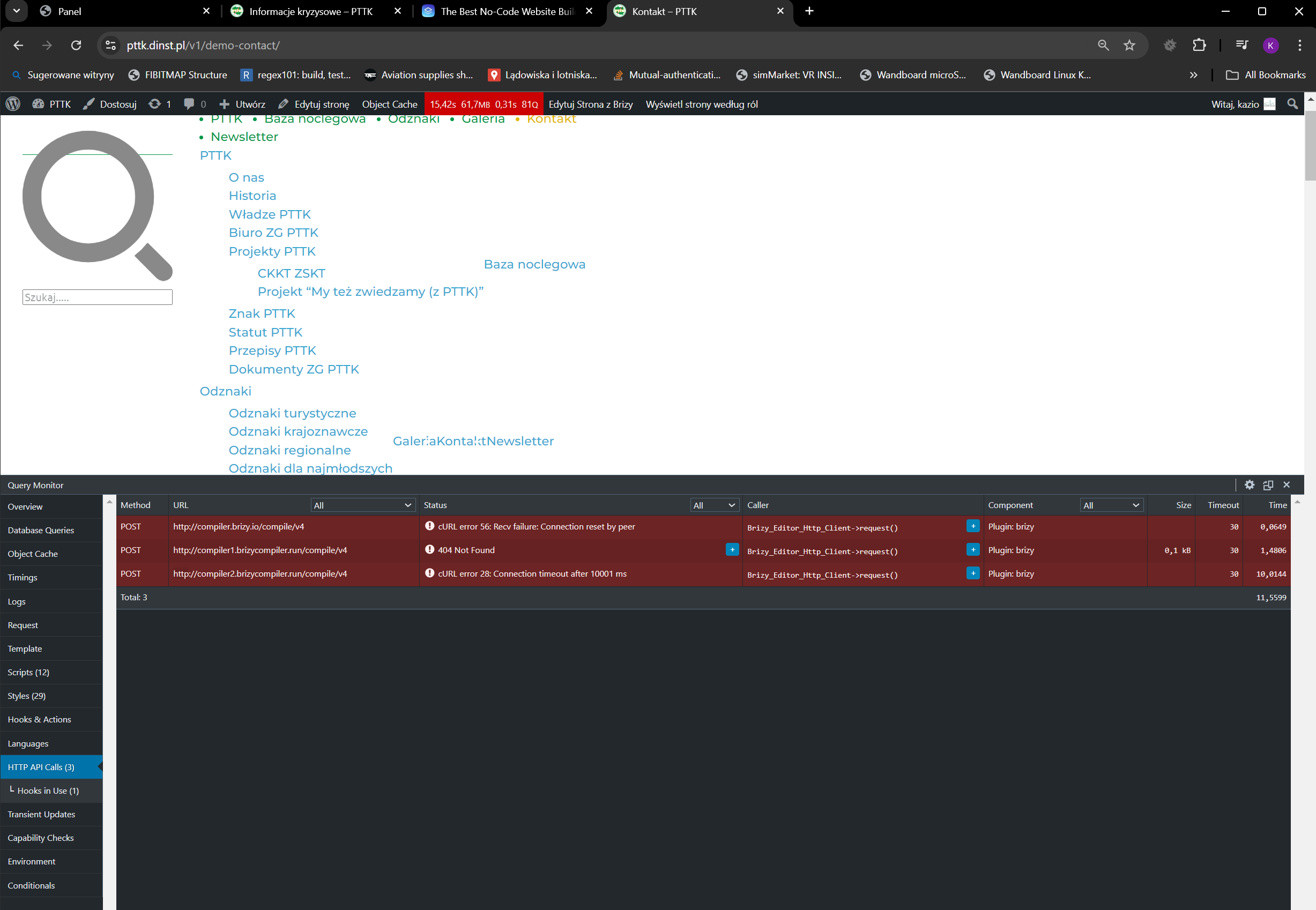
Sample of this issue
--
K0 -
Do you use an external tool for rendering HTML in your plugin?
--
K0 -
Hi Kazimierz,
I have enabled the WP Super Cache plugin and browser caching in the plugin. After activating the plugin, your page https://pttk.dinst.pl/v1/informacje-kryzysowe/ loads within 1.5 seconds. Kindly have a look at https://gtmetrix.com/reports/pttk.dinst.pl/lQWnaj4X/ for a performance report based on a GT Metrix test. You will see that the Fully Loaded Time is 1.5 seconds.
Kindly reduce the size of these images to improve the page performance further.
- https://pttk.dinst.pl/v1/wp-content/uploads/2023/01/1AlicjaDabrowska_Karkonosze_2013.jpg 1.4 MB
- https://pttk.dinst.pl/v1/wp-content/uploads/2023/09/augustow_august_2023.jpg 880 KB
- https://pttk.dinst.pl/v1/wp-content/uploads/2023/09/black_hancza_august_2023.jpg 431 KB
- https://pttk.dinst.pl/v1/wp-content/uploads/2023/12/ctw_background.jpg 366 KB
0 -
George.
Please look this https://tools.pingdom.com/#6468b33d0c000000
--
K0 -
George,
I still don't see any light at the end of the tunnel. Guess nothing to many has changed.
--
K0 -
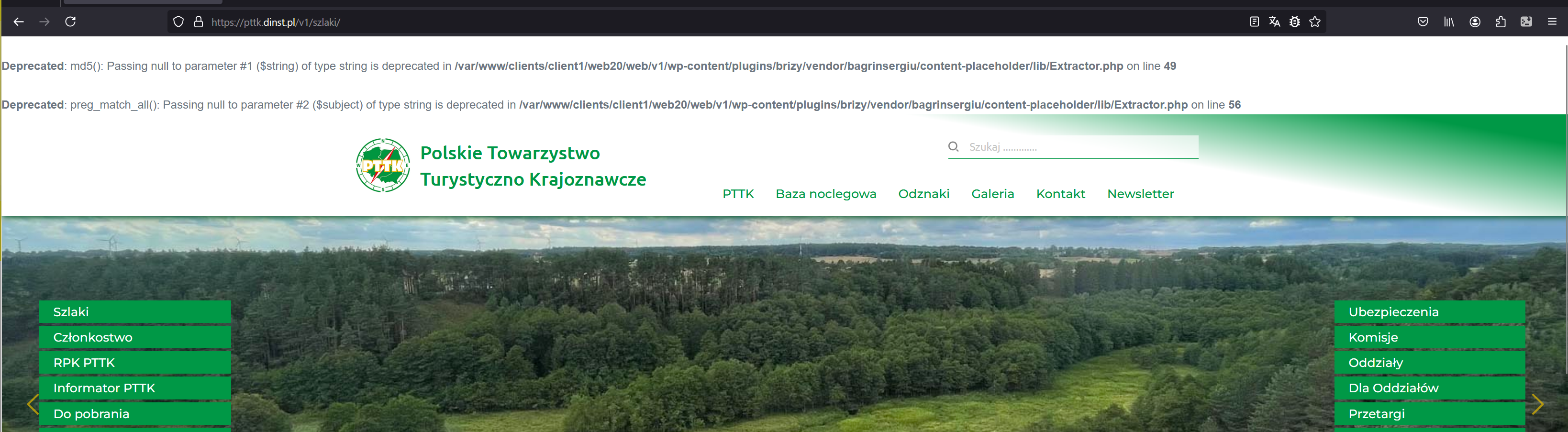
Something with Your vendor package isn't OK.
K
--
K0 -
Hi Kazimierz,
You can disable PHP Deprecated warnings in your website frontend by disabling the DEBUG mode in your WordPress instance. Have a look at this article for the procedure https://blogvault.net/debugging-in-wordpress/
0 -
Have a look at https://jmp.sh/AujwnWJ3 for a visual page loading speed at my end. The page loads within 1-2 seconds.
Pingdom's longer loading time could be attributed to the slow-moving sliders in the hero section. They could be defining page load as the time when all slider images appear on the page.
0 -
On this page specifically, this option is enabled. What about the HTML rendering on your site? From what I can see in the query monitor, communication with the API https://compiler.brizy.io/compiler/v4 takes up 70-80% of the page rendering time, in those cases where something hangs.
Kazik
0 -
Hi Kazik,
With the new compiler we have introduced recently, the page compilation moved from the server to your browser. This could be reason why you see that it takes up 70-80% of the page rendering time. You can read more about it at https://www.brizy.io/new-compiler-200-loading-performance-boost
0 -
George,
Sometimes, those 70-80% of the time equate to 10-20 seconds. From what I understand, to get it working correctly, each page needs to be saved anew. This is a bit of a "pain in the neck" with such a large project. What's needed during a page update is a functionality that automatically reloads pages with the Brizy tag. And how does it look when a template is being used?
Kazik
0 -
Hi Kazik,
Saving each page separately is not required for the compiler to work. Saving the entire project once by clicking on the the "Update" button would enable the compiler on an older project.
Have you experienced page load of 10-20 seconds at your end? Kindly do a screen recording to demonstrate the issue (just like the test I have done)
0 -
George,
Test the websites you have access to: pttk.dinst.pl and pttk.pl. You have accounts on both sites. Note! The pttk.pl site is a production site.
--
K0 -
Hi Kazik,
I looked at pttk.pl. The changes made in the editor do not reflect on the website frontend. This could be due to multiple caching on your project. You are using these caching plugins
- Autoptimize
- Redis Object Cache
- WP Super Cache
Kindly deactivate all of the above plugins and check if the issue persists.
0 -

Just wanted to add my totally useless input. After some initial issues with the update (Wordfence...) I have found speed improvements on all of my Brizy projects. There is light at the end of the tunnel.
0


Please sign in to leave a comment.
Comments
17 comments