Not able to save changes

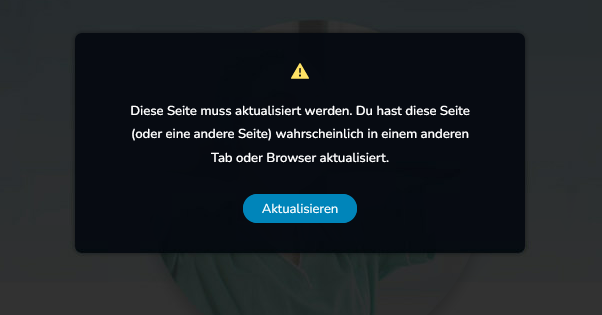
As already mentioned several times in the community, I am also repeatedly affected by the fact that changes cannot be saved. I get an error saying that it has been edited elsewhere.
The problem occurs from time to time on several of my clients' sites, all of which have different hosting providers. The problems, which have been increasing since the last updates and are also visible here in the forum (such as the errors with global blocks), are currently making it really difficult to work with Brizy.
From the previous answers to the problem, I cannot find a solution. I have not installed the WordFence plugin, deactivated all security settings of the hosters and also deactivated plugin by plugin and tested whether it is due to one of the plugins.
Is there an approach to fix the problem with the next updates so that working with Brizy is fun again as usual?
Used Brizy-Version : 2.5.3
Used Brizy-Pro-Version: 2.5.1
Used WordPress-Version: 6.6.1
Used PHP-Version: 8.2.22
Thanks for the support
-

Hi Kevin,
Since the generic solution does not apply to your situation, we will need to investigate the issue in your WordPress Dashboard to determine the source of the problem. If you grant us access to one of your projects, we will gladly assist you.
Kindly add a new user to the WordPress Dashboard of your websites and send the following details to our email: communitysupport@brizy.io
- Support Forum link: https://support.brizy.io/hc/en-us/community/posts/21043592061458
- WordPress Admin URL:
- Username
- Password
Please let us know in this forum when you send us the email.
0 -
Thank you for the quick reply. I have just sent an e-mail with the relevant data.
Best regards
0 -

Hi Kevin,
Thank you for your cooperation.
We have inspected your site; however, the issue doesn't seem to occur as demonstrated in this screencast: https://youtu.be/HXMgRnEB0SI.
I also checked the other existing pages, but the issue cannot be replicated.
Could you please try clearing your browser cache or using another browser to edit your pages? Sometimes, this issue also occurs if you have a firewall running in the background, which can cause communication issues between your browser and the server. Especially if you have a firewall with strict rules or advanced security settings, it might interfere with proper editing of the site. In this case, please also consider editing your website from another computer.
Please try this and let me know how it goes.
Best regards,
Ariel H.0 -
I also had the opportunity to save pages again yesterday evening after you looked at the whole thing. Unfortunately, the error has reappeared since this morning and I am unable to continue working.
I have also tested the points mentioned above without any improvement.
I can't explain what the problem is.I see that the community is reporting this issue on a daily basis. I hope that there may soon be an all-encompassing solution.
Best regards
 0
0 -
Hi Kevin,
Thank you for the update.
We have re-inspected your site today, but we are unable to replicate the issue.
We understand this is a recurring problem reported by other users, but each case is unique. With previous users, we were able to replicate the issue and escalated those we couldn't resolve at this level of support to our next tier of support.
Unfortunately, in your case, changes to your page are being saved. We even tried duplicating a page and were able to save changes successfully. This is demonstrated in this screencast: https://youtu.be/EhoB0GrGBFc
We created a temporary page to replicate the issue.
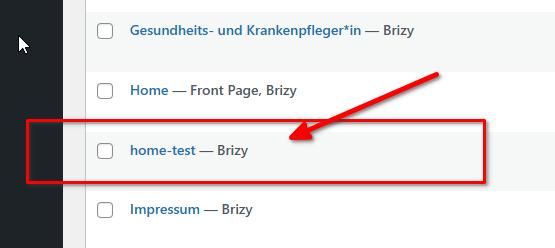
If the previously recommended actions didn't help, please ask one of your colleagues you're working with to check if they can replicate the issue. This will help determine if there are issues with your current setup or your network.
Best regards,
Ariel H.0 -
Thanks for the support anyway! I will now check all my clients' pages to see if this recurring problem is an obstacle, so that I may have to change the page builder. However, this should not detract from Brizy's work, because I am still a big fan.
Best regards
0 -
I would like to give a brief update on the information I have been able to find out in the last few days. The problem described above only occurs with my clients' domains that are hosted by Strato. For unknown reasons, the phenomenon that changes to pages cannot be saved occurs again and again at the same time for all domains.
Unfortunately, I have still not been able to find out which setting or similar is causing the problem.
Have you perhaps already had experience with the provider Strato and can guess what is causing the error?
Best regards
0 -
Hi Kevin,
Thank you for the update.
Could you please check if temporarily disabling ModSecurity in your hosting panel resolves the issue?
Please try this and let me know how it goes.Best regards,
Ariel H.0 -
Hey Ariel,
unfortunately, the problem also occurs with the disabling. That was one of the first mechanisms I tried to change. For some time-critical projects, I was now forced to change the page builder. For existing projects that are not time-critical, I hope that the next updates will improve the situation.
Best regards
0 -
Hi Kevin,
Recent Brizy versions have some compatibility issues with the Apache web server. Please check if your website is hosted on an Apache web server following the procedure at https://jmp.sh/2UeqSoEE
Kindly rollback to the previous Brizy versions to edit and save your changes if your website is hosted on an Apache web server. Use these versions of Brizy
- Brizy 2.4.45 https://jmp.sh/6w60BmCr
- Brizy Pro 2.4.38 https://jmp.sh/eEwWoJGK
Follow the steps below to roll back.
- Deactivate and delete Brizy Pro
- Deactivate and delete Brizy
- Download Brizy 2.4.45 and in your WordPress Dashboard under Plugins - Add New - Upload Plugin, upload Brizy
- Download Brizy Pro 2.4.38 and under Plugins - Add New - Upload Plugin, upload Brizy Pro
0
Please sign in to leave a comment.
Comments
10 comments