Saving a page

Hello, I have a text only page that has been working well. However, today I wanted to edit a bit of the text and the page will not save, the indicator just spins. After several minutes I get an error message stating "This page needs a refresh. You’ve probably updated this page (or another page) in a different tab or browser."
Can you help me please?
-

Hi,
Thank you for contacting us.
We have found that this issue is prevalent among users who have WordFence installed.
To resolve the issue, please set WordFence to Learning mode by following the steps below:
A. In the WordFence plugin settings, navigate to Firewall;
B. Enable Learning Mode and set it to automatically switch back to "Enabled Protecting" in 2 days; this will allow WordFence to learn the actions from the Brizy editor.
C. Save your WordFence changes.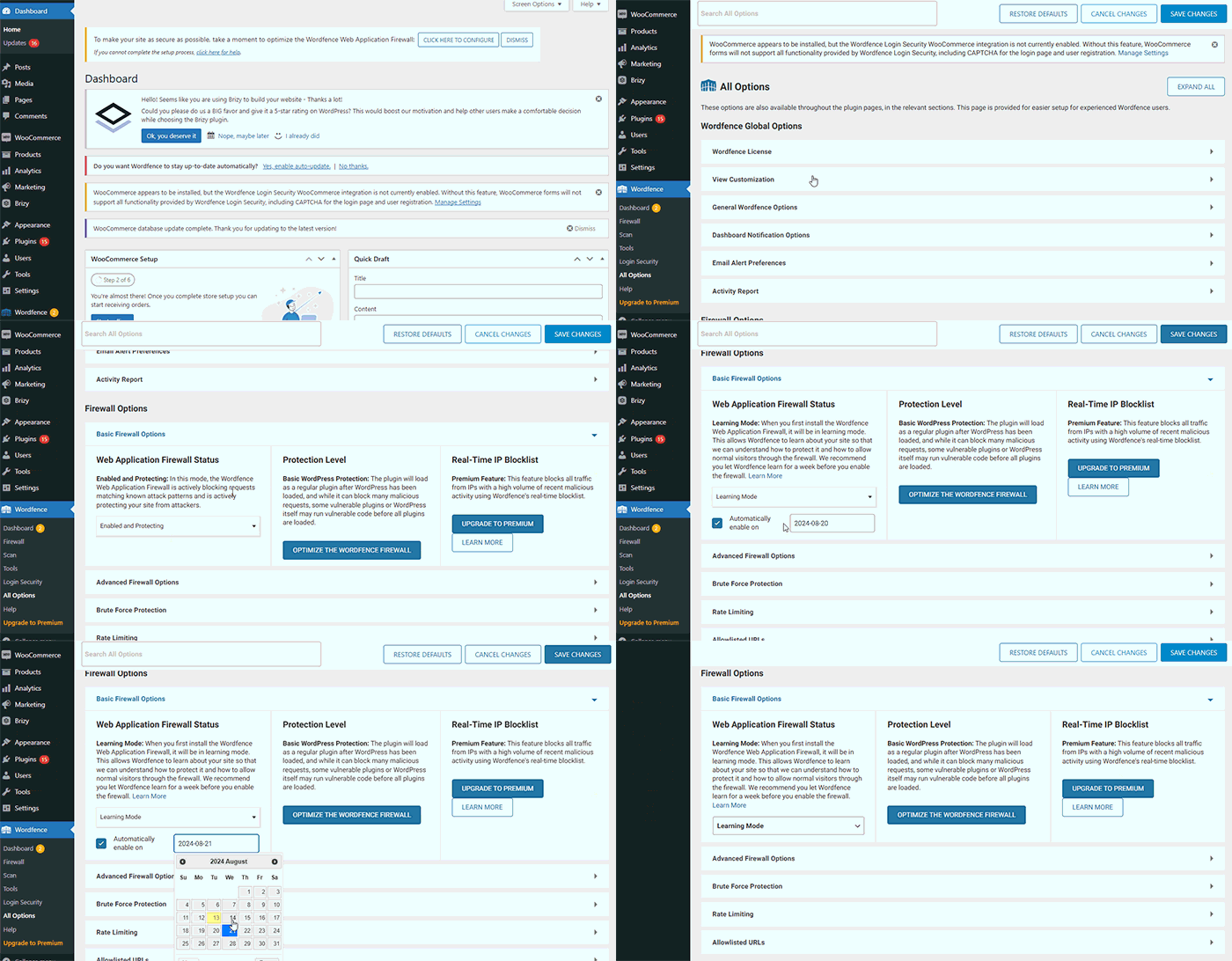
By following these steps, you can save or update your Brizy pages.
If you do not have WordFence, please also check if you have access in your Hosting panel to disable Firewall/ModSecurity, as this may help resolve the issue.
If the issue continues, could you kindly provide us temporary access to your WP Admin details so we can take a closer look. Please add us as an Admin user to your WordPress Dashboard and send the following details to: communitysupport@brizy.io
Community Post link: https://support.brizy.io/hc/en-us/community/posts/20981877958802
WordPress Admin URL:
Username:
Password:Please make a full backup of your site as a precaution.
Best regards,
Ariel H.0 -
Thank you for your quick response - I really appreciate it.
I don't have wordfence on this site, and I disabled the security plugin I use (All In One WP Security) to see if that would allow the edit. No luck.
Please help :-)
Kate
0 -
Hi Kate,
Thank you for the update.
The issue doesn't appear to be happening on my end, as shown in this screencast - https://youtu.be/g5v2qr4Xtag
Does this problem occur on a specific page only? Could you please inform me of the page you were working on?
I am looking forward to your response.
Best regards,
Ariel H.0 -
Hi Ariel,
Sorry, I should have specified the page. It is the Scholarship information page.
Kate
0 -
Hi Kate,
Thank you for the update.
Could you please request your hosting provider to adjust your server settings according to these recommendations?
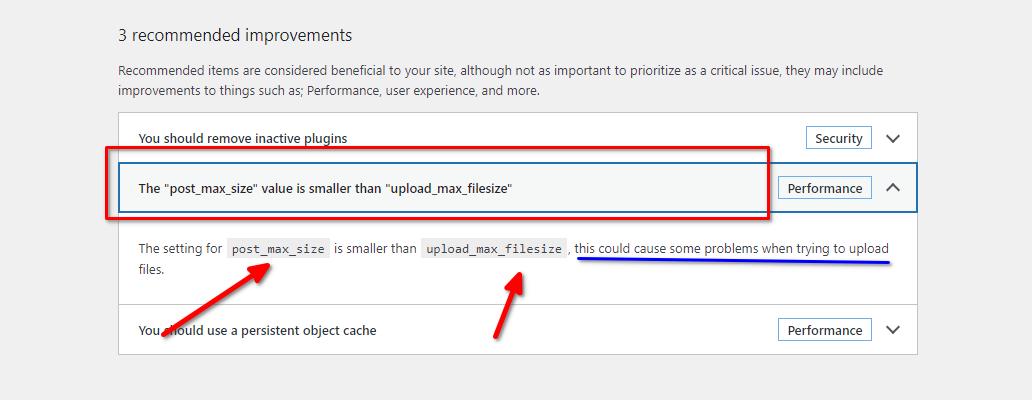
Currently, the 'Upload max filesize' is configured at 1G, and the 'PHP post max size' is set to 128M. You can ask them to change the 'Upload max filesize' to 64M and the 'PHP post max size' to 128M or higher. After making these adjustments, kindly verify if you can replicate the issue.
We also observed that this issue is linked to pages with numerous page revisions. Additionally, you may need to optimize your database. It's worth noting that this problem does not occur on newly created pages.
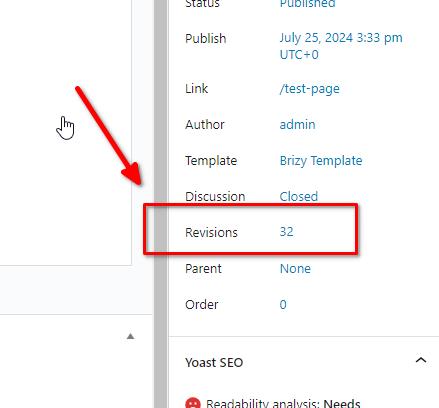
To address this issue, I recommend trying the steps outlined in this link to see if it resolves the issue:
https://www.elegantthemes.com/blog/wordpress/how-to-manage-wordpress-revisions-to-optimize-site-performanceIn the above article offers a manual method of limiting page revisions using PHPMyAdmin, or you can opt for WP Optimize, which is simpler to operate.
Please give this a try and inform me of the outcome.
Best regards,
Ariel H.0 -
Thank you so much for this info. I changed the PHP and the max file size. Sadly, it didn't work and I'm not sure what to do.
Your login info is still in place. Could you please take a look at the Scholarship info page to see if you can identify anything that might be causing my issue.
Many thanks,
Kate
0 -
Hi Kate,
Thank you for the update.
We have now escalated this issue to our senior support team for further investigation. I will reach out to you as soon as I have any new updates. Sorry for the inconvenience.
Best regards,
Ariel H.0 -
Thank you!
0 -
Hello -
I have a new issue - after clicking on edit with brizy on existing page, selected page will not load. Only a black screen with spinning icon.
I get the same spinning icon and black screen when trying to add a new page.
Please help! Your accress credentials for this site are:
User:
PW:
0 -
Hi Kate,
Thank you for keeping in touch.
I assume that this is for www.al***ha******dation.org.
Unfortunately, the credentials don't work. Could you please review them and send them again?
In the meantime, please ensure that you have these versions installed and see if this makes any difference.

Best regards,
Ariel H.0 -
Hi Ariel,
Yes it is for the A*****anye******ation.org, sorry I should have mentioned it.
So your login is:
[credentials removed]
Thanks,
Kate
0 -
Hi Kate,
Thank you for the update.
After reviewing the issue, we noticed a 500 error in the console, which points to a possible server configuration problem.
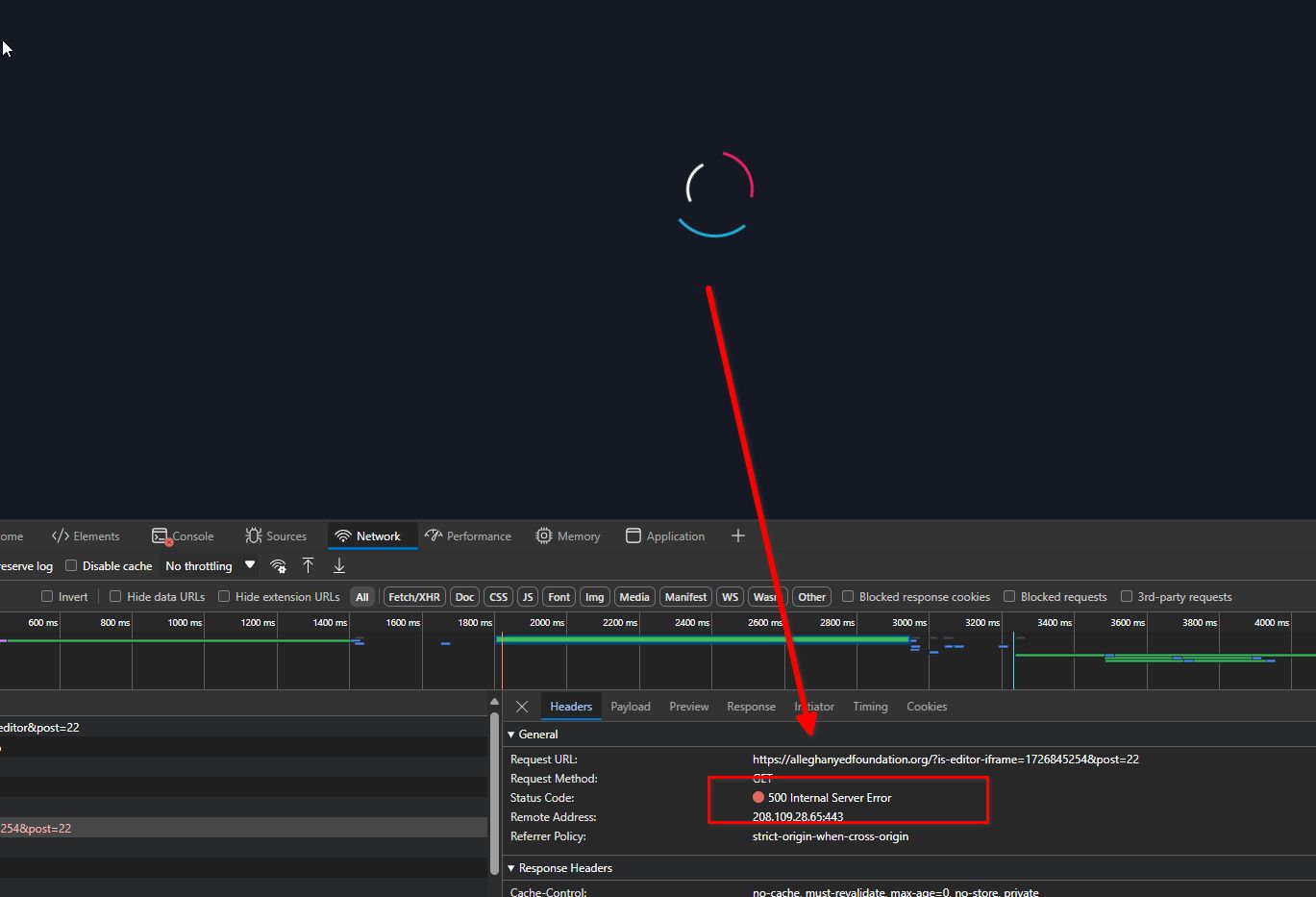
Please contact your hosting provider and ask them to review the error logs for any insights.
Alternatively, you can provide us with temporary cPanel access, and we can investigate further from our side.
Best regards,
Ariel H.0 -
Hi Ariel,
I'm back with the same website (alleghanyedfoundation.org) having issues.
I believe the previous issues have been resolved. However, when making edits, I cannot get them saved.
For example, the red donate button at the top of the page is causing issues with the hamburger menu on mobile devices. So I want to move it into the very top green band. I can make the change/move but cannot save the page after the change. I've also tried to remove the animation for the button without success.
After clicking the save/update button it appears to be saving but the indicator keeps spinning. Then I get the message "This page needs a refresh. You’ve probably updated this page (or another page) in a different tab or browser." -- which I have not done.
This site has become a real problem and I'm worried about losing the client.
Please help.
Thanks,
Kate
0 -
Hi Kate,
Thank you for keeping in touch and I apologize for the inconvenience.
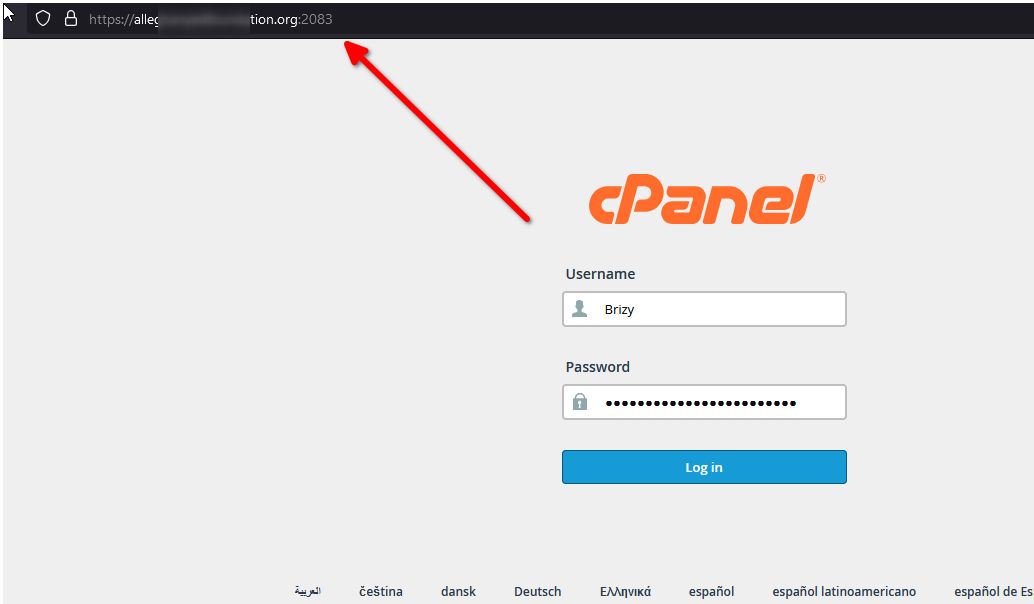
Would you be able to provide us temporary access to cPanel so we can further investigate the issue?
Best regards,
Ariel H.0 -
Hi Ariel,
Here are login in credentials:
0 -
Hi Kate,
Thank you for the update.
We're looking for your hosting control panel credentials, if possible.
Best regards,
Ariel H.0 -
Is it within the website or my hosting - I'm not sure where/how to find that.
0 -
Hi Kate,
Yes, please contact your hosting provider to get your cPanel credentials.
0 -
Sorry for the delay in responding, we have been weathering Hurricane Helene and with out power.
The maximum file upload size has been increased to 1GB but I cannot edit any of the pages.
Thanks for your help with this. It is a very important client for me.
Kate
0 -
Hi Kate,
Thank you for the update.
I have already escalated this issue to our senior support team for further investigation. I will reach out to you as soon as I receive an update.
Upon checking, this issue doesn't occur on older versions of Brizy. In case you have other websites encountering the same issue, I'd be glad to provide you with a link to download the older versions if needed.
Best regards,
Ariel H.0 -
Should I re-install an earlier version on this site?
0 -
Hi Kate,
We tried this while troubleshooting your site, and this is where we confirmed that this issue doesn't occur in older versions. Please leave it there for now, until we have finished looking into your website. I will get back to you as soon as I have any new updates.
Kind regards,
Ariel H.0 -
Good morning Ariel,
Please give me an update and/or solution for this site. I'm desperate.
I can access the page, edit the page, but the edits will not save.
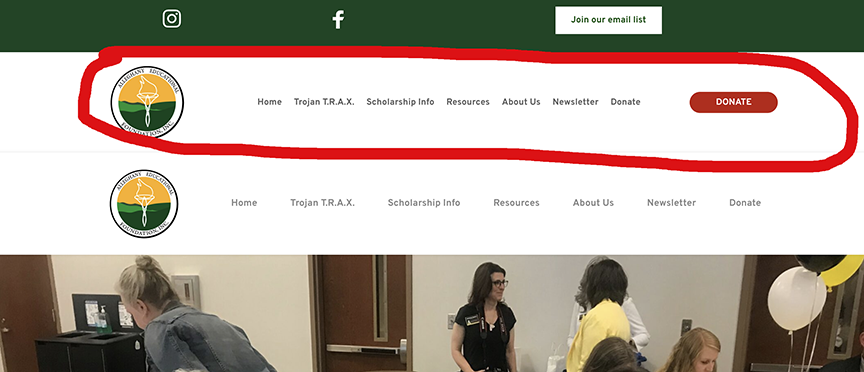
For example, I have two headers on the About page. I wanted to edit the one with the red Donate Button. I could not edit it but it would not save. Thinking that the problem might be in that header block, I created a new one thinking that I could delete the whole header. I was able to save the new header, but cannot delete the old one with the red button.
I can make changes to the page but they will not save.
Please, I'm desperate.
Kate
0 -
Good morning Ariel,
Please give me an update and/or solution for this site. I'm desperate.
I can access the page, edit the page, but the edits will not save.
For example, I have two headers on the About page. I wanted to edit the one with the red Donate Button. I could not edit it but it would not save. Thinking that the problem might be in that header block, I created a new one thinking that I could delete the whole header. I was able to save the new header, but cannot delete the old one with the red button.
I can make changes to the page but they will not save.
Please, I'm desperate.
Kate
0 -
Hi Kate,
My apologies for the inconvenience.
If you need work done on this website, and it is urgent, try rolling back to previous versions of Brizy to see if that resolves the issue. Please make sure to take a full backup of your website first, then download the following versions:
- Brizy 2.5.2: https://jmp.sh/2bXHLvAZ
- Brizy Pro 2.5.1: https://jmp.sh/s29vW87tTo roll back, follow these steps:
1. Deactivate and delete Brizy Pro.
2. Deactivate and delete Brizy.
3. In your WordPress Dashboard, go to Plugins → Add New → Upload Plugin, and upload Brizy 2.5.2.
4. Repeat the same for Brizy Pro 2.5.1.If the menu element doesn't work, try making a minor change to the global header (e.g., increase padding by 1 pixel). Then, hit the update button to save your changes and preview your site to see if this fixes the issue. You can revert your changes if necessary and hit update again. This should also apply to blocks with broken layouts after the update.
Best regards,
Ariel H.0 -
Hi Ariel,
I've made the Brizy version changes noted in your email.
I can make changes to the site, but they will not save.
My immediate need is to delete the header/menu block with the red "donate" button in it.
I also need to know what needs to be done to keep this from becoming an issue again.
Please let me know your thoughts.
Thanks,
Kate
0 -
Hi Kate,
Sorry about that. We're working on an update to address this issue, and it should be rolled out soon.
Best regards,
Ariel H.0 -
Can you please delete the block circled in red for me?
 0
0 -
Do you have any idea when this might be corrected, I hate to be a pest, but I'm losing this account.
0 -
Hi Kate,
Please try removing the display conditions, as shown in this example, and see if this helps fix the issue.
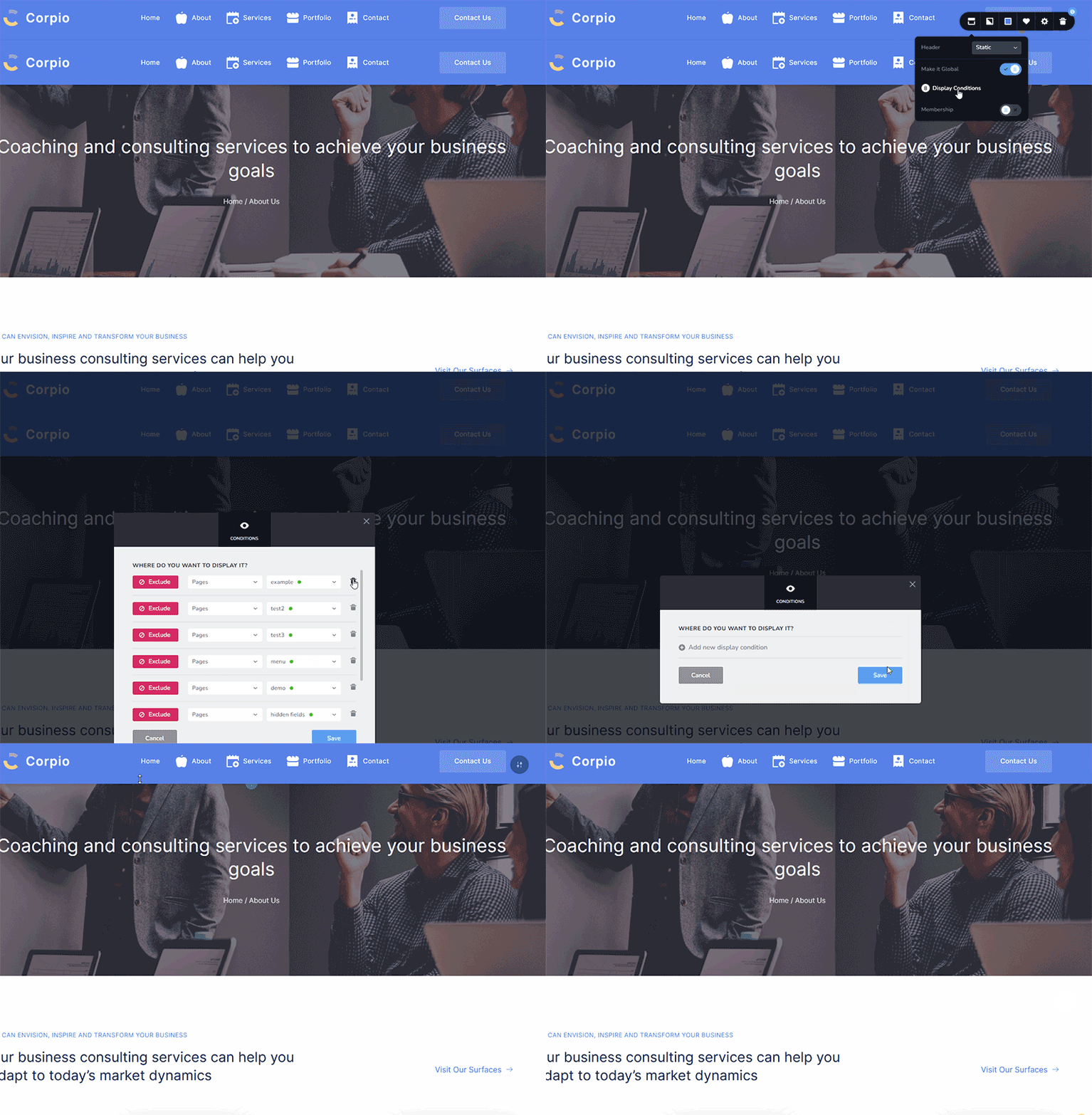
After this, the duplicated block will disappear. Hit update to save your changes.Please try this and let me know how it goes.
Best regards,
Ariel H.0
Please sign in to leave a comment.
Comments
34 comments