Why do post excerpts in Brizy Pro Wordpress remove links and punctuation and how to fix?

I have tried using the Single Post page "Excerpt" element in multiple sites, but, for some unexplained reason, links and paragraph/line returns are removed completely, and I can find no setting to adjust this. Many times, the excerpt is all that a visitor reads, and to have URLs/Links not working, well, it simply looks like an error or sloppy design. How can this be corrected/fixed? I've noticed it's not working properly on all sites created by Brizy Pro WP.
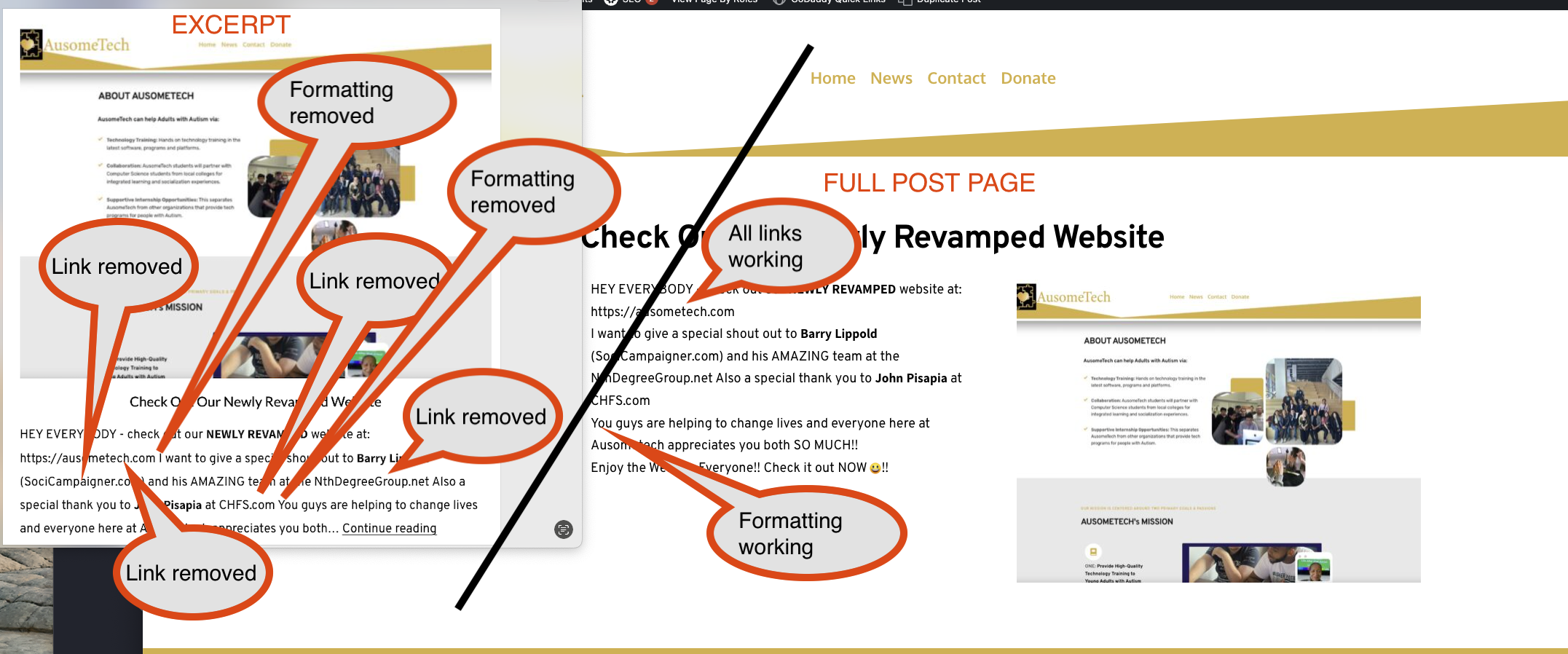
-

Hi Barry ,
WordPress strips out all formatting including hyperlinks from auto generated excerpts in blog posts. Hence hyperlinks and formatting are not shown in blog archives. If you want to show formatting and hyperlinks, kindly follow these steps
- Copy the HTML code for the content you want to appear in the blog post excerpt
- Paste the copied content in the Excerpt box in the Gutenberg editor
- In the Brizy Blog archive template, use the dynamic text for excerpt instead of the Brizy Excerpts element.
Please watch the screen recording at https://jmp.sh/KmRQIJin for a more detailed explanation.
0
Please sign in to leave a comment.
Comments
1 comment