Puzzled by PNG transparency issue

I have two photoshop saved PNG images that still show up with a white background. I'm unable to resolve this issue. I have other PNG images that work fine with the transparent background. When I "place" both of the images into Illustrator, they work as intended (transparent background.) I've looked for help, but to no avail. Help will be appreciated. Thank you.
-

Hi Wil
Are you looking for help to remove background color from your images in Photoshop? Kindly have a look at the procedure provided at https://support.photobiz.com/blog-post/how-can-i-create-a-png-with-transparency-in-adobe-photoshop-cc-and-higher
0 -
Still confused. Attached are 2 PNG images. One appears just fine without a white background (beagle) and the other appears with a blocked white background (dice) in Brizy. What am I doing wrong to prevent the dice image from having a white background? Thank you.

 -1
-1 -
Hi Wil,
I have added the two images to a Brizy page at https://brizy.online/png-transparency/ I don't see a white background color for the second image. Can you share the URL of a page where you are seeing a white background color?
Kindly ensure that you have not added an overlay color to your image in Brizy. Have a look at the screen recording at https://jmp.sh/UKhXjycU
0 -
https://staging.resourcebeagle.org/disability/
Hi George,
Attached is the image on my disability page. It's only on the staging site, so hopefully you can get to it. I checked to ensure that all of the colors in the color area were at zero. Also, I have another issue with that page. The man smoking the cigar at the desk has a -200 vertical position which moved him up and into a couple of block above, leaving the dice hidden behind his image, but effectively moving the dice to just above his shoulder. In Brizy editor, it looks good, but when I preview it, the image is not where I thought it was and I have to experiment getting the image in the right place on the page so that it appears correctly after the update. Any suggestions for that? I certainly don't profess to be the Brizy expert and realize that there are best practices that I am likely clueless about. In a sense, I wing-it until I get to the answer I'm looking for. Then, I read the directions when all else fails. Strike 1. :-) But, I will be reading and watching most all of the information and videos in due time. Just had a rush assignment for this particular site. (My daughter) If you need additional information, please reach out. Thanks again for your help.
0 -

Hi Wil,
Thank you for your cooperation.
The image format displayed in the Google console is a JPG image. Could you please verify that the PNG file was selected? It's probable that both JPG and PNG files were uploaded to the Media Library, and the incorrect one might have been chosen.
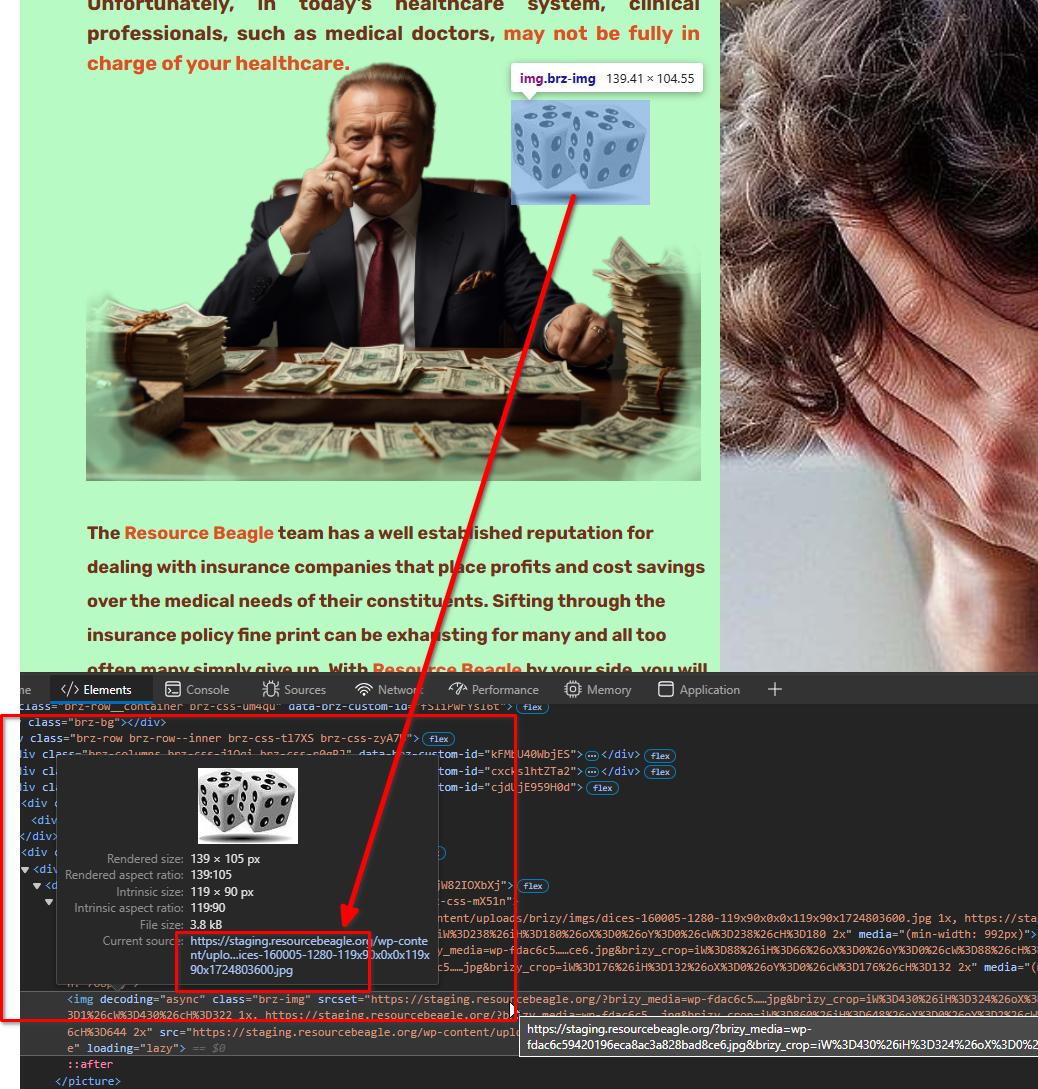
Otherwise, please provide us temporary access to your WP Admin page for this staging site so we can look into this issue.
Best regards,
Ariel H.0 -
Hi Wil,
The 'Better Images' plugin you are using, converts your PNG images to JPG automatically. Hence you are losing the transparency of your PNG images. I have temporarily deactivated the plugin to allow uploading of the PNG image. Now the PNG image at https://bionicsolutions.link/disability/ looks transparent.
0
Please sign in to leave a comment.
Comments
6 comments