Edits made to website will NOT save. "page needs a refresh"

For over a week now, I have been unable to make changes to my companies website. When I make an edit it presents an error message that says:
"This page needs a refresh. You’ve probably updated this page (or another page) in a different tab or browser."
I have tried clearing the cache, uninstalling plug-ins, etc. and nothing has worked. Please help!
-

Hi Reed,
Thank you for contacting us.
We have found that this issue is prevalent among users who have WordFence installed.
To resolve the issue, please set WordFence to Learning mode by following the steps below:
A. In the WordFence plugin settings, navigate to Firewall;
B. Enable Learning Mode and set it to automatically switch back to "Enabled Protecting" in 2 days; this will allow WordFence to learn the actions from the Brizy editor.
C. Save your WordFence changes.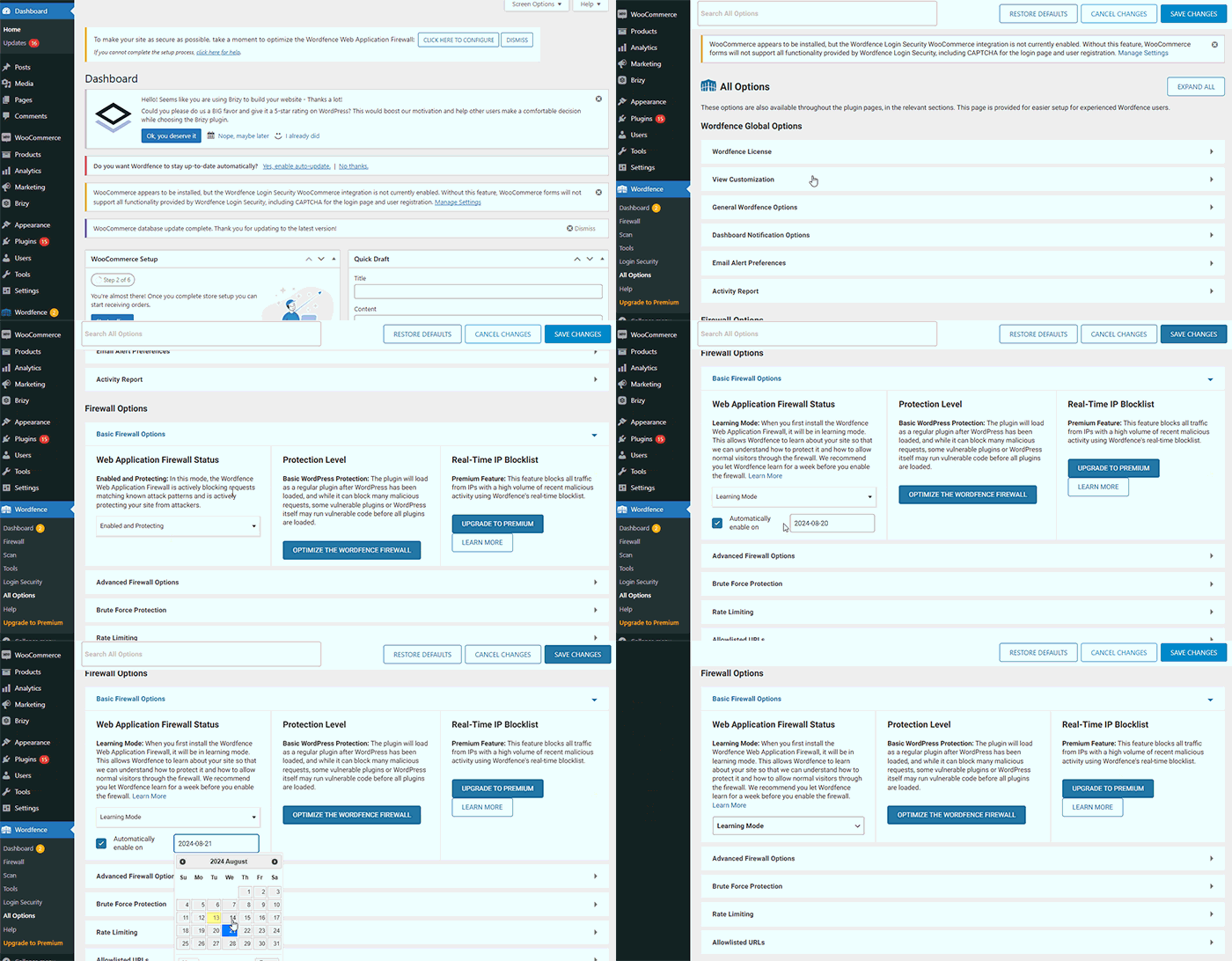
By following these steps, you can save or update your Brizy pages.
If you do not have WordFence, please also check if you have access in your Hosting panel to disable Firewall/ModSecurity, as this may help resolve the issue.
Please try this and inform me of the outcome.
Best regards,
Ariel H.0 -

Hi team Brizy, I entered the same problem. I'm using the theme Neve, but it occurs with Astro, Twenty-Four. I've tried flush permalinks, disable post revisions in config.php. I've tried other browsers, currently using Safari. But problem persists in Chrome and Firefox. I've tried emptying caches and deactivate plug-ins. I'm running a test page for a client which I have to present early coming week. Please help!
I will be sending credentials and link to this thread to your support email. Thank you in advance!Wishing you a wonderful day,
Suus Wolters0 -
Hi Suus,
Thank you for taking the time to send your site’s credentials.
The issue seems to be related to pages with a high number of revisions. You may also need to optimize your database. It’s important to note that this problem doesn’t occur on newly created pages.
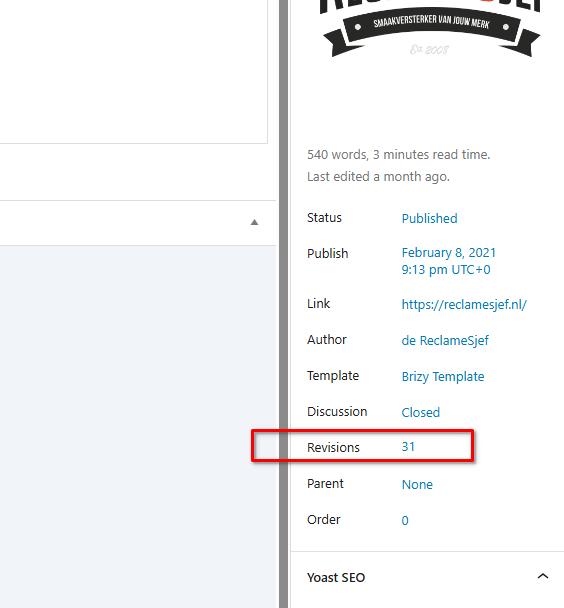
To address this, I recommend following the steps outlined in this link to see if it resolves the issue:
https://www.elegantthemes.com/blog/wordpress/how-to-manage-wordpress-revisions-to-optimize-site-performanceThe article offers a manual method for limiting page revisions using PHPMyAdmin, or you can opt for WP Optimize, which is simpler to use.
Please also ask your hosting provider to update the following server settings:
max_execution_time: 300
memory_limit: 512M (or higher)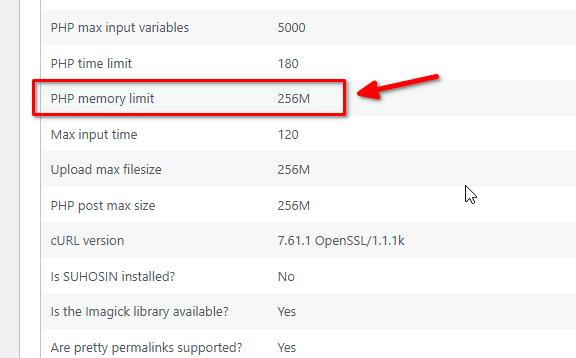
If you have access to cPanel, you can make these changes yourself. Go to Select PHP Version, then to Options. There, you will find these settings and can modify them. After making the changes, please check your page again to see if the issue persists.
Please try this and let me know how it goes.
Best regards,
Ariel H.0 -
Hi Ariel, Thank you so much for your prompt reply and the clear explanation on the Elegant themes page. I've tried to change the config file, but got a white screen. So I've activated WP Optimize. That seemed to do the trick. Then I changed the memory limit and file size. Logged in and out. Everything seemed to work. I changed something at the top, that was saved. I edited the footer and tried to save and again got the message I had to refresh and lost all the edits...
Sorry to have to be a bad messenger0 -
Hi Suus,
Thank you for the update.
Upon checking, this error shows up in Google Console.
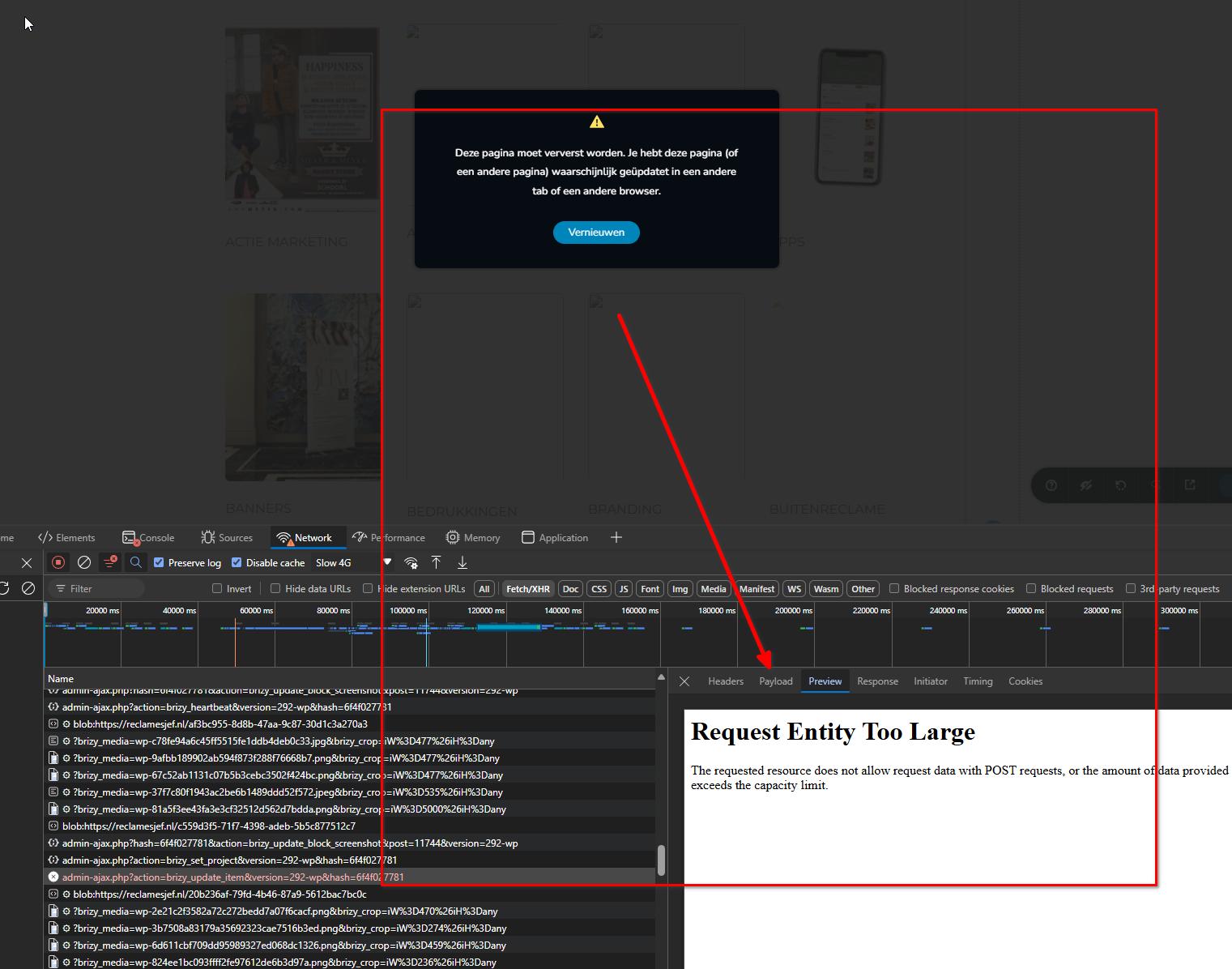
The '413 Request Entity Too Large' error indicates a server issue where the file being uploaded exceeds the maximum file upload limit set on your hosting account. You can find detailed information about this error in the following article:
https://www.wpbeginner.com/wp-tutorials/how-to-fix-the-413-request-entity-too-large-error-in-wordpress/To resolve this issue, we recommend trying out the solutions provided in the article. If you encounter any difficulties, please reach out to your hosting provider. Kindly explain the issue you are facing and share the article with them to assist in adjusting the necessary settings on your server.
I hope this helps.
Best regards,
Ariel H.0 -
Hi Ariel, I've fixed the 413-too large error, but still encounter the problem. I'll contact my hosting provider. Thank you so much for helping out so far!
Best wishes and have a wonderful day!
Suus0
Please sign in to leave a comment.
Comments
6 comments