Menu "Active state not working as expected - [Solved}

Hi,
I have already successcfully created a main menu whereby a menu items colour appears white when in a "normal" state, changes green when the mouse pointer is "hovered" over the menu item and changes to green with a border under the text (underline) when the menu item is the "active" menu item. This menu is made up of PAGES.
However I have now created a menu which contains items of which all are of a CUSTOM LINK type. These links of each item all exist within the same website.
However having applied the same characteristics as my main menu in terms of NORMAL, HOVER and ACTIVE I find that only the NORMAL and HOVER states work. The ACTIVE state does not work.
For example I have my menu (CUSTOM LINK MENU) which is global on PAGE A, the menu items PAGE B links to PAGE B (custom link) on the same website, menu items PAGE C links to PAGE C (custom link) on the same website and menu items PAGE D links to PAGE D (custom link) on the same website. The global display properties of the CUSTOM LINK MENU are enabled for PAGE A, PAGE B, PAGE C and PAGE D. On either PAGE A, PAGE B, PAGE C or PAGE D if I hover over any of the menu items of the CUSTOM LINK MENU the items correctly changes colour to green. However if I click on ANY menu item PAGE B, PAGE C or PAGE D and I am taken to that page however the respective page in the menu item DOES NOT change its colour to green with the undeline as per the ACTIVE state settings. i.e if I click on the PAGE B menu item having been take to the custom link of PAGE B I would expect the PAGE B menu item to display its ACTIVE state settings i.e. grenn and a botttom undeline border rather than the "normal" white colour.
As the only difference is that the second menu is made up of custom links rather than actual pages am I correct in thinkind that the active state is NOT possible for "custom link" menu items, even if those links are within the same website?
Kind regards
-

Hi Wayne,
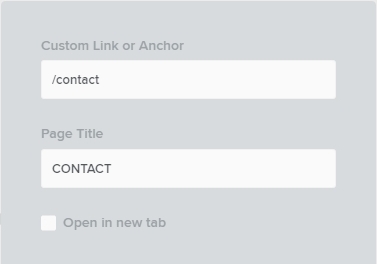
If you use the full path of a page in a Custom Link, the active colors will not work.

To make the active colors work, you must use the relative path. Instead of the full path https://restaurant-1.brizy.site/contact kindly use the relative path /contact and the active colors will work
 0
0 -
Thank you.
0
Please sign in to leave a comment.
Comments
2 comments