Your blogging platform is so frustrating

See this video and point me in the right direction. I am on a deadline and your "Easy to use" platform is going to drive me to drink.
I create a blog post, then I do another one and ALL of the text and formating go over to my new post. I have been going over this 15 or so times.
Make this EASY! I need SPECIFIC directions.
https://www.loom.com/share/b53298f87bc54c97986136954f0accb6?sid=30579233-2e59-407a-8842-e02d14bc934b
-

Hi Michael,
Global blocks are used when you want to reuse the design of a specific block on multiple posts or pages over and over again. When you make a change to a global block, your changes will apply automatically to all instances of the global block on your website.
For your blog posts, the header and footer can be set as global blocks since you want the same header and footer on blog posts. However since the blog post content will vary from one blog post to another, the content block must be a regular block (and not a Global block)
In your project, you have set the blog post content block as global. This means that whatever changes you make to one blog post content will apply to all blog posts.
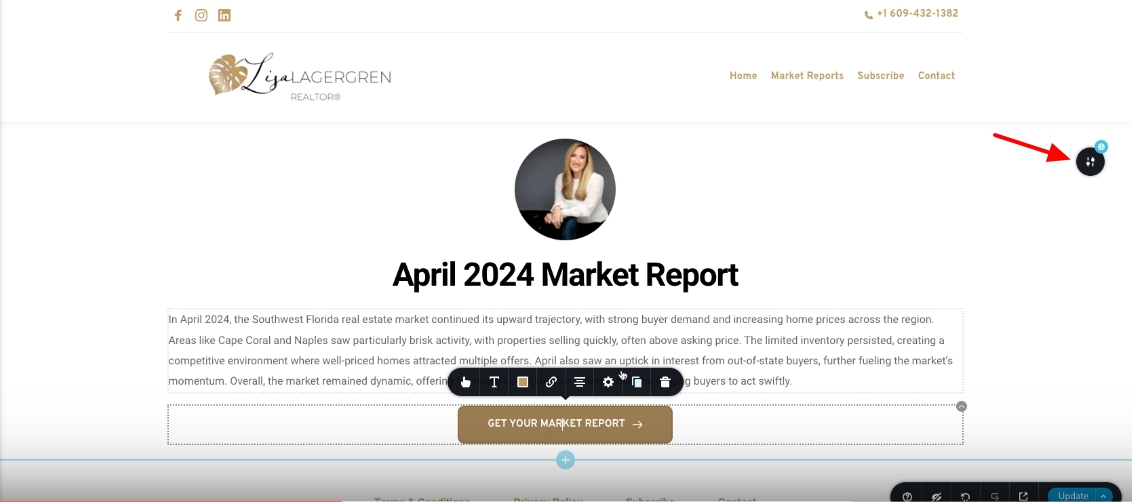
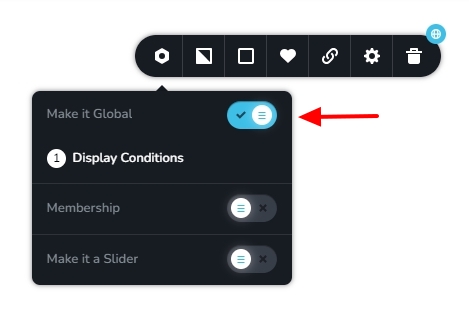
To fix this issue, kindly set the blog post content block as a regular block by disabling the "Make It Global" option. Then the changes you make to the content block will apply only to the specific blog post
 0
0
Please sign in to leave a comment.
Comments
1 comment