How to de-link a brizy created website from a custom domain?

I recreated my site as directed via the 'save every individual page as a layout' method and then made a new site and added every page as a layout. I tried linking the new site to my custom domain but cannot remove the old one. Both show that they are published on the old domain in the dashboard. How do I properly remove the old version of the site without deleting it?
-

Hi Brandon,
You can remove a custom domain added to a website by selecting the "Delete Domain" option in the "Publish On Your Domain" screen
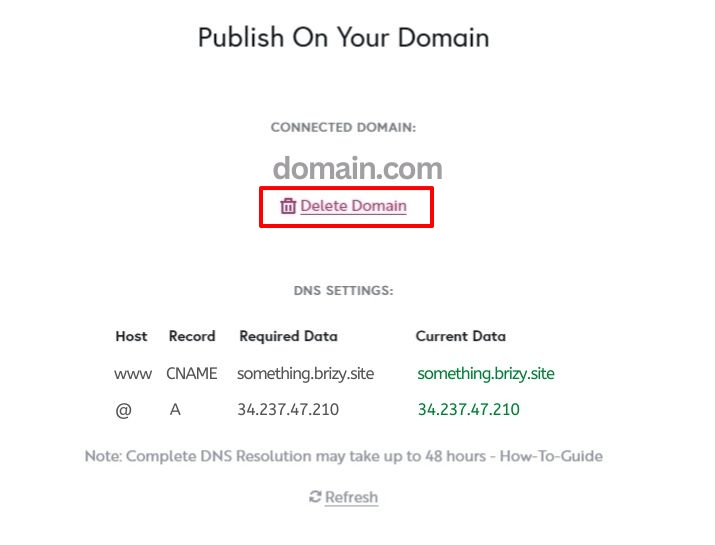 0
0 -
OK I tried that and it did not instead show my new site but basically took down my site. What steps may I be missing to get the new version of the site to show?
0 -
Hi Brandon,
Kindly delete the custom domain from the old site and add the same custom domain to your new project.
0 -
EDIT: It was the brizy.site subdomain that was mismatched. It is working now. Thanks.
When should it be accessible because this is what I get when following those instructions:
A blank page stating: "Domain was not found" or:
This site can’t provide a secure connection
www.peerlesspest.com sent an invalid response.
ERR_SSL_PROTOCOL_ERRORSo I add my old site back so I still have a website.0 -
Hi Brandon,
Your website URL is accessible already. After you add a custom domain, it takes 30 minutes for the SSL to be autogenerated. Until then you will see the "This site can't provide a secure connection" error
0 -
Please delete this thread or scrub private details such as URL and photos. Thank you.
0
Please sign in to leave a comment.
Comments
6 comments