Menus disappeared

-

Hi Rick,
Thank you for contacting us.
We have found that this issue is prevalent among users who have WordFence installed.
To resolve the issue, please set WordFence to Learning mode by following the steps below:
A. In the WordFence plugin settings, navigate to Firewall;
B. Enable Learning Mode and set it to automatically switch back to "Enabled Protecting" in 2 days; this will allow WordFence to learn the actions from the Brizy editor.
C. Save your WordFence changes.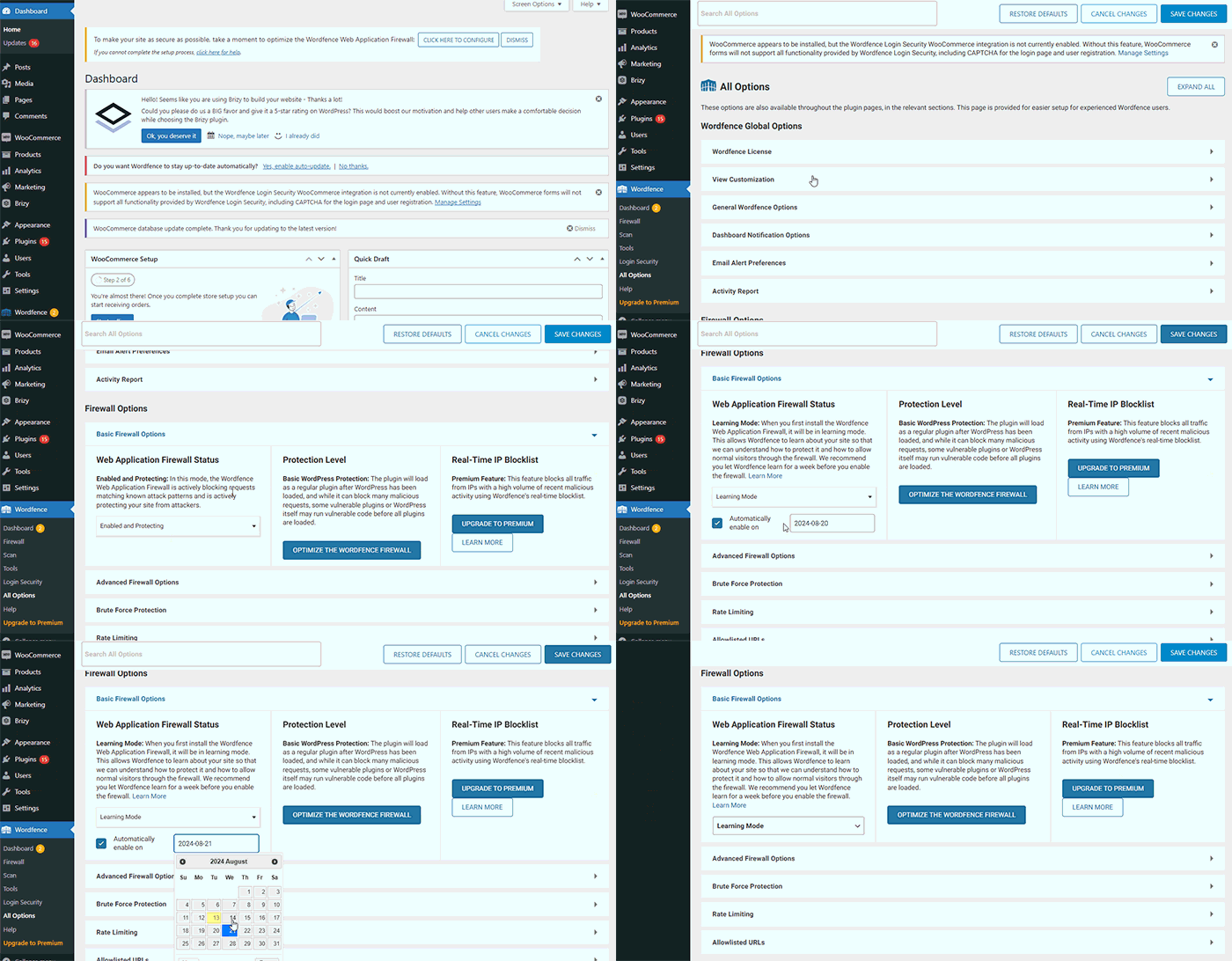
By following these steps, you can save or update your Brizy pages.
If you do not have WordFence, please also check if you have access in your Hosting panel to disable Firewall/ModSecurity, as this may help resolve the issue.
Please try this and inform me of the outcome.
Best regards,
Ariel H.0 -
I went and set wordfence to learning mode and I turned off ModSecurity. I still cant edit any of my sites. I have also reverted all sites back to the older brizy and brizy pro plugins just so my menus and footers show up again. What would be my next step?
0 -
Hi Rick,,
Thank you for the update.
This is something we need to inspect from your WP Admin page. Please add us as an Admin user to your WordPress Dashboard and send the following details to: communitysupport@brizy.io
Community Post link: https://support.brizy.io/hc/en-us/community/posts/20794563386514
WordPress Admin URL:
Username:
Password:Please make a full backup of your site as a precaution.
Best regards,
Ariel H.0 -
Hi Rick,
Thank you for your cooperation.
The headers and footer now appear to be functioning correctly. Please confirm on your end and inform me if you encounter any issues. You can view the demonstration on this screencast: https://youtu.be/L8tK5so0hOo
If you come across pages without a header or footer, or if the layout appears broken, please start by purging the WP Rocket cache. If this doesn't resolve the issue, proceed to edit the page with Brizy. Make minor adjustments like adding 1 pixel of padding or margin and remember to save your changes. After this, purge the WP Rocket cache once again to ensure that the changes take effect.
If you have any further questions, please don't hesitate to contact us.
Best regards,
Ariel H.0
Please sign in to leave a comment.
Comments
4 comments