Cannot edit website | Brizy Cloud

I have been recreating my website because Brizy cloud apparently had a big update since I first built my site. I finished saving pages as a layout on my old site and then recreating them in a new project but before publijsing the newer version of my same site I went back to edit one thing and now I get this error: "
Oops! An Error Occurred
The server returned a "500 Internal Server Error".
-

Hi Brandon,
I opened the 4 projects in your account and could not see the error 500 Internal Server error. Do you see this error over and over again or just saw it once? If you continue to see the error, kindly let us know
- Project Name
- Steps to reproduce the error
0 -
Peerless Main Site 2.0
It is still happening right now, since yesterday. All i do is click the Edit Project button from the dashboard to get that error.
0 -
Hi Brandon,
I opened the Peerless Main Site 2.0 project at my end. I do not see the 500 Internal Server Error. Kindly see my test at https://jmp.sh/uMsc1Mx6
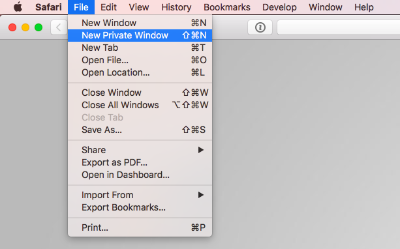
Kindly sign into Brizy Cloud Dashboard from a new private (incognito) window of your browser and check if the error persists? Kindly also repeat the same from different browsers, computers and Internet Service Providers and check if the issue persists.
 0
0 -
Edit: Cleared as much website data as I could from the browser and it's working again. Thanks.
OK it works like that. I thought I had tried another browser but I didn't. Do I need to clear the cache or something? I did try deleting cookies.
0
Please sign in to leave a comment.
Comments
4 comments