WC message encoding is incorrect

Hello.
A few days ago I noticed a message from WC with incorrect encoding.
This error occurs only on pages created by Brizy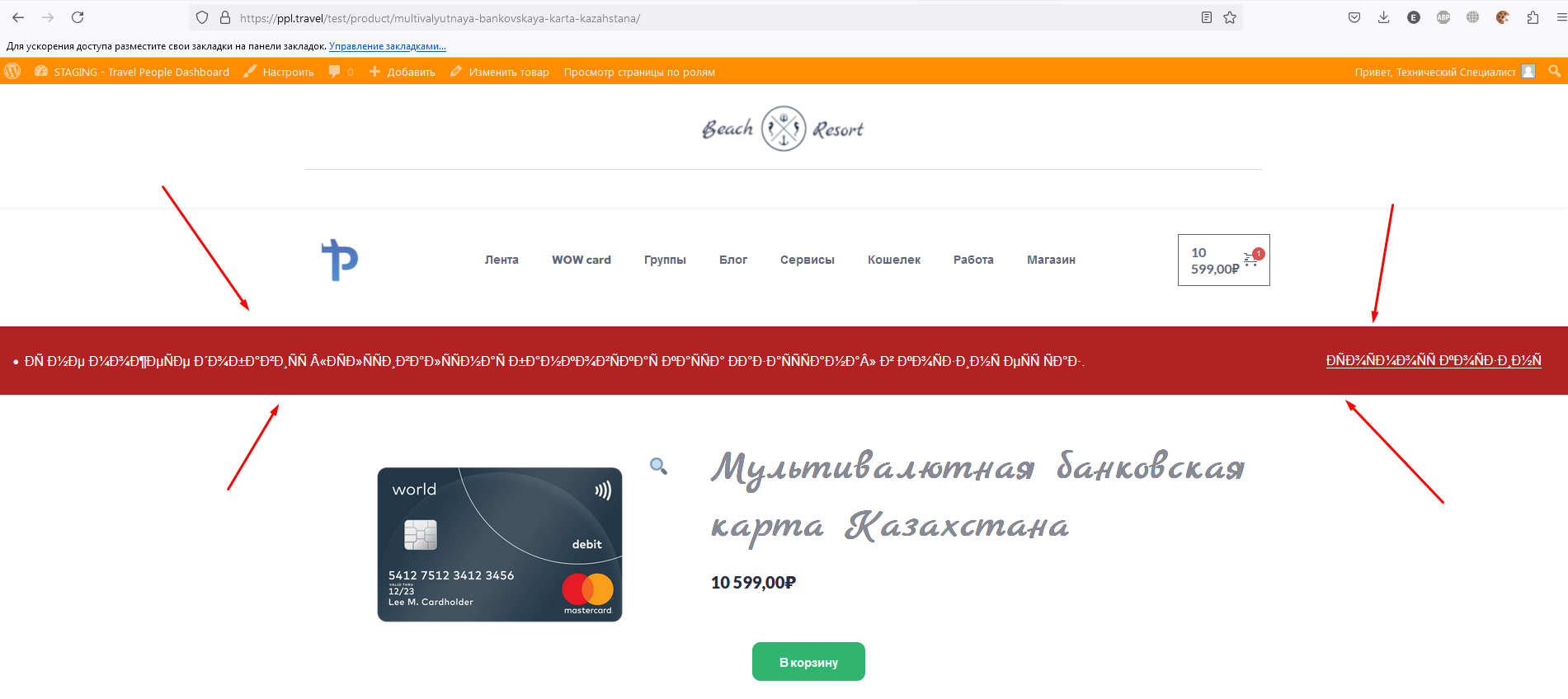 I have already tried many options: 1) disabled all plugins 2) used standard themes
Please help me fix the error.
I sent us an email with access to the site. (communitysupport@brizy.io)
-

Hi Nikita,
Thank you for reaching out to us.
I have requested one of my colleagues to investigate the issue. I will follow up with you once I have received new information.
Best regards,
Ariel H.0 -
Hello.
I hope you are doing well.
Were you able to solve anything for my problem?
0 -
Hi Nikita,
Thank you for the update. Unfortunately, this is currently in progress. It may take some more time for us to inspect your site, but I will get back to you as soon as I receive any new updates.
I apologize for the inconvenience.
Best regards,
Ariel H.0 -
Hello.
I hope you are doing well.
Were you able to solve anything for my problem?
0 -
Hi Nikita,
I apologize for the inconvenience. Unfortunately, we do not have an update on this yet. Rest assured, I will continue to monitor this and will promptly inform you once we have a solution to this issue.
Best regards,
Ariel H.0 -
Hello.
Were you able to solve anything for my problem?
0 -
Hi Nikita,
Unfortunately, this issue is currently in progress and may take us some more time. I will contact you once I have any new updates.
Sorry for the inconvenience.
Best regards,
Ariel H.0 -
Hello
I'm already very worried.Why is there such a long delay in solving the problem?
0 -
Hi Nikita,
I apologize for the lack of progress on this issue. Upon checking, it's still pending. You may need to roll back your site to the older versions of Brizy if necessary. I can send you links to download them. Or you may also consider reverting your site from a previous backup until we address this issue.
Best regards,
Ariel H.0 -
Ok
send me links to download previous versions of the plugin0 -
Hi Nikita,
Please use this link to download the older versions: https://tinyurl.com/4z3cj26y
Steps to roll back.
1. Go to the Plugins area and uninstall both Brizy and Brizy Pro.
2. Upload and activate Brizy first.
3. Upload Brizy Pro and activate it.Best regards,
Ariel H.0
Please sign in to leave a comment.
Comments
11 comments