Pages Not Saving/Updating - Timing Out Server

Hi Brizy Team. I wanted to add a new post because my original topic was a little vague.
At first the issue was header/footers disappearing with latest Brizy Update. Now it has graduated to pages not saving any changes. The server simply times out and changes don't save. I hope the below info is descriptive, so you can help me and others get this resolved:
I followed Brizy instructions on making a change to header and footer to get them to display. I also followed the instructions for Wordfence as well. Now my header/footer display on one out of numerous sites - but I can't get any changes to update, pressing update just times out the server no matter what page I try to update.
I then did the following: Disabled all plugins except for Brizy - including WP Rocket, changed my theme from WordPress 20-20 to Blocksy, experimented with different php versions, did a full uninstall of WordFence including removal of all database tables etc, no sever-side cache... Nothing has worked.
I will say that my sites that never had WordFence seem to be ok. The sites that did/do have Wordfence are 100% failing - even after a full removal of Wordfence and all database tables.
Update - Please note: it appears that I can create new pages and make successful updates on my own site. I can't change and update existing pages.
It is important to get this fixed. Please advise on what I/we should do. Thanks for your help Brizy team.
-

Hi Carl,
Thank you for the update.
Could you please follow the recommended steps outlined in this link to completely remove WordFence from one of your websites experiencing this issue: https://bandittracker.com/ways-to-remove-wordfence/
https://www.wordfence.com/help/advanced/remove-or-reset/One of the steps suggested is to install the Wordfence Assistant plugin to delete all WordFence data from your site.
After completing this process, revisit your pages to check if you can still replicate the issue.
If you confirm that the issue is not replicable, you have the option to consider re-installing WordFence and reconfiguring it, or explore alternative plugins for securing your site.
Please try this and inform me of the outcome.
Best regards,
Ariel H.0 -
Hi Ariel.
Thanks for the below communication.
This is getting very concerning. I took the steps below and completely removed WordFence. It was easy. Then I manually inspected the database and all applicable folders and files to verify that all of Wordfence’s elements were indeed removed – they were…
Then I updated Brizy and the problem still persists. What steps can Brizy take to get this corrected?
0 -
Hi Carl,
Thank you for the update.
Could you please try using another browser and see if you get the same result?
If the issue continues, this is something we need to inspect from your WP Admin page. Please add us as an Admin user to your WordPress Dashboard and send the following details to: communitysupport@brizy.io
Community Post link: https://support.brizy.io/hc/en-us/community/posts/20740816821778
WordPress Admin URL:
Username:
Password:Please make a full backup of your site as a precaution.
Best regards,
Ariel H.0 -
Hi Ariel,
Thank you very much for the offer to inspect this for me. I will send over credentials for you on Monday or Tuesday next week Aug 19 or 20 (out of town for a couple of days).
In the meantime, please note: With WordFence completely uninstalled, and all other plugins turned off the problem still persists. The php errors are:
[16-Aug-2024 20:27:41 UTC] PHP Warning: Undefined array key 0 in /home/giifxovp5u10/public_html/wp-content/plugins/brizy/admin/blocks/main.php on line 217
[16-Aug-2024 20:27:41 UTC] PHP Warning: Attempt to read property "post_type" on null in /home/giifxovp5u10/public_html/wp-content/plugins/brizy/admin/blocks/main.php on line 220
[16-Aug-2024 20:27:41 UTC] PHP Warning: Attempt to read property "post_type" on null in /home/giifxovp5u10/public_html/wp-content/plugins/brizy/admin/blocks/main.php on line 231
[16-Aug-2024 20:27:41 UTC] PHP Warning: Attempt to read property "ID" on null in /home/giifxovp5u10/public_html/wp-content/plugins/brizy/admin/blocks/main.php on line 232
0 -
Hi Carl,
Thank you for your cooperation.
Could you also please provide us with temporary access to cPanel so we can further investigate this issue? Please send the credentials to our community support inbox.
Best regards,
Ariel H.0 -
Hi Ariel,
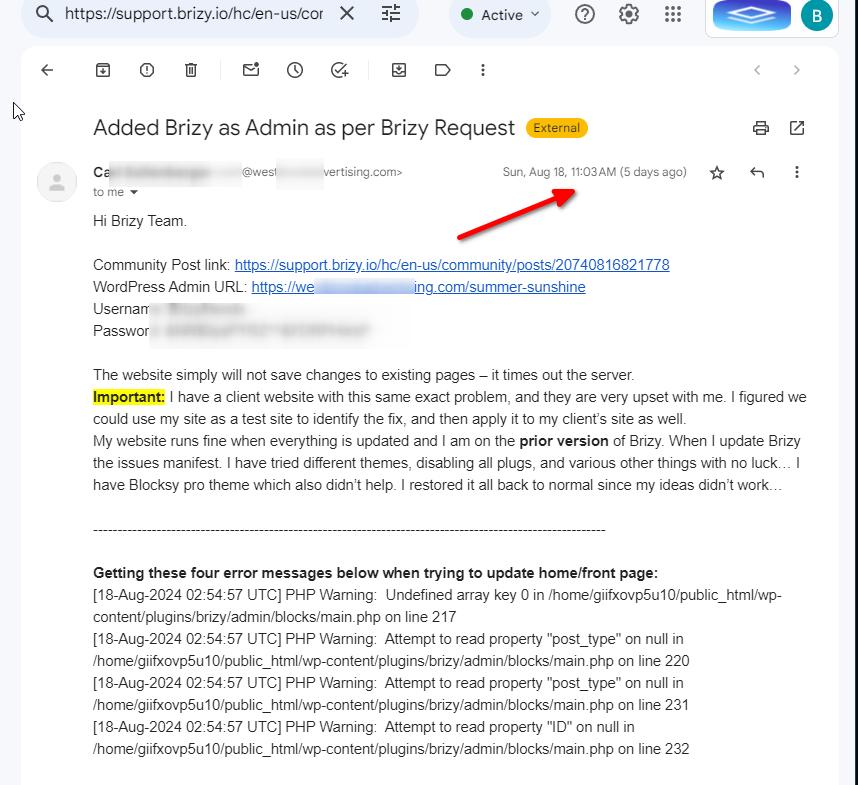
I sent this access over on Aug 17, and I have not received an update. The Brizy Plugin update issue is not yet resolved. Can you bring me up to speed on your progress?
0 -
Hi Carl,
Thank you for the update.
The last email we received from you was five days ago. You had shared your WordPress Admin credential, which we received. We responded by requesting the cPanel credentials, but we haven't received them yet.
Unfortunately, the issue cannot be resolved within the WP Admin alone. Therefore, we kindly request access to your cPanel to assist in resolving this matter.
Best regards,
Ariel H.0 -
Hi Ariel,
Thanks very much for your follow up. On Aug 19, 2024 I sent over cPanel credentials, but it may not have gone through. I am resending now at 9:22am my time to communitysupport@brizy.io
Please let me know if the email gets to you this time. Have a great day!
0 -
Hi Carl,
Thank you for your cooperation.
I have requested one of my colleagues to investigate this issue. I will reach out to you as soon as I receive any new updates.
Kind regards,
Ariel H.0 -
Hi there Ariel,
Please do keep me posted. As mentioned, I have a client site that is experiencing the same issue. It is important that we get them all taken care of. Without Brizy working correctly we are in rough shape.
Have a great day and thank you.
0 -
Hi Carl,
Thank you for the update, and we apologize for the delays. This issue is currently in progress. I will keep you informed as soon as I receive new information.
Best regards,
Ariel H.0 -
Hi Ariel, it has been 13 days since you told me you will keep me informed. Can you please tell me if this issue has been resolved? As mentioned before, I have two websites that I am unable to update with changes which is starting to have negative affect for business.
Please let me know where we stand. Thank you.
0 -
I wanted to add that I thought the issue only presented on already existing pages because I was able to create new pages and they would indeed save. BUT I have learned the new pages will not save when more than a few sections are added. I tried to copy my home page and it worked fine up until I got through about 75% of the content. When trying to add the last couple of sections the new pages timed out just like the already existing pages. The prior version of Brizy does not have these issues - it is only on the big new update you all released.
0 -

Hi Carl,
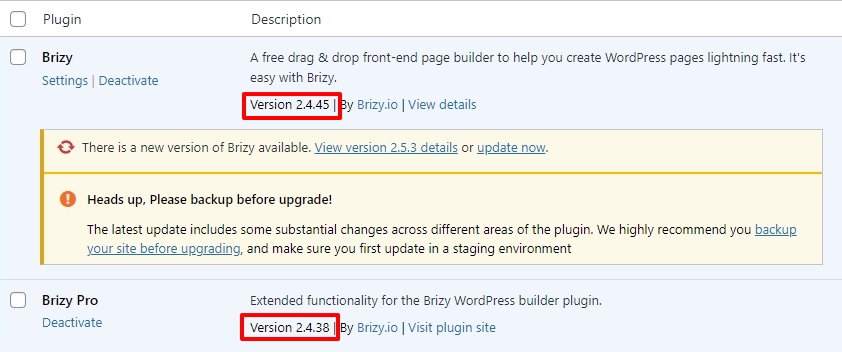
The recent versions of Brizy has an incompatibility with Apache web server. We have rolled back Brizy to its previous versions to allow editing. Kindly retain these versions of Brizy until we have an update to fix this incompatibility.
Kindly check if you are able to save your edits
0 -
Hi KC Geroge. I hope your day is going great.
I have six sites on this account. Four are working fine. Two are not. How are four working with no issue if Brizy has an incompatibility with Apache web servers while two do not? I really need to get this resolved on one of the two problem sites. It's been well over a month... I greatly appreciate your help. Please forgive my urgent tone, but it is important. Thanks very much and please let me know
0 -
Hi Carl,
We're sorry to hear you're having issues with Brizy. I've created a private ticket and escalated the issue to one of my colleagues for further investigation.
You should receive a notification shortly.
Best regards,
Ariel H.0 -
Hello Brizy Team.
Can we please follow up on this. As of Oct 19, 2024 this issue is still not solved. I have been unable to update Brizy now for over two months (since mid-August).
0 -
Hi Carl,
Sorry for the delay. It appears that my colleague Basharat replied to you on September 19th and asked for your site's credentials so he could revert your site to an earlier version of Brizy Pro until we address this issue.
Unfortunately, the previously provided credentials no longer work. Please check his reply for more details:
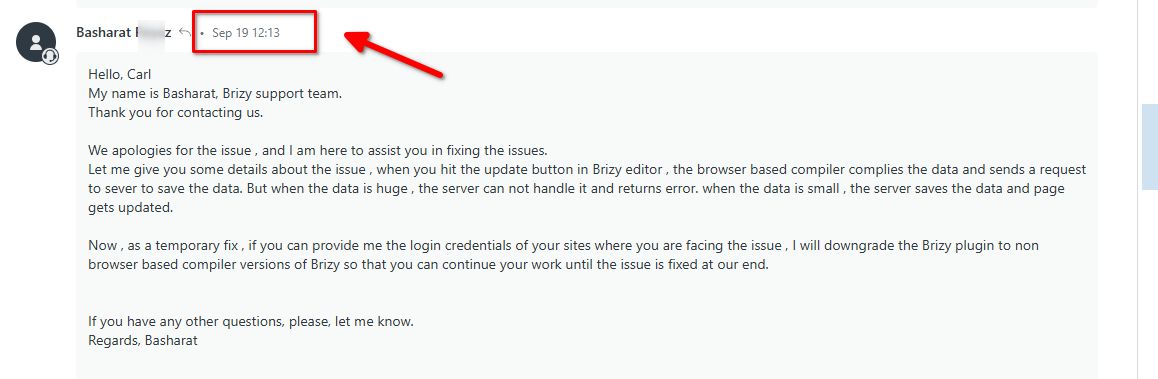
The email may have been filtered as spam, which is why you didn't receive it.
Please send your site credentials to communitysupport@brizy.io, including reference number 20740816821778 in the subject line. I will then forward the credentials to Basharat.
Best regards,
Ariel H.0 -
Please update your files showing that your team had already rolled back to the earlier version before you made that request. So, setting the site back to an earlier version is done...
My question: has the original issue been resolved, and if not, will I be notified when it is? Also, is there an eta on when this original issue will be resolved?
Looking forward to your response and thanks for the help.
0 -
Hi Carl,
Thank you for staying in touch.
The issue you're experiencing is unique to each website, so resolving it may require different approaches depending on the specific case. At this time, we don't have an ETA for when the original issue will be fully resolved, but rest assured, we will keep you informed in this support thread once it has been addressed.
We apologize for the inconvenience.
Best regards,
Ariel H.0 -
My question is specific to the below statement by KC George from two months ago. How will I know that the issue with Apache servers is solved? It has been months. I'm looking forward to being able to update my website. Standing by for your answer to this specific question. Thanks very much!
"Hi Carl,
The recent versions of Brizy has an incompatibility with Apache web server. We have rolled back Brizy to its previous versions to allow editing. Kindly retain these versions of Brizy until we have an update to fix this incompatibility."0 -
Hello Carl,
We later discovered that the error "This page needs a refresh. You've probably updated this page (or another page) in a different tab or browser." was caused by incompatibility with the default ModSecurity configurations. With the latest Brizy versions you can save your edits, by following the recommendations provided at https://support.brizy.io/hc/en-us/community/posts/22353994289170
If you have multiple websites to update Brizy, kindly apply the solution provided in the above thread in one of the websites and check if the issue resolves. Later you can repeat the same solution for other websites.
0 -
Hi KC George,
I just updated everything but Brizy (all plugs WordPress to 6.7, and theme) and site works with the same old version of Brizy. But when I update Brizy free & pro and try to simply open a page to edit it just sits and spins.... I can't even get a page to pull up to make an edit. I read through your above content and none of those recommendations are working. By the way, when I view the page it is missing headers and footers. I can't do anything about that, because I can't even open a page in Brizy editor let alone make any changes. It has been several months now with no resolution - a big confidence killer. I'd really like to get this fixed. Please help.
Update:
Some pages work in that I can open them, edit them & save the changes (progress). Header and footer also came back because I made a couple slight changes and updated which caused them to restore. The home page (Front Page) will not open at all in the editor. It just sits and spins. - I'm very close - please help me get this resolved.I added this code to the HT-access file and then things started partially working. I don't this code helped though because when I removed it I get the same result... Some pages work, but the Front Page will not even open.
# BEGIN Line too long fix
<IfModule mod_substitute.c>
SubstituteMaxLineLength 20M
</IfModule>
# END Line too long fix0 -
Hello Carl,
The recommended ModSecurity configuration parameter increases the maximum allowable http request size to allow saving of longer Brizy pages. If you are only able to save shorter pages and not longer ones, it implies that the ModSecurity directives have not been effectively implemented.
The above code you have added to the .htaccess file does not look right. These are the recommended ModSecurity configuration directives. Kindly replace the above code with this.
<IfModule mod_security.c>
    SecRequestBodyLimit 4194304
    SecRequestBodyNoFilesLimit 2097152
</IfModule>
After adding the above directives to .htacess file if you are unable to save longer Brizy pages, kindly request your hosting provider to add the below directives in the ModSecurity configuration file
SecRequestBodyLimit 4194304 # Limit request bodies to 4 MB
SecRequestBodyNoFilesLimit 2097152 # Limit non-file request bodies to 2 MB
If none of the above helps, kindly give us access to your WordPress Dashboard and cPanel. We will implement the changes for you. Please add a new user to your WordPress Dashboard and send the following details to our email: communitysupport@brizy.io
Support Forum link:
WordPress Admin URL:
Username
PasswordPleas also add a new user to your cPanel and send us these details
- login URL
- Username
- Password
Please let us know in this forum when you send us the email.
0 -
Thanks K C George. the email has been sent.
The site is fully functional at the moment, because everything but Brizy is up to date. Once Brizy is updated, the issues will present themselves for you.
0 -
Hello Carl,
Thanks for sharing your cPanel and WordPress login credentials. However, your email does not include the URLs for the cPanel and WordPress Dashboards. We tried to access westbrookadvertising.com with the credentials. It didn't work. We were unable to access your website. Please provide the cPanel URL and the WordPress Admin URL.
0 -
Thanks for that follow up. Email has been sent.
0 -
Hi Carl,
Thank you for your cooperation.
Upon checking, we noticed that your hosting firewall appears to impose a limit on the page length. We were able to save changes when the page had fewer than 10 blocks, but beyond that, GoDaddy's firewall seems to prevent the page from being saved.
This is demonstrated on this screencast - https://youtu.be/WlDtFDXpvzM
Could you please reach out to your hosting provider to check if this limit can be adjusted?
Best regards,
Ariel H.0 -
Hi Ariel. Thank you very much for the reply.
Important question and concern:Question: Why is this issue not happening to the same degree with the prior version of Brizy? As above stated, I am experiencing this issue on several sites when updating Brizy. Prior version 2.4.45 is not having this issue nearly as bad. I am able to open, edit & save all pages on Brizy prior version as they currently are, but when I upgrade Brizy there are pages I can't even open anymore. If I can't open pages, I can't make updates and save....
Concern: GoDaddy is likely to point the finger back at Brizy saying it is a developer issue/conflict, which is hard to argue with.
0 -
Hi Carl,
Thank you for the update.
The recently introduced Brizy compiler can sometimes result in larger HTTP requests when editing your page.This increased activity might occasionally be flagged by firewalls as unusual, which could lead to them blocking it.
To resolve this, I recommend contacting your hosting provider to review the firewall settings. They may need to simply whitelist your site or adjust the configuration to allow this activity, ensuring that you can update and save your pages without issues.
Best regards,
Ariel H.0
Please sign in to leave a comment.
Comments
30 comments