Unattend page behaviour

I use BRIZY PRO + ASTRA PRO.
To build clients' websites I often use a start site made coping a whole just-myself-made site of a different client of mine, to get lot of plugins a more things just made, and then modify.
Now I've a site of mine that I CANNOT modify anymore, as out of the blue when I open the Brizy editor I find the old content coming from previous site, but... online the same page shows the updated content !! Now, why I cannot edit the updated content anymore???? And we I find in the Brizy editor the super-old content ????
I'm totally blocked as in home page I've lost header and footer after last Brizy updates (as I explained in a previous post) but I cannot modify the page, as if I try to save I get a quite different home page !!
I give you admin access to the site to check:
CHECK THE ONLINE HOME PAGE https://www.easywebsolutions.it (scrolling down)
AND COMPARE IT WITH THE SAME PAGE SHOWING IN BRIZY EDITOR
note: the online site now is without header and footer too as explained
-

Hi Enrico,
Thank you for reaching out to us. We managed to update your pages and fixed the header and footer. Unfortunately, some images are missing in the middle of the page. They're also not visible in the editor. Please try to re-upload those images.
If you can't edit your pages on your end, please try clearing your browser cache or try using another browser. You might also consider temporarily disabling third-party plugins that you don't need while updating your pages, such as WP Cerber Security, NinjaFirewall, WP Optimize, Complianz | GDPR/CCPA Cookie Consent, and Caldera Forms Anti Spam, as they may interfere with the update process. You can re-enable them once you have successfully published your pages.
Please try this and let me know if you have any further questions.
Best regards,
Ariel H.0 -
PLEASE READ CAREFULLY MESSAGES BEFORE ACTING AND REPLAYING !!
What you've done to restore header and footer
is EXACTLY what I've NOT done because it results
in restoring an OLD HOME PAGE OVERWRITING THE CURRENT HOME PAGE
as I've explained in previous message.As you've overwritting the real home page,
now I was obliged to restore the whole-site backup to get back online the real home pageMAIN POINT IS:
there is no way to EDIT THE CURRENT HOME PAGE !!
So, what you say is totally wrong:
there are NO MISSING IMAGES, problem is quite different.The real matter is:
when you go on Brizy editor what you get is
TO EDIT a QUITE DIFFERENT HOME PAGE
INSTEAD OF TO EDIT THE HOME PAGE DISPLAYED ONLINE!!So what you have done is simply restore the previous home page overwriting the online one, that is exactly the unexplicable behaviour for I've opened this ticket.
To be aware
JUST SCROLL DOWN THE ONLINE HOME PAGES AND THE SAME PAGE OPENED IN BRIZY EDITORIt's so easy to check:
- open in a your browser's tabs the address: https://www.easywebsolutions.it/ AND SCROLL DOWN
- open in a new tab the address: https://www.easywebsolutions.it/adminareawp and LOG IN
- open the home page with Brizy editor AND SCROLL DOWN: PAGES ARE QUIT DIFFERENT EXCEPT THE TOP SLIDESHOW
- compare (SCROLLING THE 2 TABS!!!!) what you see in these 2 tabs
Waiting for an answer, cheers
Enrico
0 -
Hi Enrico,
I apologize for the inconvenience. Could you also please restore the previous user account and password? Alternatively, you can provide us with new credentials to log in to your site and set the language to English.
Best regards,
Ariel H.0 -
Hi Ariel.
As for your request, I've set up English language and authorized admin login with previous credentials.
Have a good day
Enrico0 -
Hi Enrico,
Thank you for your cooperation.
We're also puzzled by this issue. Was this website migrated from another hosting provider?
In any case, could you please provide us with temporary access to your hosting control panel so we can take a closer look into this issue?
I am looking forward to your response.
Best regards,
Ariel H.0 -
Hi. No, site was not migrated from another hosting provider. I use Serverpilot as hosting control panel, there is almost nothing you can do there, you can just switch PHP version, that is 7.3 with this site for compatibility with any plug-in. Do you want Serverpilot access anywhere?
0 -
any news ? Do you want Serverpilot access ?
0 -
Hi Enrico,
Thank you for the update.
Could we request your permission to download a copy of your website to our local test environment for further investigation? This server operates locally and is not accessible from external sources.
I am looking forward to your response.
Best regards,
Ariel H.0 -
Yes I give you the links to download site's backup copy.
Rebuild an exact copy will be super easy (performed by Duplicator pro):- set up a test domain on your server, for example puzzletest.brizy.io.
This domain must be normally reachable from any browser
- OR setup it in localhost; bottom line is to open INSTALLER.PHP from your browser - copy the 2 files (I send you in links in next lines) in your test site's root directory
- launch 20240815_easywebsolutionsit_installer.php from your browser and follow instructions
Here are links to files to download:
Let me know
0 - set up a test domain on your server, for example puzzletest.brizy.io.
-
Hi Enrico,
Thank you for your cooperation.
We're now looking into this issue; I will get back to you as soon as I have any new updates.
Best regards,
Ariel H.0 -
Hi, so... any news ?
0 -
Hi Enrico,
I apologize for the delay. Please allow us some additional time to inspect your site. I will reach out to you as soon as I have any new updates.
Best regards,
Ariel H.0 -
Hi, still there is not any news about this issue?
0 -
Hi Enrico,
Unfortunately, this is a complex issue. The backup file we downloaded did not assist either, as it reverts the page in the editor whenever changes are made. In any case, this issue is currently in progress and may take us some more time. I will contact you once I have any new updates.
Sorry for the inconvenience.
Best regards,
Ariel H.0 -
Hi Enrico,
Thank you for your patience.
Unfortunately, we were unable to determine the exact cause of this issue. It is possible that the section of the page was a global block that got deleted, but we cannot confirm this for certain. Nevertheless, we have reconstructed the page at https://www.easywebsolutions.it/new-home. This block is also available in your Saved Blocks if you want to import it to your homepage. You may need to adjust the animations as needed.
Feel free to reach out if you have any further questions.
Best regards,
Ariel H0 -
Hi, sounds really strange that neither you are able to explain this behaviour.
This means that will always be possible for us Brizy's users to do something that out of the blue breaks the hard work we made to develop the site whitout way back, really this is not so tranquilizing...
So I think you shoud investigate better until you'll be able to reproduce the issue, so you will be able to apply a stable fix.
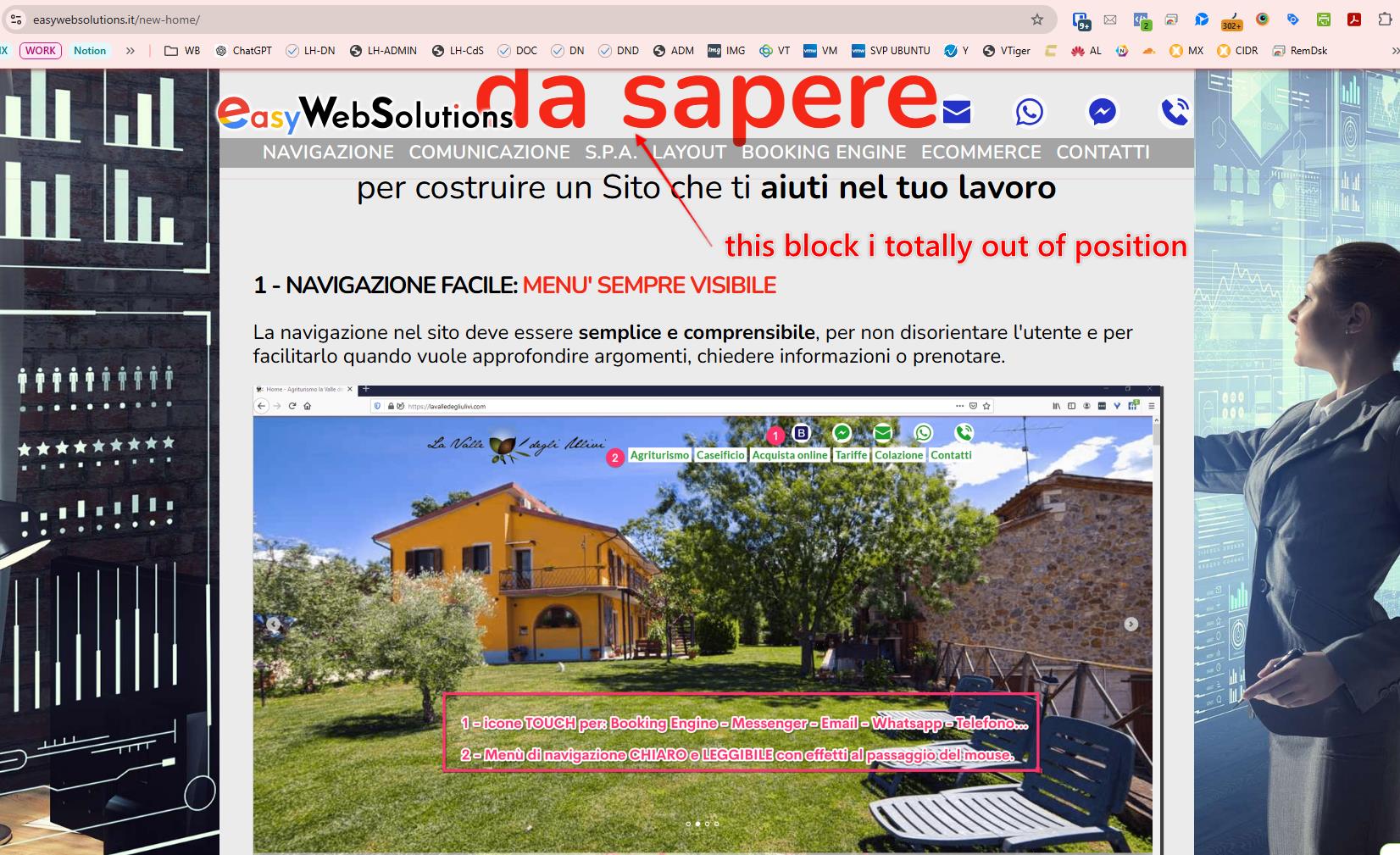
More, the page you "reconstructed" it's quite different:
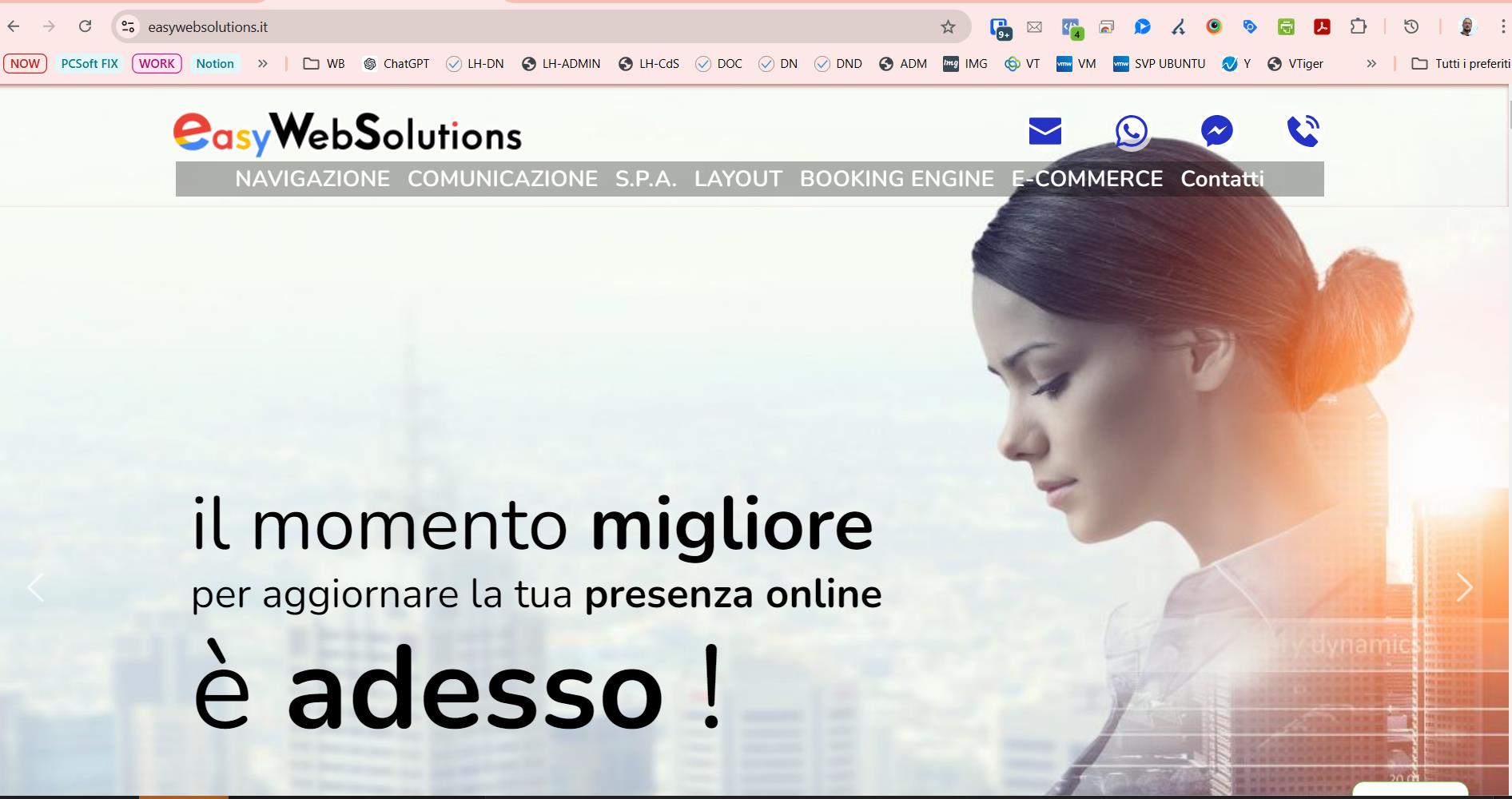
This is the orginal one (with missing header and footer but all the remainig is OK:
this is the NEW-PAGE:
 0
0 -
....wait a moment... Here is any misunderstanding... what I see now is that the site seems fixed, but I've done NOTHING to fix it, I've not applied the NEW HOME. It seems you fixed it without being aware of this...
So, thanks in the meantime, but... Did you find any fix to apply to next Brizy's release ?0 -
Hi Enrico,
I understand your concern, and I wish I could offer a clear explanation for why this occurred. However, without direct access to the server, it’s difficult for us to troubleshoot the issue. Unfortunately, this is the first time we’ve encountered this problem, but we’ll keep it on record and monitor for any similar reports from other users.
If you need further assistance, please don’t hesitate to reach out.
Best regards,
Ariel H.0
Please sign in to leave a comment.
Comments
18 comments