Unable to Save or Publish

WP Version: 6.61
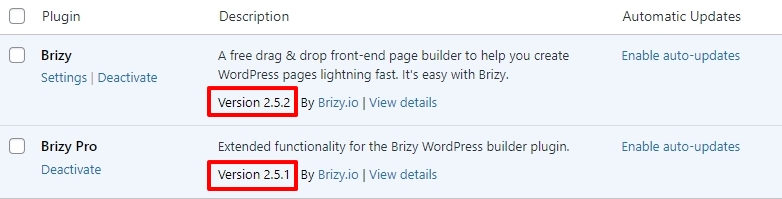
Brizy: 2.5.2
Brizy Pro: 2.5.1
PHP version: 8.1.29
While I am able to edit and save other brizy pages, I have not been able to update my homepage.
Troubleshooting
- After attempting to recreate page using saved blocks, I have identified inability save on blocks that have youtube links,
- When trying to recreate a block from scratch failure to save when adding nested rows and columns.
-

Hi Joseph,
Thank you for contacting us.
Unfortunately, I am unable to reproduce the issue as described. I can update and make changes to a layout imported from saved blocks without any problems. It is possible that I am approaching it differently. Could you please provide us with a screencast to demonstrate the issue?
In the meantime, we have recently encountered users experiencing similar issues, being unable to update their pages. If you have WordFence installed, please consider trying the following steps to resolve the issue.
1. In the WordFence plugin settings, go to Firewall;
2. Turn on Learning Mode - https://imgur.com/TucapoH;
3. Go back to your Brizy page, embed the code and update the page.
4. After completing the changes, go back to the WordFence settings and re-enable the 'Enabled and Protecting' option.If you don't use WordFence, please also verify if you have access to temporarily disable the Firewall/Mod Security in your hosting console. This should help resolve the issue.
Please try this and let me know how it goes.
Best regards,
Ariel H.0 -
Hi Joseph,
Thank you for your cooperation.
Could you please check if you have access to temporarily disable ModSecurity in cPanel?
ModSecurity is a security software on your server; however, sometimes it may occasionally flag Brizy as a false positive threat. After this, please check if you can save your changes.
https://www.plothost.com/kb/enable-disable-modsecurity-domains-cpanelIf the issue continues, please also provide us temporary access to cPanel so we can further investigate the issue. Kindly send the credentials to communitysupport@brizy.io.
Best regards,
Ariel H.0 -
Hi Ariel,
I appreciate your response.
- I have no ModSecurity settings in my cpanel and I also do not have wordFence installed.
- I have also uploaded two screen recordings (shared via email):
- of my homepage which I have not been able to edit
- another page where I have been trying to recreate using saved blocks not able to save
Important to note, all these issues have occurred subsequent to my most recent update of Brizy
0 -
Hi Joseph,
Thank you for the update.
I understand that the issue occurred after the recent update. We suggested disabling ModSecurity as this has resolved the issue reported by other users. We will need access to cPanel so we can check the server logs for clues as to why this is occurring on your website. We only received the video in your last email; please also send your cPanel credentials so we can further investigate the issue.
Best regards,
Ariel H.0 -
Hi Ariel
Unfortunately, we had to rollback your brizy updates to be able to edit the website. I believe there is an issue with the brizy updates, if your changelog requires clients to made additional system changes I think that should be QA again to ensure it is fit for release.
Thank you for your assistance.
Will check back in a month, to see if it is resolved.
0 -

Hi Joseph,
With Brizy 2.5.2 and Brizy Pro 2.5.1, we have launched a new compiler. You can read more about it here https://www.brizy.io/new-compiler-200-loading-performance-boost To activate the new compiler, you must update to these versions.
A security software flagging a legitimate Brizy request as a potential threat is not a bug with a Brizy. As the security systems get smarter and more intelligent, it will make lesser misjudgements and will be more accurate. The only remedy right now is to temporarily disable ModSecurity to allow Brizy editing.
0 -
Hi KC George and Ariel
My hosting does not have ModSecurity running as indicated above. The updates are also causing same issue on another domain.
I appreciate your assistance, but what are my other options?Ariel,
I have reinstalled the updates, appreciate resolving this so I can implement for the other websites.0 -
Hi Joseph,
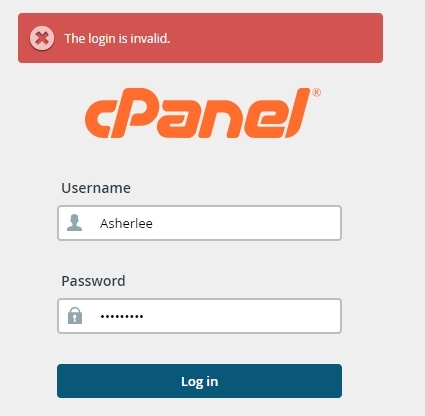
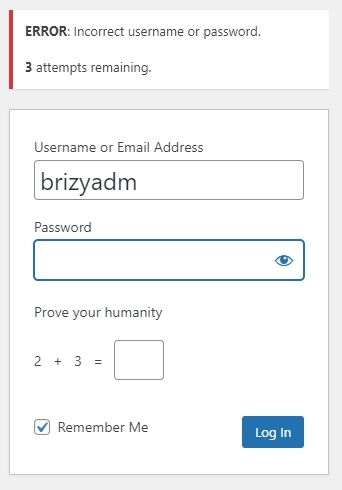
I am seeing "The login invalid" and "Incorrect username or password" errors and could not access your cPanel and your WordPress Dashboard. Kindly check the credentials you had sent.
 0
0 -
Hi Joseph,
Thank you for your cooperation.
From my observation, the issue seems to be linked to pages with numerous page revisions. Additionally, you may need to optimize your database. It's worth noting that this problem does not occur on newly created pages.
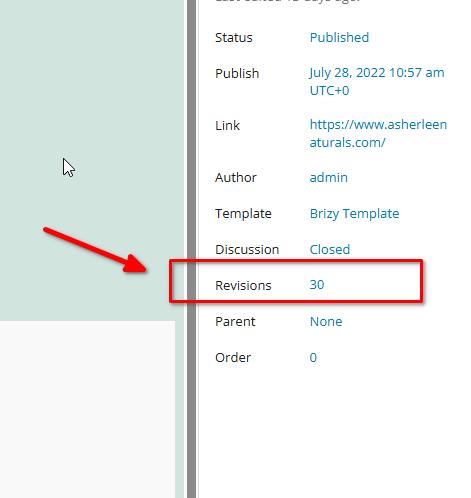
To address this issue, I recommend trying the steps outlined in this link to see if it resolves the issue:
https://www.elegantthemes.com/blog/wordpress/how-to-manage-wordpress-revisions-to-optimize-site-performanceIn the above article offers a manual method of limiting page revisions using PHPMyAdmin, or you can opt for WP Optimize, which is simpler to operate.
Please give this a try and inform me of the outcome.
Best regards,
Ariel H.0 -
Hi Ariel,
Really appreciate the support thus far, please note my actions as per your instructions I followed your recommendations and cleared the revisions with WP Optimize. Unfortunately this has not resolved the issue.
You will note in my very first post, I did indicate I was able to create a new page, however, the following were my troubleshooting findings:
- After attempting to recreate page using saved blocks, I have identified inability save on blocks that have youtube links
- When trying to recreate a block from scratch failure to save when adding nested rows and columns.
So the ascertion that new pages can be created is taken, but there are issues I am still experiencing since the recent update. When I rollback the update, I no longer experience these new issues.
0 -
Hi Joseph,
I am unable to replicate the issue you are facing at my end. Kindly see my test at https://jmp.sh/lKpYnAMM
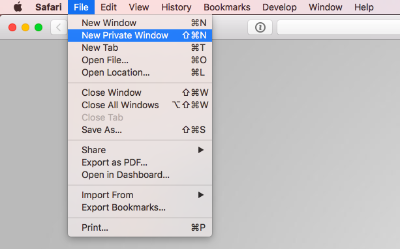
Kindly sign into your WordPress Dashboard from a new private (incognito) window of your browser and check if the issue persists. Kindly also try to update your pages using alternate browsers and check if that helps.
 0
0 -
Hi KC George
Thank you for responding. I believe, I shared a screen recording of my experience prior. Nevertheless, as guided, please see recording of my attempts to edit homepage/default browser is edge, in private/incognito mode.
Screen Recording 2024-08-25 at 11.42.43 PM.mov
As also indicated when I try also to recreate homepage and the instances I have experience failure is saving and publishing. See video below
Screen Recording 2024-08-26 at 12.25.55 AM.mov
Kindly note, when I rollback brizy updates I am able to resume editing (primarily homepage) without failure.0 -
Hi Joseph,
Thank you for the update.
We encountered this issue while inspecting your site.
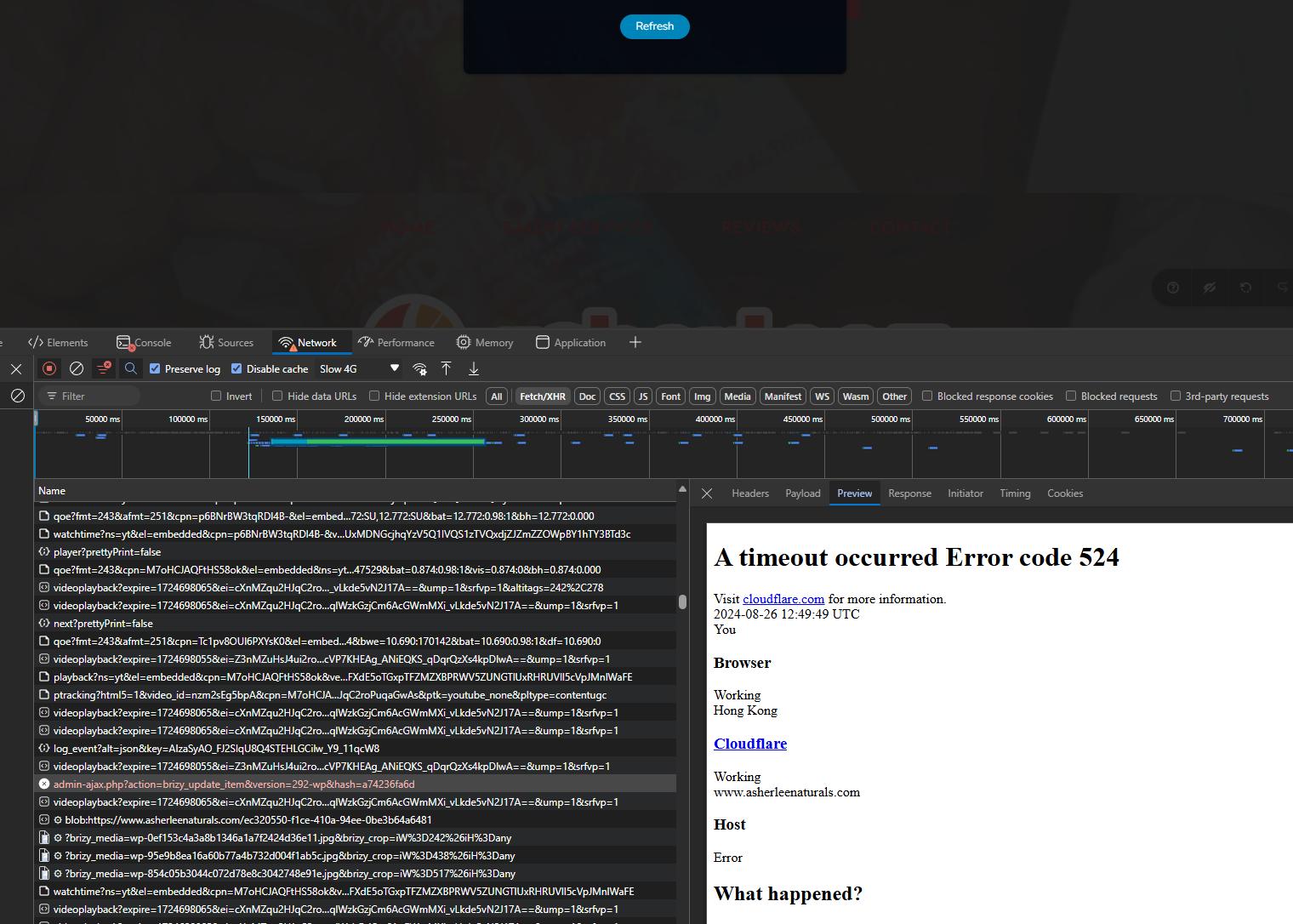
Could you also please enable Development mode in CloudFlare following the steps on this link:
https://developers.cloudflare.com/cache/reference/development-modeKindly inform us once this is done so we can proceed with further investigation into this issue.
Best regards,
Ariel H.0 -
Please note I have turned on Developer mode on the cloudfare setting.
0 -
Hi Joseph,
Thanks for the update.
Unfortunately, we have lost access to your site and cPanel with the credentials provided. If the issue persists, kindly grant us access to your site and cPanel so we can continue investigating the issue.
Best regards,
Ariel H.0 -
Hi Ariel,
No changes were made to the access credentials. In fact, I was able to successfully sign in both portals.
Please try again!
0 -
Hi Joseph,
Apologies for the confusion. We made attempts to access your site with previously incorrect credentials.
I can verify that this issue does not occur in previous versions of Brizy by configuring a staging site on your server at /staging, where I have installed the older versions. Kindly keep it there for comparison purposes in case we need to escalate the issue.
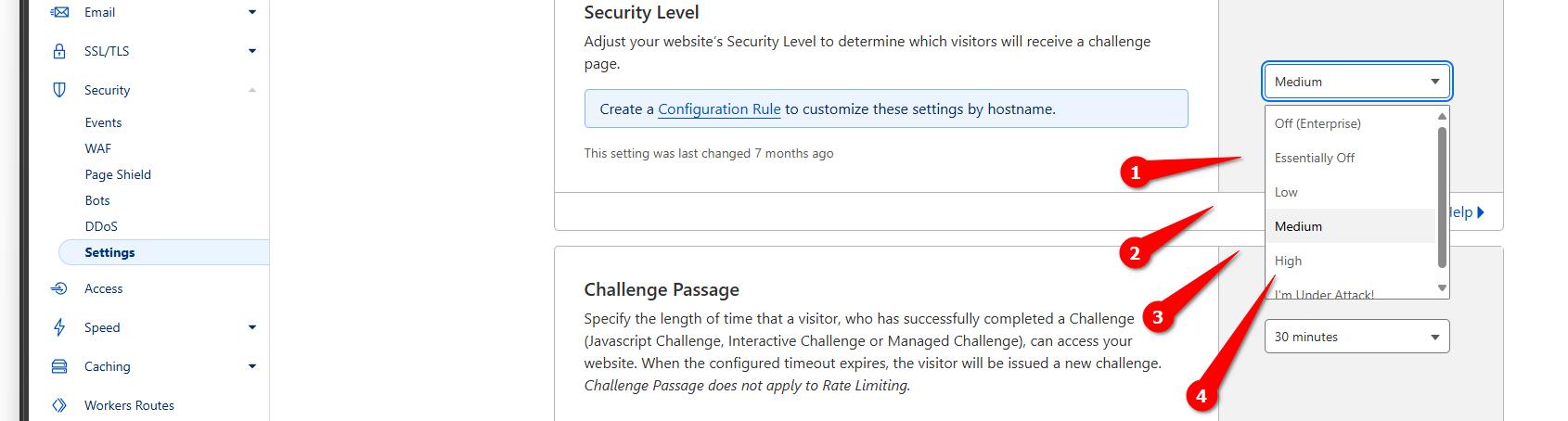
In the meantime, please review and adjust your Cloudflare settings. Sometimes, reducing the security level or temporarily disabling certain features can aid in troubleshooting the issue.
Start by setting the security level to 'Essentially Off,' visit your page, and check if the issue persists. If not, gradually increase the security level to test for the problem. Continue this process until you reach the highest security level where the issue is no longer replicated.
If you have any questions or need further assistance, please don't hesitate to reach out.Best regards,
Ariel H.0 -
Hi Ariel,
In an effort to remove cloudflare as a possible reason we have not been able to successfully update our website. We have since moved away for troubleshooting.- We are still unable to publish to the website.
- We have also setup a fresh install of wordpress and install of brizy and we are unable to update a fresh install. What is going on with Brizy?
0 -
Hi Joseph,
I apologize about the issues you’re experiencing.
We’ve temporarily rolled back your site to an earlier version of Brizy and Brizy Pro where the issue did not occur.
With your permission, I would like to download your site and replicate the issue on a test environment to help us determine if it's related to any server limitations.
Best regards,
Ariel H.0
Please sign in to leave a comment.
Comments
19 comments