HELP!! Page needs a refresh! CRITICAL BUG!

Help see above's quick help!!
You have some bug in one of the last versions! all of my 30 website projects can no longer be updated, there is always this stupid and super annoying hint that I should refresh the website etc. I have ALWAYS had the Wordfence Firewall running and it used to ALWAYS work correctly. As already listed in the forum, this annoying error is piling up. Of course, I've already tried firewall in learning mode etc. doesn't help. And besides, in the past it all went flawlessly. Please provide quick and competent help. Feel free to give you the access data for a project. I'm really upset, I paid for it and then such a mistake!! My customers want to be able to edit all the pages themselves. Thanks for fixing it quickly. Where should I send the admin accesses if necessary?
-

Hi Uli,
Kindly add a new user to one of your website's WordPress Dashboard and send the following details to our email: communitysupport@brizy.io
- Community Post link: https://support.brizy.io/hc/en-us/community/posts/20613355899154
- WordPress Admin URL:
- Username
- Password
Please let us know in this forum when you send us the email.
0 -
Hello George, just for your information: with a downgrade to Brizy Pro 2.38 and Brizy Free 2.45 everything works without any problems. You don't have to change anything about the firewall etc. This means it has to do with your plugin in the current version. Since this affects many people, I ask for a quick update of the incorrect version.
0 -

We're experiencing the same issue. Is there a global fix for this issue?
0 -

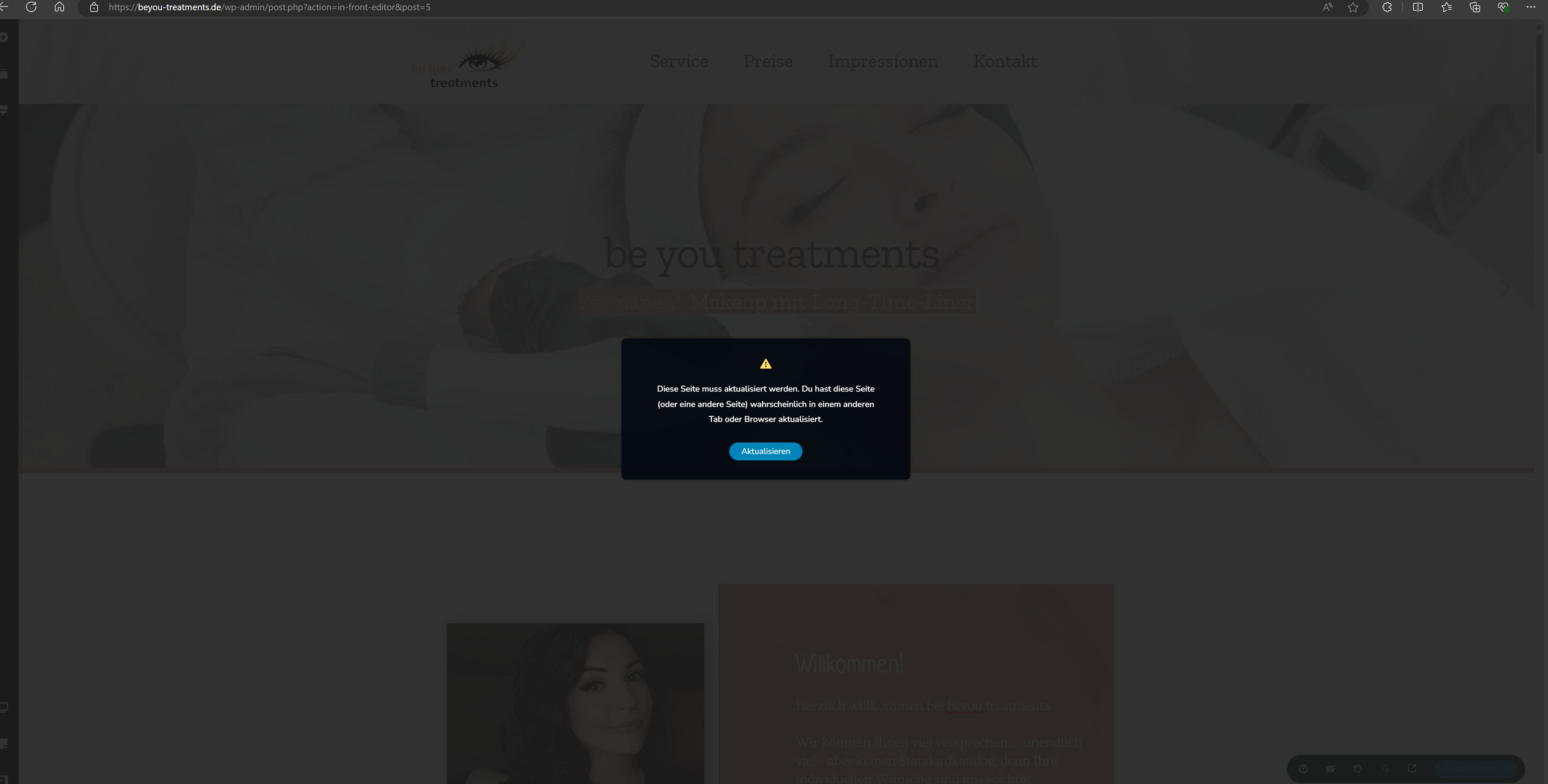
This page needs a refresh. You’ve probably updated this page (or another page) in a different tab or browser, im getting this error, how to fix?
0 -

I had the same issue on one of my sites. I had to use Wordfence in learning mode. Then purge any and all cache/cdn that I was using. It took a few purges before everything worked again.
0 -
Hello Uli and Kishore,
With the Brizy 2.5.2 and Brizy Pro 2.5.1, we have launched a new compiler. You can read more about it at https://www.brizy.io/new-compiler-200-loading-performance-boost To activate the new compiler, you must update to these versions.
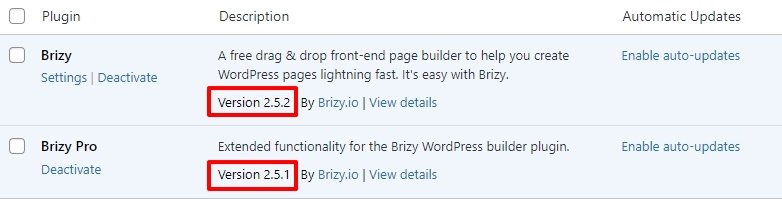
Once you update the plugins, you must allow Wordfence to learn that Brizy editing is safe and does not pose a security threat by following the steps below.- In your WordPress Dashboard under WordFence - All Option , navigate to "Firewall Options"
- Enable Learning Mode - https://jmp.sh/dXzpSFmk
- Return to your Brizy page, make some minor changes, and then update the page
- Once done, return to the WordFence settings and re-enable the "Enabled and Protecting" mode
Rolling back to previous version may give you a temporary relief, but it is not a recommended solution. You can never update Brizy in the future if you follow this approach.
0 -
OK, how long does the firewall have to stay in learning mode?
0 -
The firewall can stay in learning mode just for a few minutes. If the learning mode helps to edit Brizy pages, you can turn it off immediately after editing the first page.
0 -
Unfortunately it doesn't work - first it worked (in learning mode) then firewall switched to protection there it worked too - now 2 hours later it doesn't work anymore :( Not even in Learning Mode! That's really super shit!!! Please help can you (I have over 30 web customers) take a look at one and fix this crap once and for all? SORRY BUT IT SUCKS
0 -
Hi Uli,
Would you kindly forward the WordPress credentials for one of your projects in the format that I have requested in my first comment above?
0 -
okay, email send
0 -
Hello Uli,
I have enabled the learning mode for the WordFence firewall and is disabled. Kindly check if you are able to make edits to your project and save your work.
0 -
 0
0 -
Unfortunately, it still doesn't work :(
0 -
Hi Uli,
Please have a look at this screen recording https://jmp.sh/aq14YqCJ
0 -
hey george, the following problem I watched your video - and then tried it again on the beyou-treatments website. it worked. I then went to another customer's website www.fahrwerk-holzkirchen.de and wanted to edit something and there was a refresh error. Now I'm back on the beyou-treatments.de site as a test and boom! The error comes back now!! what could this be, what should I do? are there any commands? e.g. ipconfig /renew in windows command prompt? please for help. p.s. I'll give you the same access to www.fahrwerk-holzkirchen.de.
0 -
Hi Uli,
Looks like you are currently logged in to https://beyou-treatments.de/. Can we take a look at this issue on this website?
0 -
Yes please look at both sides (fahrwerk-holzkirchen.de) as well as (beyou-treatments.de)
I'm now logged out everywhere0 -
Hi Uli,
I have deactivated the Wordfence Assistant plugin in beyou-treatments.de. Can you please check if you are able to edit your pages and save your work with this plugin deactivated?
0 -
and again its the same problem. it worked at the first time but then...
0 -
then went to another customer's website www.fahrwerk-holzkirchen.de and wanted to edit something and there was a refresh error. Now I'm back on the beyou-treatments.de site as a test and boom! The error comes back now!! what could this be, what should I do? are there any commands? e.g. ipconfig /renew in windows command prompt? please for help. p.s. I'll give you the same access to www.fahrwerk-holzkirchen.de.
0 -
Hi Uli,
I am unable to reproduce the issue at my end.
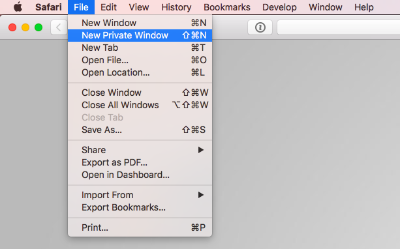
Sometimes this error could happen due to cached images and files in your browser. Kindly repeat the test from a new private (Incognito) window of your browser or from an alternate browser and let us know if the issue persists
 0
0 -
okay, now i try beyou-treatments.de and it worked.
pls can u now check www.fahrwerk-holzkirchen.de?
0 -
Hello Uli,
Have you shared with us credentials for fahrwerk-holzkirchen.de? If you have not, kindly send us these details
- Community Post link: https://support.brizy.io/hc/en-us/community/posts/20613355899154
- WordPress Admin URL:
- Username
- Password
Please let us know in this forum when you send us the email.
0 -
You already have the access data - they are the same as for beyou-treatments.de
0 -
Hi Uli,
I am able to save pages at my end. Kindly see my test at https://jmp.sh/lizkp9Kx
Kindly sign into your WordPress Dashboard from a new private (Incognito) window of your browser or from an alternate browser and check you are able to save your work
0 -
Hello, can you please check again with Fahrwerk Holzkirchen whether it still works? I'm getting the stupid error message again, even though the firmware is in learning mode. Really, really bad!!
0 -

Hi Uli,
Thank you for staying in touch.
Could you please resend your site's credentials so we can investigate the issue?
Please share the following details with us at communitysupport@brizy.io:- Community Post link: https://support.brizy.io/hc/en-us/community/posts/20613355899154
- WordPress Admin URL:
- Username:
- Password:As a precaution, please create a full backup of your site.
In the meantime, have you tried clearing your browser cache or using a different browser to edit your pages?
Best regards,
Ariel H.0
Please sign in to leave a comment.
Comments
28 comments