blog snippat option not showing in brizy wordpress

Hi, When i am trying to add my blogs posts into homepage in elements the posts or archive is not showing Please check this recording: https://www.awesomescreenshot.com/video/30208807?key=9ca76f7f23d8f4ad5031652d0192a0b8
-

Hi Salman,
Thank you for getting in touch.
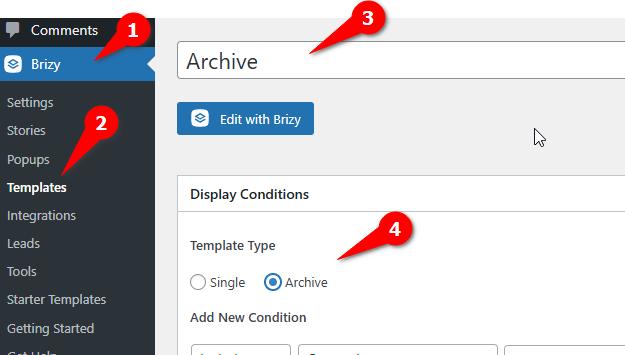
The Archive element will only appear in the sidebar if you are working in a Dynamic Template.
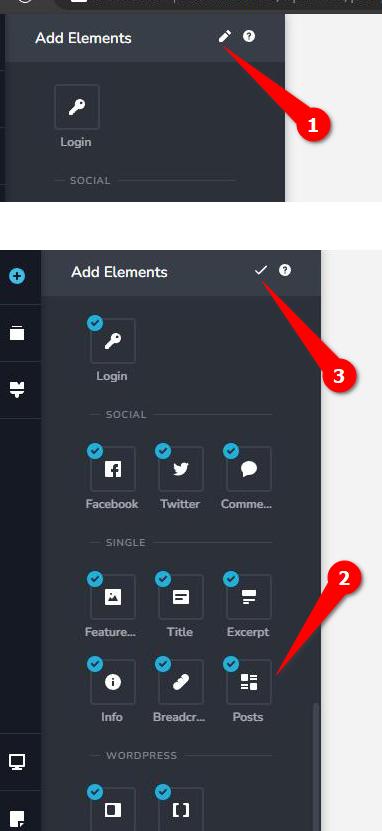
You can access the Post element on any page, but it may sometimes be hidden. To locate it, click on the pencil icon at the top, ensure that the post element is selected, and then click on the check icon to close it.
Upon reviewing your screencast, it seems that Brizy Pro is not activated, as indicated by the red circles next to the elements in the sidebar, indicating that the Pro features are currently inaccessible. To access these features, you will need to install and activate Brizy Pro.
If you have any additional questions, please do not hesitate to inform us.
Best regards,
Ariel H.0
Please sign in to leave a comment.
Comments
1 comment