Unable to Deactivate Brizy Pro License on nconstruction.pl

Hi Brizy Support Team,
I hope this message finds you well.
I am reaching out regarding an issue I am facing with deactivating the Brizy Pro license on my website nconstruction.pl. I have recently acquired a new license and would like to update the current code to the new one for the Pro version.
However, despite multiple attempts, I am unable to deactivate the existing code. Could you please guide me through the process or provide any assistance to resolve this issue? Your help would be greatly appreciated.
Thank you in advance for your support.
Best regards,
Paweł Nowicki
-

Hello Paweł,
The procedure to deactivate a Pro license from a project is quite simple. Have a look at the screen recording at https://jmp.sh/lk2ONQxy
When you say, "despite multiple attempts, I am unable to deactivate the existing code" what do you mean? Can you give us more details?
0 -
However, when I press the deactivation button, I receive an error message stating 'cURL error 28: Failed to connect to www.brizy.io port 443: Connection timed out '.
On the Brizy site, I pressed disable, and now when I try to press delete license, I get the message 'This license cannot be deleted.'
0 -
Hi Paweł,
A Brizy Pro license key that you had was generated using your previous subscription to the Brizy PRO Personal plan. This license key was disabled as you have upgraded to the Freelancer WP plan. I have now deactivated this license from your account.
To fix the error "cURL error 28: Failed to connect to www.brizy.io port 443: Connection timed out" kindly request your hosting provider to upgrade cURL version to 8.1.2 or above. Then try deactivating the license key again.
0 -
I updated the version to 8.2, but the message still appears cURL error 28: Failed to connect to www.brizy.io port 443: Connection timed out and I cannot deactivate the license.
0 -
Hi Paweł,
You may need to investigate this issue with the help of your hosting provider. Have a look at this article for more troubleshooting steps to fix this error https://www.bluehost.com/blog/how-to-fix-curl-error-28-connection-timed-out-in-wordpress/
0 -
Please provide the address of the server to which this plugin connects
0 -
Hi Paweł,
The cURL access is to the URL https://www.brizy.io/ port 443. The IP Address of the server is 192.124.249.103
0 -
A simple CURL test indicates that the server might be blocked by their firewall: https://nconstruction.pl/test-curl.php
This problem does not occur with other addresses, as shown in the test. Additionally, I performed another query directly on the server, and the connection also failed.
nconstru@web9:~$ wget www.brizy.io
--2024-08-07 19:26:37-- http://www.brizy.io/
Resolving www.brizy.io (www.brizy.io)... 192.124.249.103
Connecting to www.brizy.io (www.brizy.io)|192.124.249.103|:80... failed: Connection timed out.
Retrying.--2024-08-07 19:26:41-- (try: 2) http://www.brizy.io/
Connecting to www.brizy.io (www.brizy.io)|192.124.249.103|:80... failed: Connection timed out. 0 -
Hi Paweł,
Should we whitelist your IP 49.12.127.90 on our Firewall? Do you know if you have a firewall setup at your hosting end? You may also need to whitelist Brizy IP 192.124.249.103 in your hosting firewall.
0 -
Yes is our IP. Please add too this IP:
116.202.230.15
49.12.127.90
157.90.89.27
162.55.91.242
178.63.247.179
88.99.51.2370 -
Hi Paweł,
We have whitelisted the above IPs in our firewall.
0 -
Hi,
I have error message cURL error 28: Failed to connect to www.brizy.io port 443: Connection timed out
It must be other problem.
0 -

Hi Paweł,
It appears that the connection timeout error you're encountering when running the 'curl' command is specific to your server's configuration. Since the same command works successfully on a local machine, the problem is likely related to network restrictions, firewall rules, or DNS settings on your server.
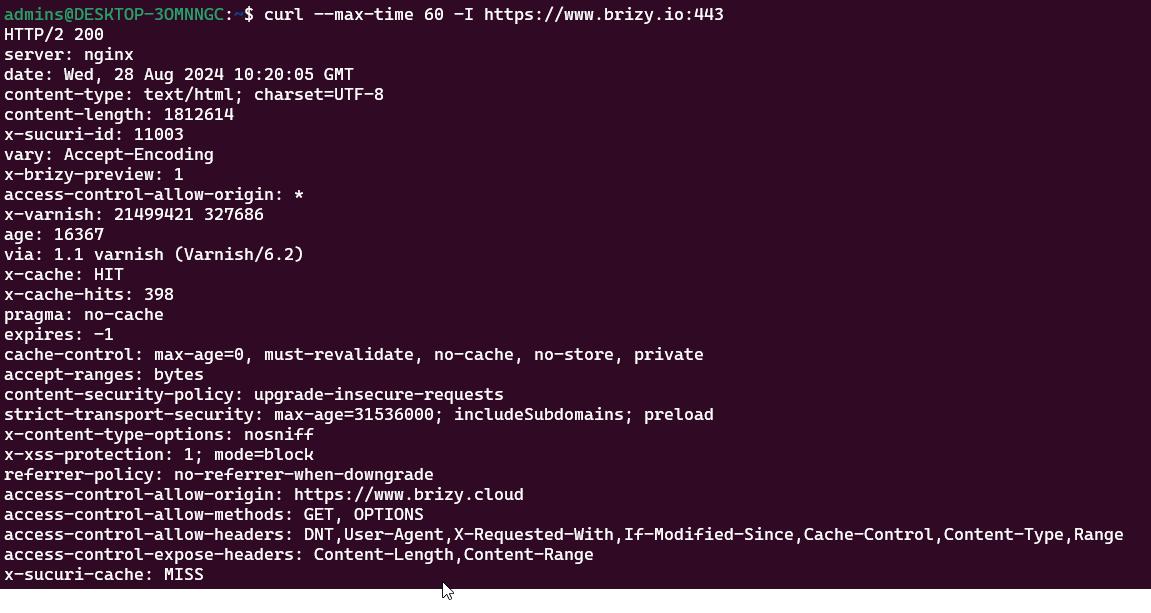
We recommend checking your server’s network settings and firewall rules to ensure that connections to external sites, particularly on port 443, are not being blocked. Additionally, verifying DNS resolution on the server might help resolve the issue.
If you need further assistance, please let us know.
Best regards,
Ariel H.0
Please sign in to leave a comment.
Comments
13 comments