Mobile Spacing on Brizy Pro Wordpress

Hi guys (and gals),
No idea why, but the mobile version of a site I'm creating is FULL of extra white space. HUGE amounts of it.
While I can get rid of it, I have to click into EACH element and reduce the padding and margins.
What am I doing wrong that this excessive white spaces in there at all? I'm copying my friend site (in convertri) and his mobile site is tight and looks great. Mine looks like every element is in an ice rink.
what can I do other than spend hours, going thru the every element of every page of 30 page site to reduce the unnecessary white space Brizy is putting in there.
Appreciate any help.
Thanks,
Alfred
-

Hi Alfred,
Thank you for reaching out to us.
Could you please provide us with the URL so we can inspect it?
In the meantime, if you have any cache plugins or server-side caching enabled, please try flushing the cache or temporarily disabling it to see if this resolves the issue.
Best regards,
Ariel H.0 -
Hi Ariel,
Thanks for the quick response.
The home page I've been painstakingly adjust padding and margin so it's pretty much done:
https://offers.qualifiedcashoffer.com
However, the rest of other pages I have yet to work on. (dreading it!)
Take your pick. (while they look ok on desktop, mobile is the spacing issue
Here is one example:
https://offers.qualifiedcashoffer.com/frequently-asked-questions/
Thanks again for your help Ariel. I'm hoping it's something I'm doing. I'm invested in Brizy....
Alfred
0 -
Hi Alfred,
Thank you for the update.
The issue seems to be related to LiteSpeed Cache. Please try clearing the cache or temporarily disabling the plugin to see if this resolves the issue. Additionally, please update Brizy to version 2.5.2.
If the problem persists, kindly provide us with temporary access to your WP Admin page for further inspection. Please add us as an Admin user to your WordPress Dashboard and send the following details to: communitysupport@brizy.io.
Community Post link: https://support.brizy.io/hc/en-us/community/posts/20489514849810
WordPress Admin URL:
Username:
Password:As a precaution, please make a full backup of your site.
Best regards,
Ariel H.0 -
Hi Ariel,
I've purged the cache, even disabled the plugin. I've updated Brizy (That update came in yesterday as I always keep all my plugins, especially Brizy, updated.
Same issue as you can see from the screenshot below. I will send temp access privately (and backup my install first).
Thanks,
Alfred
0 -
Hi Alfred,
Thank you for your cooperation.
The credentials do not seem to work. Could you please review and send them again?
Best regards,
Ariel H.0 -
Hi Alfred,
After clearing the LiteSpeed cache, the mobile view seems to be functioning correctly now. This is demonstrated on this screencast - https://youtu.be/JgMrJu7ezW4
Please verify from your end and consider clearing your browser cache or switching to another browser if you continue to see the excessive white spaces.
Best regards,
Ariel H.0 -
Ariel,
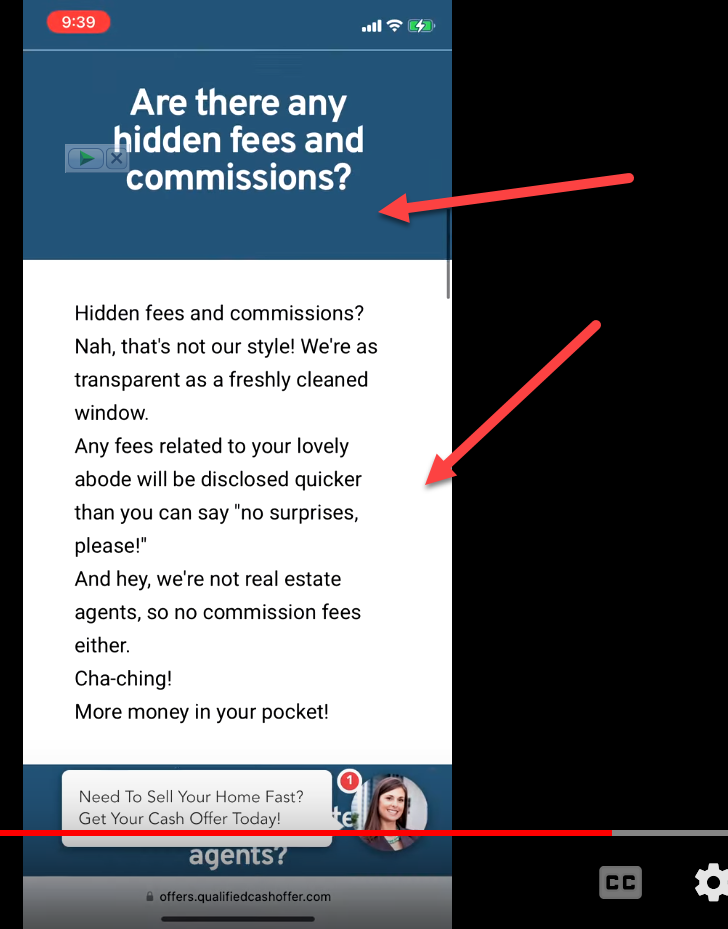
Thanks for the video but you picked the home page (which I had already manually removed the extra space and mentioned in my previous reply).
The FAQ page CLEARLY stillhas the spacing issue.
So, nothing has really been fixed.
 0
0 -
Hi Alfred,
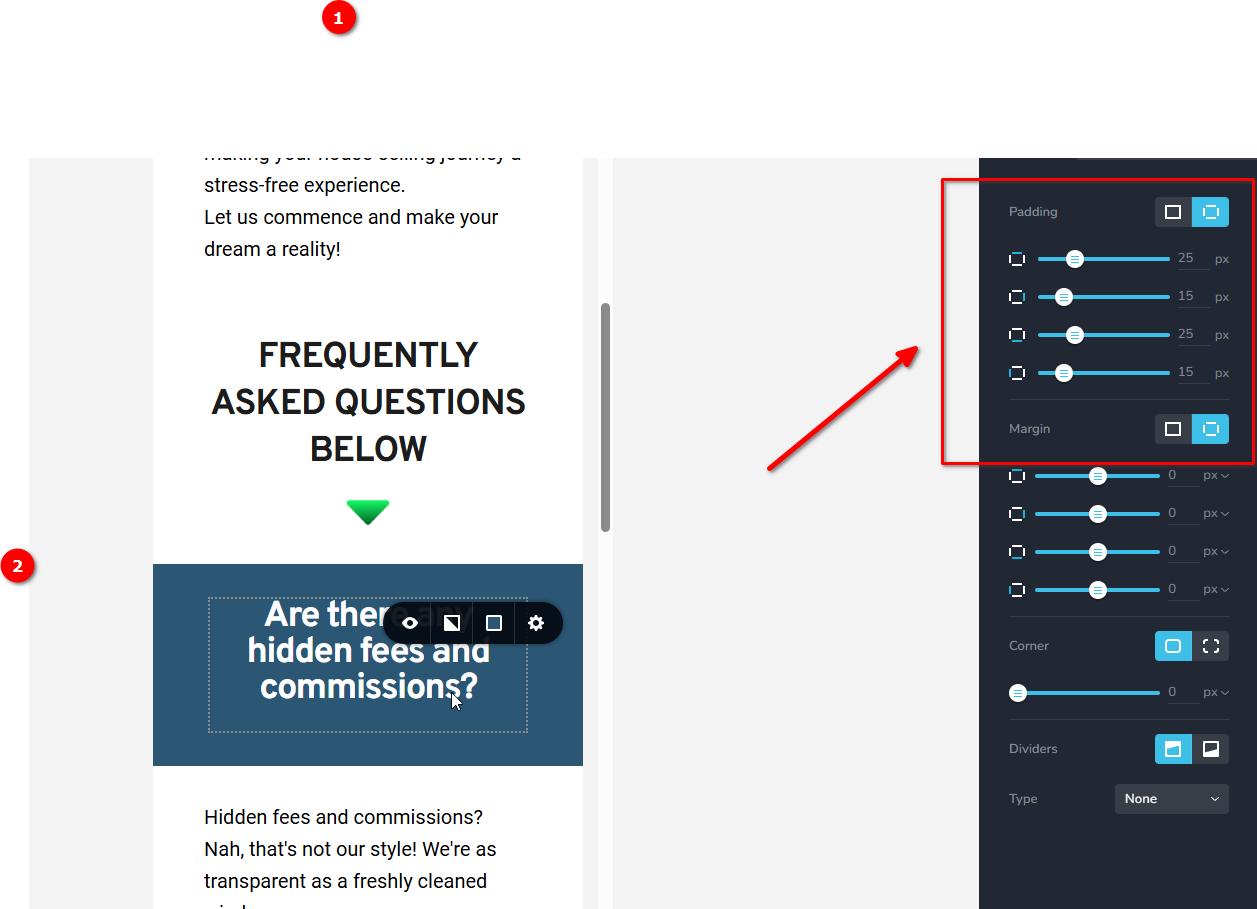
I've noticed that there is some padding on the elements in the mobile view. Were these settings different before updating Brizy and Brizy Pro?
Best regards,
Ariel H.0 -
Nope, the same before and after updating Brizy. (I haven't touched the site after update this am)
I may have started to adjust them, but I was exhausted and frustrated so I went to bed. (it was like 2 am)
0 -
Hi Alfred,
Thank you for the update.
Please try using the following CSS to address the issue:
@media (max-width: 1024px) {
    .brz .brz-rich-text > div > p {
        display: none;
    }
}
Please add this CSS in Appearance > Customize > Additional CSS.
If you have any further questions, please let us know.
Best regards,
Ariel H.0 -
THANK YOU Ariel!
I appreciate you not forgetting me and this issue.
Will do and I'll report back.
While Brizy is great, it's the people behind it, like you, that keep it great.
I'll test asap.
Alfred
0 -
Ok, working on it,
There seems to be a 25px spacing in between elements that I can only bring down to 15px manually in mobile.
how do I change that via CSS and where do I find that info in Brizy?
I think this CSS idea of yours will save my bacon from having to modify every element on every page..
Also, I'm seeing on every element in mobile there is a margin of 10px above and below (contributing to the problem. How do I remove this?
So, on mobile I need the default spacing between elements from 25px to 15px and both margins and padding to zero
What is the code for that and where do I find a tutorial for that so I can do it myself?
Also there seems to be 2 of this 25px spacers in the mobile view. What the heck?
0 -
Hi Alfred,
Thank you for the update.
Without the CSS, the page appears to be working properly on this duplicated version of the page - https://offers.qualifiedcashoffer.com/test01/
In mobile view all width of all content blocks were set to 94%
Best regards,
Ariel H.0 -
Hi Ariel,
that test page you viewed, I zeroed out the padding and the margins for all the elements, and reduced the spacers from 25px to 15px. Manually. I would like to do that site wide for mobile via the customize/CSS
So please, I ask again what is the CSS in Brizy for:
1. Reducing the spacers that Brizy puts in from 25px to 15px (it's puts in 2 of them so it's putting in 50px between elements. No idea why )
2. CSS so Brizy sets the margins and paddings to zero in mobile
3. How can I do this for myself?
Please....
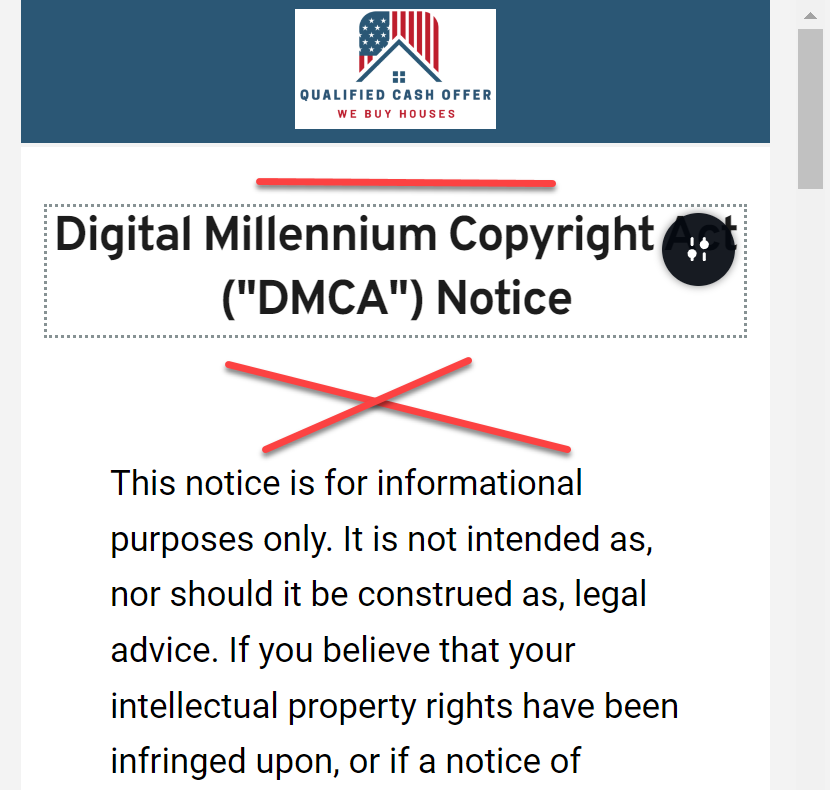
See the graphic of another untouched page that STILL has the problem.(I added the red lines in the screenshot)
 0
0 -

Hi Alfred,
The whitespace you see in the mobile design view is carried forward from your desktop design and you must make manual changes to each page to reduce the whitespace. In this screen recording, I demonstrate how you can do it for the DMCA mobile page. https://jmp.sh/Pt9Lg4w7
Similar steps must be repeated for each page.
0 -
Well, first off, thank you for taking the time to create the video.
Having said that, it's a PITA to have to do that for EACH ELEMENT on EACH PAGE.
It's seems Brizy is very concerned with adding new features but requires time consuming, manual work to make a mobile page look good. (a mobile page, the likely most used element).
Brizy ads 2 spacers, of 25 px each for what? for fun? And those spacers can't be removed? the can only be manually reduced to 15 px?
Very disappointing. I WAS a fan of Brizy. It should not take so much work to make it look acceptable.
Who is the head coder? I'd like to make him aware of this major Brizy flaw. (and it IS a flaw. Too much whitespace and no way correct it easily IS a flaw)>
If it doesn't put out good looking pages and it takes hours to manually correct, each element on each page, so it doesn't save time, what is the point of Brizy?
I appreciate your guys taking the time to answer, just too bad Brizy is so carelessly coded to make Mobile pages look terrible (and not allow a way to correct via CSS).
0 -
Hi Alfred,
The changes need to be applied at the block level and not at the element level. Making these changes for 10 pages should take around 20 -30 minutes. If you have set spaces correctly for any page, we can repeat the same for all your other pages. Please let us know.
0 -
HI KC,
1. Not only at the block level (of which there are anywhere for 3 to 10 block elements on varying pages), but I have to reduce, manually, the double 25px spacers to 15px INBETWEEN each block element.
2. I shouldn't have to spend 30 minutes of time to correct an Brizy mobile display issue. (in my vertical, as on many others, mobile is the primary display mode used)
3. Brizy doesn't allow (from what you tell me and I believe you) to correct any CSS at the block level. (so, Brizy adds unneeded whitespace but doesn't allow it to removed easily.
Bottom line is that Brizy adds unnecessary whitespace in mobile view, (a significant amount) has no easy way to remove it. I realize that I have to go back and double check every Brizy site I've made.
Really wish your coders would stop with new features for a moment and simply fix the pages that Brizy does put out...or at least give us the ability to fix them via CSS.
Since it seems it's not possible to reach out to them, I'll do via a YT video....
Thanks again for your help. I don't mean to be difficult and I was a Brizy fan (my group is having a field day cause I pushed Brizy instead of Convertri (and convertri puts out concise, sharp mobile pages with no extra coding)
A page builder that puts out crappy looking pages and requires extra time and work to correct (and for a seasoned builder like Brizy) is NOT a good look.
Thanks again,
Alfred
0 -
Hi Alfred,
Brizy allows you flexibility for responsive design. For design tasks requiring a high degree of precision, a tool that offers extensive customization options for responsive design is beneficial. Brizy offers responsive design with a degree of design flexibility that will appeal to those creating websites that need high precision. If you were working on a page like https://www.adymiobooks.com/, I am sure you will appreciate the design flexibility that Brizy offers for responsive design.
A great degree of precision might not be necessary for mobile responsive design on a webpage that has predominantly text based content (like the DMCA page). A designer working on a text-based page design feeling overwhelmed by the amount of responsive design options is understandable. This just suggests that the design tool you are using is not created specifically for webpages with predominantly text content.
Responsive design for a website cannot be carried out with the help of a CSS code; it is the responsibility of the web designer. Whitespaces that are added in Brizy for the desktop design gets carried forward to mobile design and it allows you to customize those whitespaces according to your preferences. However the designer must spend the required time to implement responsive design.
If time a constraint for implementing responsive design for your project, kindly let us know. We will do it for you.
0 -
Quote:
"Whitespaces that are added in Brizy for the desktop design gets carried forward to mobile design and it allows you to customize those whitespaces according to your preferences. However the designer must spend the required time to implement responsive design."
End quoteThe whole idea of using a page build is to save time, not have the builder added items that later need to corrected. That's not a good statement IMHO.
One thing is for the designer to ADD extra whitespace if they choose, but another is to have to correct excessive whitespace arbitrarily put in by Brizy. (because we really need 25px vs 15 px spacers). I get that you are trying to justify what Brizy is doing, but adding that unneeded whitespace to mobile is simply not a good idea. I get that you are trying to rationalize why Brizy does that.
Two of the builders I know, DO NOT add whitespace (Convertri and Elementor) and yet their mobile designs look fine (without having to spend extra time removing unwanted, unneeded whitespace). Only Brizy expects its designers to "spend the required time to implement responsive design" C'mon. Really?
Why not just admit there is really no logical or even a design reason for the extra whitespace, we'll submit it to the higher powers for review.
0 -
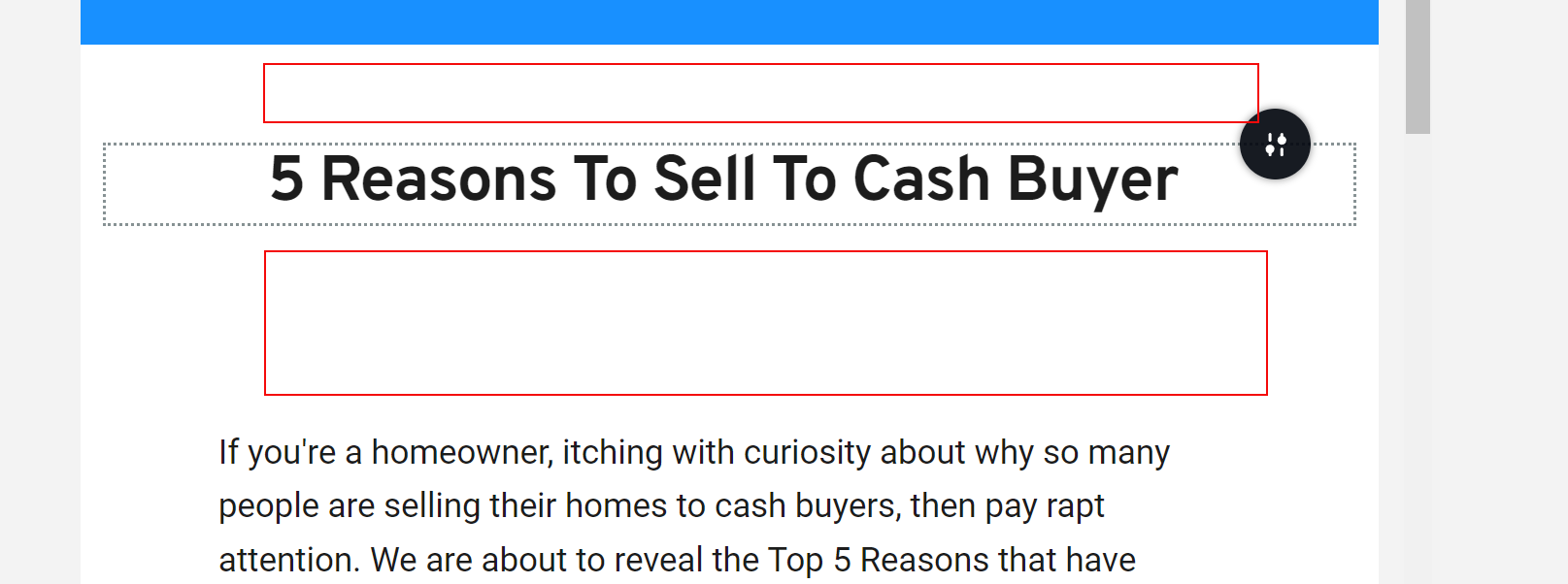
BTW, it gets even better. I have to do the SAME thing for tablet view...for all pages.
So EACH ELEMENT has to be adjusted (not just block) AND you have to reduce each spacers from 25px to 15 px. Adjust each element, in each view, in each page.
So it's about an hour or so, on every Brizy project.
I don't know, but this doesn't seem like "Brizy allows you flexibility for responsive design." it actually just ads work to correct items it shouldn't have formatted in the first place. I mean, why 25px spacers and 2 of them between each element?
 0
0 -
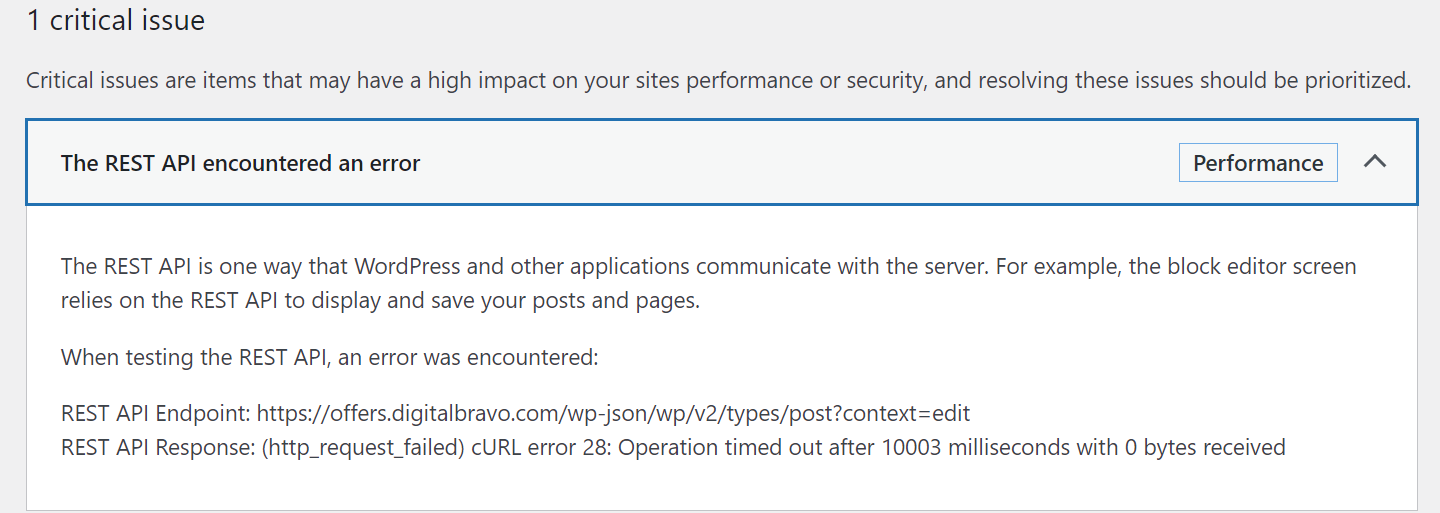
and NOW, the ultimate revenge, my site won't load after making 75% of the changes.
I was trying to figure out a element that showed up but I couldn't edit.
Then, everything just stopped. Gotta love it. After leaving it for 5 minutes, it loaded slooowly...
What the heck is this? I can't access it, nor delete it. Me and Brizy are just not getting along...

 0
0 -
Hi Alfred,
Thank you for the update.
Every page builder has its own unique features. Convertri and Elementor have different approaches too. With Brizy by design, you will have to manually adjust your preferred layout in desktop, tablet, and mobile views. Initially, if there are no settings yet, it will take the margins, padding, or spacing from the Desktop view.
You may need to change the way you layout your page. Instead of having different blocks for the heading and a separate block for your text content, you can group both in one block and use rows to separate the heading and the text content inside the block. This will be easier to manage as all the settings needed for different views will be done once in the first block, and you can reuse the block by duplicating it. Since all parameters were already set in the first block, all you need to do is change the heading and text. This will also ensure consistency in your layout.
This is demonstrated in this screencast: https://youtu.be/Ijczbd5lk0g.Regarding the second issue you have encountered, unfortunately, this is more related to your server: https://devcommunity.x.com/t/operation-timed-out-after-30000-milliseconds-with-0-bytes-received/11804.
In this case, you will need to report the issue to them so they can help you resolve it.If you have any further questions, please let us know.
Best regards,
Ariel H.0
Please sign in to leave a comment.
Comments
23 comments