Since update I no longer have a header and footer on every page

Installed update and instantly have lost my header and footer when viewing the site. nspaintherapy.com.au
I am able to view them and edit them in Wordpress. My website visitors cannot.
On mobile there is no header and footer, nor a hamburger menu.
-

Hi Gregg,
My apologies for the delay.
Your website seems to be working correctly from my end. I assume you have already resolved the issue on your own. If you require any further assistance, please do not hesitate to inform us.
Best regards,
Ariel H.0 -
I actually rolled my website back to before the update. I can’t afford to not have a functioning website. I’ll wait and see if you have a patch
0 -

Hi Gregg,
With the Version 2.5.1 and Brizy Pro 2.5.0, we have launched a new compiler. You can read more about it here https://www.brizy.io/new-compiler-200-loading-performance-boost To activate the new compiler, you must update to these versions.
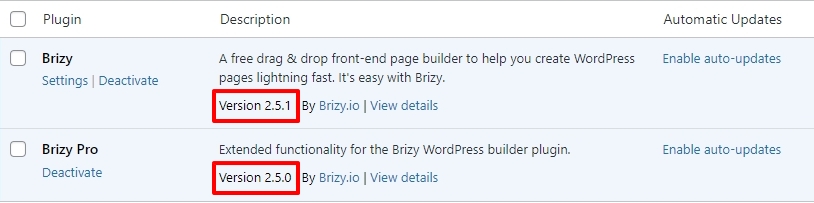
For new projects, the compiler's benefits are automatically applied, ensuring immediate performance boosts. However, to take advantage of these enhancements on existing projects, kindly follow these 3 steps
- Open Your Project: Open the project you wish to optimize in the Brizy Editor
- Make a Minor Change in the header: Navigate to any page within your project, make a small edit in the global header (such as modifying the padding by one pixel), and then revert the change.
- Make a Minor Change in the footer: Similarly make a small edit in the global footer (such as modifying the padding by one pixel), and then revert the change.
- Save the Project: Update the page to activate the compiler.
If you are using WordFence Security plugin please follow these steps and see if this will help resolve the issue with saving changes to your project.
- In your WordPress Dashboard under WordFence - All Option , navigate to "Firewall Options"
- Enable Learning Mode - https://jmp.sh/dXzpSFmk
- Return to your Brizy page, make some minor changes, and then update the page
- Once done, return to the WordFence settings and re-enable the "Enabled and Protecting" mode
0
Please sign in to leave a comment.
Comments
3 comments