Problem since Version 2.5.0

Dear Brizy Team
Since the upgrade to version 2.5.0 we facing some fatal errors with brizy. Arround 75 websites facing the same problem within our customers.
It is possible to edit the brizy website. In the frontend there is no header and footer visible. In addition no popups are able to be displayed.
We hope you can fix this issue by wednesday 31.07.2024
-

Hi George,
Thank you for reaching out. Unfortunately, this issue is still ongoing.
You might be able to resolve it by making small modifications to your pages, dynamic templates, or global header and footer—such as adding extra letters or adjusting elements. Save the changes and update the page. Then, revert your changes, update the page again, and preview the site to see if the issue is resolved.
If you need an immediate solution to get your websites running, you can download the previous version of Brizy and Brizy Pro from this link: https://tinyurl.com/mr3b4bev
If you decide to revert to an older version, please disable automatic updates to prevent the Brizy free version from updating after installation. You can follow this guide: https://www.wpbeginner.com/wp-tutorials/how-to-disable-automatic-updates-in-wordpress/
The easiest approach is to install the "Easy Updates Manager" plugin as described in the article to disable automatic updates.If you have any further questions, please let us know.
Best regards,
Ariel H.0 -
Hi Ariel
Thanks for the reply.
But there is also a big problem!
Brizy PRO requires Brizy Free 2.4.43 or newer. BRIZY PRO IS NOT RUNNING.
Here the picture:
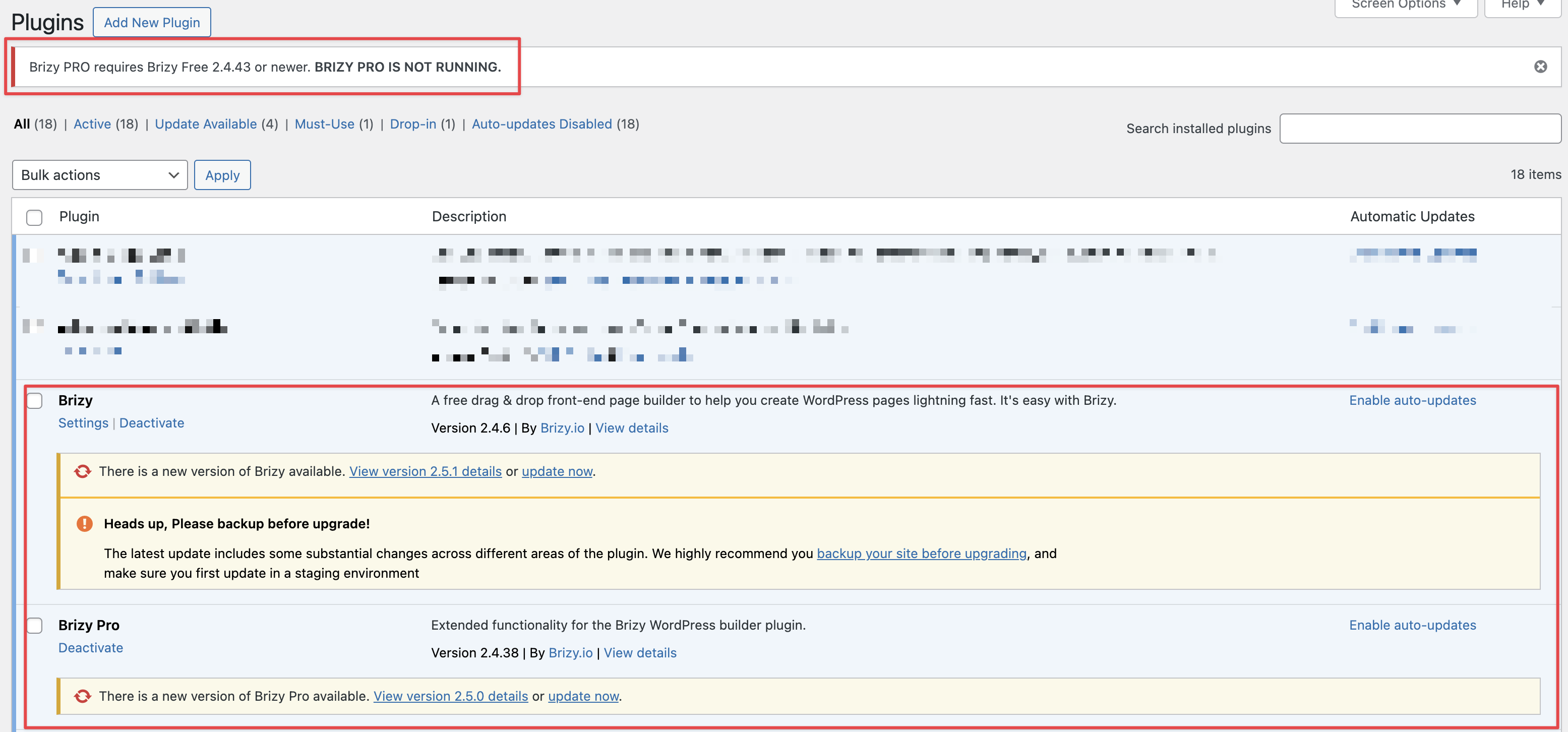
Can you provide us a solution?
When is the ETA of the update for Brizy and Brizy Pro? We have arround 100 Websites affected because the update zu 2.5.0.
0 -

Hi Laurin,
Ariel had given you these files
- Brizy 2.4.45
- Brizy Pro 2.4.38
You have installed these versions
- Brizy 2.4.6
- Brizy Pro 2.4.38
As you can see, the version numbers are not matching. Kindly delete Brizy and install Brizy 2.4.45 from https://jmp.sh/DaCPMBIf
If you have updated a website to the most recent Brizy versions, you can also fix the global header and footer issue by following this work around procedure
- Make a minor change to the global header and reverse the change
- Make a minor change to the global footer and reverse the change
- Click on the "Update" button at the bottom right corner and check to see if the header and footer are visible in the frontend
0 -
Thanks George!
If you have updated a website to the most recent Brizy versions, you can also fix the global header and footer issue by following this work around procedure
-
Make a minor change to the global header and reverse the change
-
Make a minor change to the global footer and reverse the change
-
Click on the "Update" button at the bottom right corner and check to see if the header and footer are visible in the frontend
I now performed some minor changes within a header and a footer. But the header and footer is still no being displayed within the frontend.
0 -
-
Hi Laurin,
Can you please share with us the URL of the website where you have made the above changes?
0 -
I performed a restart of the server. Now its working again
0
Please sign in to leave a comment.
Comments
6 comments