Mega menu width

The mega menu is too wide. I tried reducing its width percentage, but the minimum percentage allowed is 35%. Why is that? When I switch to px, I can reduce it to the desired width, but the menu position shifts.
-

Hi Johnny,
Thanks for getting in touch with us.
Currently, this is how it's intended to work. If the mega menu takes up less than 35% of the screen, it might not display well on smaller screens. However, you do have the option to use pixels (PX) if you want a slim mega menu or if you prefer setting it to a fixed width.
If you have any further questions, please let us know.
Best regards,
Ariel H.0 -
I try used px, but it will misalignment
 0
0 -
Also how do I make the mega menu highlight when the page is a submenu of the mega menu?
0 -
Hi Johnny,Thank you for the update.
Unfortunately, the mega menu is better suited for more complex menus, as shown in this example.
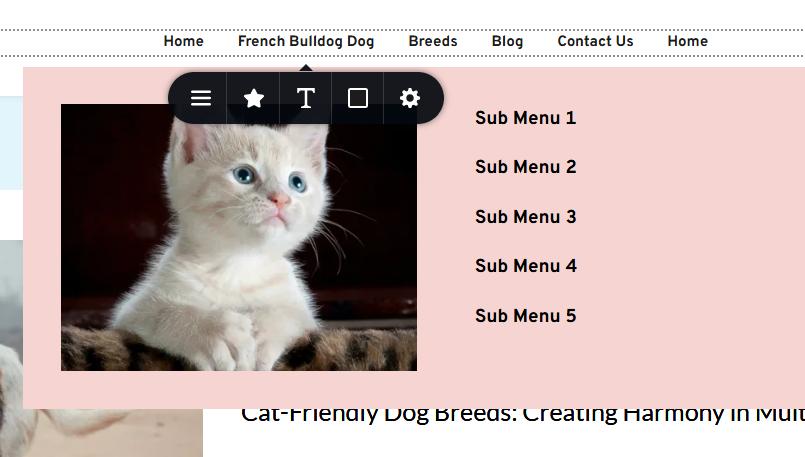
For this menu type, I recommend using submenus in the Menu element, as demonstrated in this screencast: https://youtu.be/IGcpE9vM8fc
Please give this a try, and feel free to reach out if you have any additional questions.
Best regards,
Ariel H.0 -
Its working, but still cant edit sub-menu width?
0 -
Hi Johnny,
Thank you for the update.
Please use the following custom CSS to address the issue. You may increase the width as needed:
.brz-menu .brz-menu__item:hover>.brz-mega-menu__portal, .brz:not(.brz-ed) .brz-menu .brz-menu__item:hover>.brz-menu__sub-menu {
    width: 200px;
}
Here is how you can insert the code into your project - https://youtu.be/u-kgIs6MjDQ
Please try this and let me know if you have any further questions.
Best regards,
Ariel H.0
Please sign in to leave a comment.
Comments
6 comments