URGENT: I cannot save changes to my Brizy pages, get Refresh error

I recently updated the Brizy plugin to the latest version due to a vulnerability notification. However, now every time I go to update my Brizy pages, I get an error message that it cannot be saved and needs a refresh. I need to be able to update my website. Please help as soon as possible!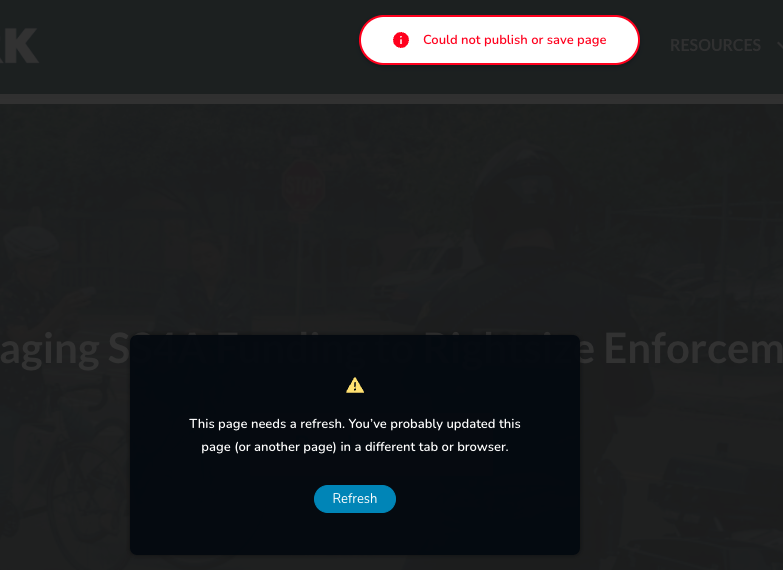
-
I searched your forum and I see that this issue was related to Wordfence. So I followed the instructions and temporarily disabled it. That seems to have resolved the Saving Brizy page updates issue. But when I reactivate it the issue comes back. Are you saying that Brizy and Wordfence are no longer compatible? Do I have to keep Wordfence disabled until you resolve the issue with a future Brizy update? Or is there something else I am doing wrong? I have flushed the cache several times, and I am not able to save when Wordfence is active.
I am noticing another issue now with this update. On my Posts, the Typography is not spacing properly between paragraphs as it did before. Now all the paragraphs have no space between them. I have had a lot of issues with Typography and Brizy and submitted a lot of tickets. It finally seemed to be resolved, but then new issues arise all the time. This is very frustrating. Our Posts are using a Brizy template we built and then it is just displaying the Post Content within the body of the Post area.
Can you please take a look? See screenshot below and the link:
https://visionzeronetwork.org/big-cost-savings-equity-benefits-highlighted-in-new-vision-zero-study/
 0
0 -
In a previous ticket I submitted months ago, there was an issue with the Post Content element not accepting all the Typography CSS and causing issues and I was told by your team to use the dynamic #postcontent in a text field to display the post content instead, which fixed the issue. Now, however, with your recent update, the Post Content element is working better and the dynamic text #postcontent, is the one causing the issue. But at the same time, I am still having my previous issue is that Heading Text is changing sizes when I hover over the Post Content area. See video uploaded at the link below. This is very frustrating that each time there is an update a new issue is created after I have fixed the issue based on your recommendations. Please let your engineering team know about this, as the updates are creating new issues that I need to figure out how to fix each time you release an update. So now I have the issue of either the text will not have proper spacing if I use the dynamic #postcontent in a text element, OR the Post Content element causes this issue with Headings changing their size by hovering over the post content area.
https://drive.google.com/file/d/1v24U_iKV_k_tUqVmio0WR_EybTqAk9y0/view?usp=sharing
You can view the Post example here:
https://visionzeronetwork.org/big-cost-savings-equity-benefits-highlighted-in-new-vision-zero-study/
This is not ok and I need a solution that will resolve this. thank you.
0 -

Hi Anson,
I'm Mark from Brizy Support. Thank you for contacting us.
For this, I have created a ticket for your concern. Ticket number is: 39252, the team will get in touch with you about your problem soon.
For now, please wait for an email from our team.
If you need anything else, please, let us know.
Best regards,
Mark.0 -
OK, thank you. I have downloaded and installed the previous version of Brizy. Please let me know when you have fixed this issue in a new version of Brizy.
0 -

Hi good day. Yeah, it seems there is an issue with Wordfence compatibility with Brizy. I am having the same issue. I disabled wordfence and now it works. So I may have to look for another security plugin temporarily until the issue is resolved. Maybe you can suggest another security plugin that is really good and that has no issues with brizy.
0 -

Hi Emile,
Thank you for contacting us.
Please activate WordFence and proceed with the following steps:
1. In your WordPress Dashboard under "WordFence" - "All Options", scroll down to the heading "Firewall Options", and select "Basic Firewall Options".
2. Turn on Learning Mode - https://imgur.com/TucapoH;
3. Go back to your Brizy page, make some minor changes, and then save the changes.
4. If you are able to save your work, go back to the WordFence settings and re-enable the 'Enabled and Protecting' option.Please try this and let me know how it goes.
Best regards,
Ariel H.0
Please sign in to leave a comment.
Comments
6 comments